
A media buyer asks for forty new creatives for next month's testing. The marketer writes a brief for the first one, copies it, edits the hook, copies it again, edits the visual, and somewhere around the fourteenth copy stops changing the product shot reference and starts changing the offer by accident. The designer receives forty documents, reads each of them, asks eleven clarifying questions, and builds forty files that each interpret their brief slightly differently. A month later the account has spent its testing budget and nobody can say whether the hooks, the visuals, the offer or the background colour made the difference — because all of them changed at once.
That is the cost of briefing variants one at a time. It is not just slower. It produces creative that cannot be read as a test, which means the money spent behind it buys delivery but not learning.
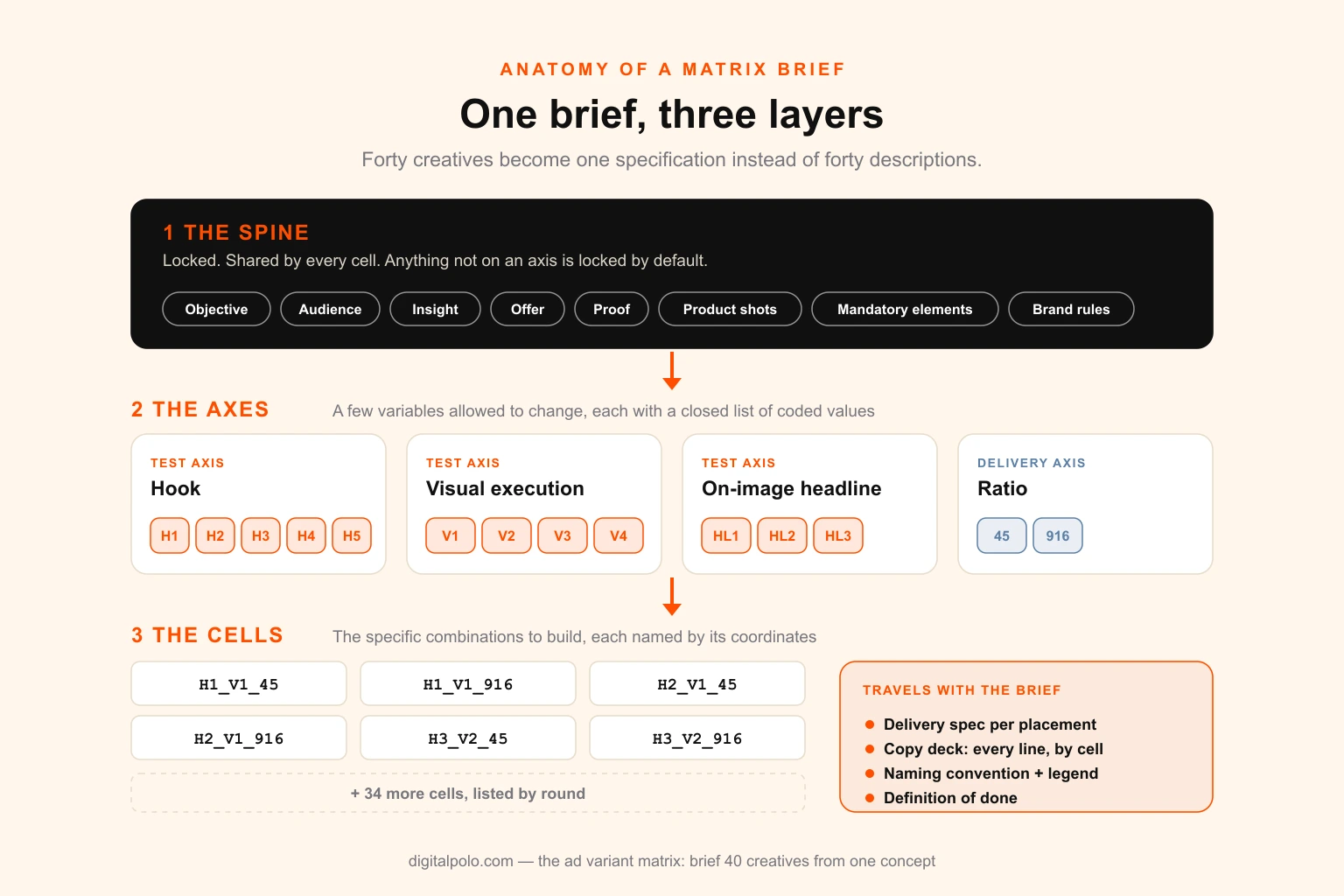
The fix is a single document — the ad variant matrix — that briefs an entire round as a grid. One concept is locked. A handful of variables are allowed to change, each with a fixed list of values. A specific selection of combinations is built. Every file is named by its coordinates. Done properly, one matrix brief replaces forty briefs, roughly halves the production hours, and turns the round into something you can actually analyse.
This guide covers:
- the three layers of a matrix brief, and why each one exists
- how to separate test axes from delivery axes from platform axes — the distinction that decides whether forty files teaches you anything
- which variables are worth a cell and which are not
- how to choose cells instead of the full factorial, including a staged version for smaller budgets
- a worked example: one concept, forty files, every coordinate shown
- the modular master build that makes forty files cost like twelve
- the copy deck, the naming convention and the QA checks that hold it together
- a copy-paste matrix brief template, the common mistakes and the KPIs to track
Need the forty files built, not just briefed? Digital Polo produces paid social and display creative from matrix briefs — modular masters, every ratio, named to your convention — on a flat monthly design plan. Agencies can run it under their own brand through white-label design.
The short answer
To brief forty creatives from one concept, write one brief with three layers:
- The spine — everything every variant shares and nobody may change: objective, audience, insight, offer, proof, product, mandatory elements, brand and legal rules.
- The axes — the few variables that are allowed to change, each with a short list of coded values (for example five hooks, H1–H5, and four visual executions, V1–V4).
- The cells — the specific combinations to build, chosen deliberately rather than generated as every possible combination.
Then add a delivery spec (ratios and placements), a copy deck with every line of text by cell, and a naming convention that writes the coordinates into every file name. The designer builds a few modular masters and assembles the cells from them.
Five hooks × four executions × two ratios is forty files from one brief, and every one of them can be traced back to exactly which variable it was testing.
What an ad variant matrix is, and what it is not
The vocabulary matters here, because the whole system rests on three units that teams constantly blur.
A concept is an angle: a claim, an insight, a reason to care. A variant is one execution of that concept, and it is the unit you test. A file is one variant rendered at one ratio for one placement, and it is the unit a designer actually produces. The creative volume guide covers how many of each a given ad spend can support; this guide is about what happens after that number is agreed — how to brief and build it.
An ad variant matrix is a brief that treats a round of variants as one structured object instead of a pile of separate requests. It borrows the logic of experimental design — fix everything except the factors you are testing, give each factor defined levels, and choose which combinations to run — and turns it into a production document a designer can build from.
It is not a creative concepting tool. The matrix does not invent the idea. A weak concept multiplied forty ways is forty weak ads. The matrix starts once the concept exists and has been judged worth testing at scale, and its job is to get the most learning and the most usable creative out of that concept for the fewest hours.
It is also not the same as resizing one asset into every channel format. That is an adaptation problem, covered in turning one campaign asset into 15 channel formats. Resizing is one axis of the matrix — the delivery axis — but the matrix is mostly about the axes that change what the ad says and shows.
Why forty separate briefs fails
Teams usually reach for one brief per creative because it feels thorough. In practice it fails in five predictable ways.
Uncontrolled drift. Every copied brief is a chance to change something by accident. Over forty documents, the offer wording, the product angle, the price display or the legal line will drift in a handful of them. Each drift is an unplanned variable, and one unplanned variable in a cell is enough to make that cell's result meaningless.
Forty interpretations. Even with identical briefs, a designer makes small judgement calls on every file — crop, type size, how much space the product gets. Built one at a time, those calls vary. Built from a shared master, they are made once.
Results you cannot attribute. If variant 12 beat variant 7, what won? With forty free-form briefs, the honest answer is usually "several things changed." The account learns that one ad worked, not why, which means the next round starts from scratch.
Briefing hours that scale linearly. Twenty minutes per brief is over thirteen hours for forty. Add clarifying questions and review, and briefing becomes a two- to three-day job for a marketer who should be reading results.
Revisions that scale linearly too. Feedback like "the logo is too small" has to be applied forty times, by hand, and checked forty times. On a matrix, it is applied once to the master and inherited by every cell.
None of this means the team is careless. It means the document format is wrong for the job. A brief for one creative is a description; a brief for forty creatives has to be a specification.
Layer one: lock the spine
The spine is everything every cell shares. Its job is to make the variables you are testing the only things that differ. Write it first, and treat everything on it as frozen for the round.
| Spine field | What to write | Why it must be locked |
|---|---|---|
| Objective | The one metric this round is judged on, and the threshold for a winner | Different cells judged on different metrics cannot be compared |
| Audience | Who will see it — the targeting, the awareness stage, the pain | A hook that suits cold traffic will lose on retargeting and vice versa |
| Insight | The single truth the concept is built on, in one sentence | If the insight drifts, you are testing different concepts, not variants |
| Offer | Exact price, discount, guarantee and wording | Offer is the strongest lever in most accounts; letting it vary swamps everything else |
| Proof | Which reviews, numbers, logos or credentials may be used | Unverified claims are a compliance risk and a confound |
| Product and assets | Which shots, which colourway, which pack, with file links | A different product image is a different ad |
| Mandatory elements | Logo lock-up, legal line, disclaimers, platform-required text | Must appear identically on every file |
| Brand rules | Typefaces, colours, tone, what is off-limits | Pulled from the brand guidelines, not reinterpreted per cell |
| Definition of done | File formats, sizes, naming, delivery location | Removes forty separate conversations about handoff |
Two rules make the spine work.
Anything not on the axes is locked by default. The designer should never have to guess whether the background is supposed to change. If it is not an axis, it does not change.
The spine is signed off before any cell is built. Once masters exist, changing the offer or the product shot means rebuilding everything. Most of the waste in variant production comes from spines that were still moving while files were being made.
If the brand does not yet have its rules written down, that gap shows up immediately in a matrix, because the designer needs them once for the masters rather than vaguely for each file. The difference between a design system, a style guide and brand guidelines matters here: a matrix needs at least a style guide's level of precision on type, colour and logo use.
Layer two: choose the axes
An axis is one variable that is allowed to change, with a short, closed list of values. Each value gets a code. That code is what the designer, the copy deck and the ad name all refer to.
Not all variables deserve an axis
The temptation is to put everything on the matrix — hooks, headlines, backgrounds, button colours, models, fonts. The result is a grid too large to build and too fragmented to read. The variables worth an axis are the ones that plausibly move the response, and they are not equal.
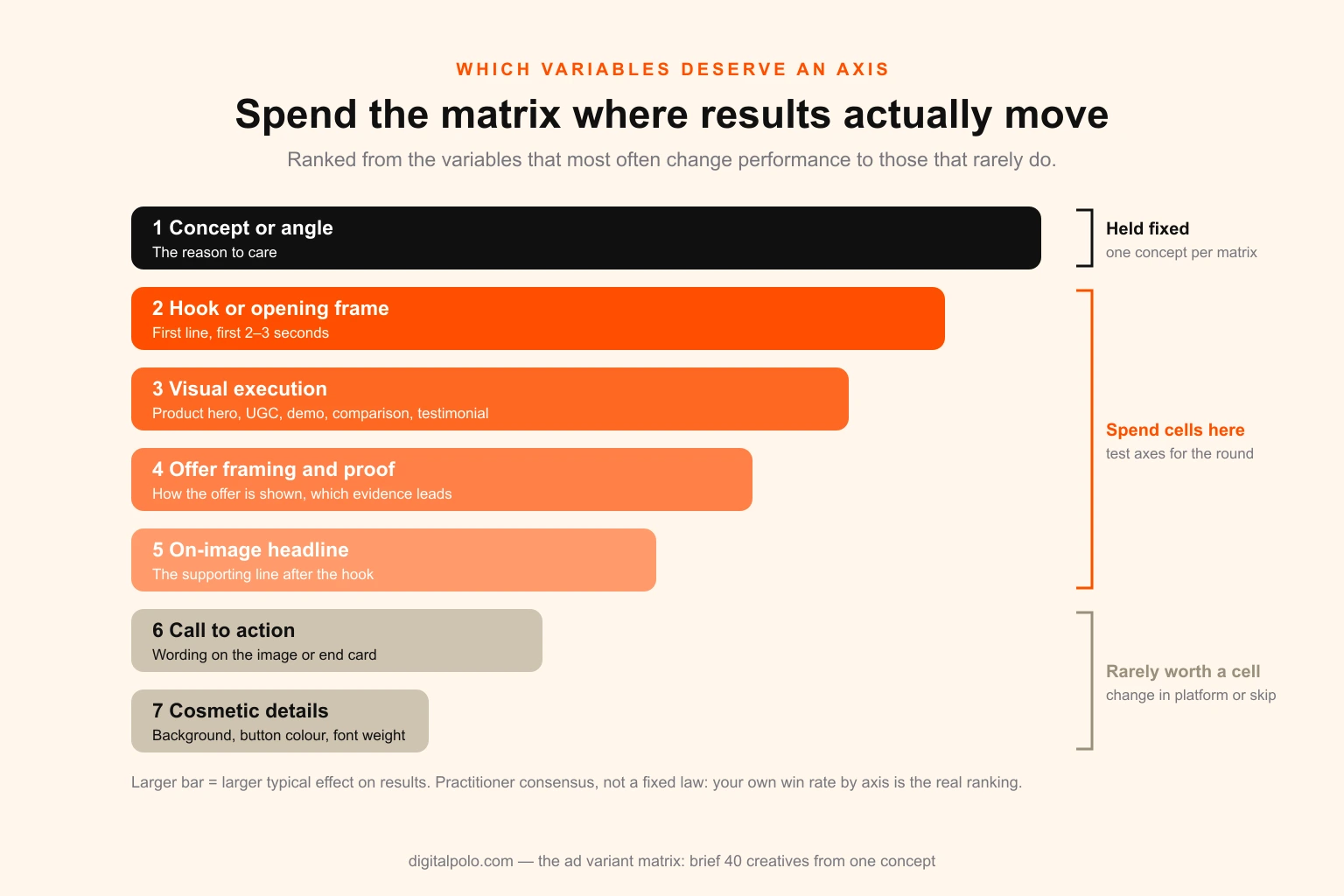
Practitioners broadly agree on a ladder of impact, from the variables that most often change results to the ones that rarely do:
- Concept or angle — the reason to care. The biggest lever, and the one the matrix holds fixed by design. Different concepts belong in different matrices.
- Hook or opening frame — the first line of on-image text or the first two to three seconds of video. It decides whether anyone stays for the rest.
- Visual execution — the format archetype: product hero, UGC-style talking head, demo, comparison, testimonial card, founder story.
- Offer framing and proof — how the same offer is presented, and which piece of evidence leads.
- On-image headline — the supporting line once the hook has done its job.
- Call to action — the wording on the image or end card.
- Cosmetic details — background colour, button colour, font weight, small layout shifts.
The bottom rung is where most wasted variants live. A button colour test needs enormous volume to detect a small effect, and on Meta there is a further problem: its ad retrieval and ranking system — the one Meta's engineers describe as Andromeda — increasingly treats near-identical creatives as near-duplicates, and media buyers widely report that very similar ads end up competing for the same delivery rather than being tested against each other. Cosmetic variants spend design hours to produce ads the platform may not even separate.
Rule of thumb: spend the matrix on rungs two to five. Rung one is held fixed. Rungs six and seven are rarely worth a cell; if they matter, they can usually be changed in the platform rather than in the design file.
Test axes, delivery axes and platform axes
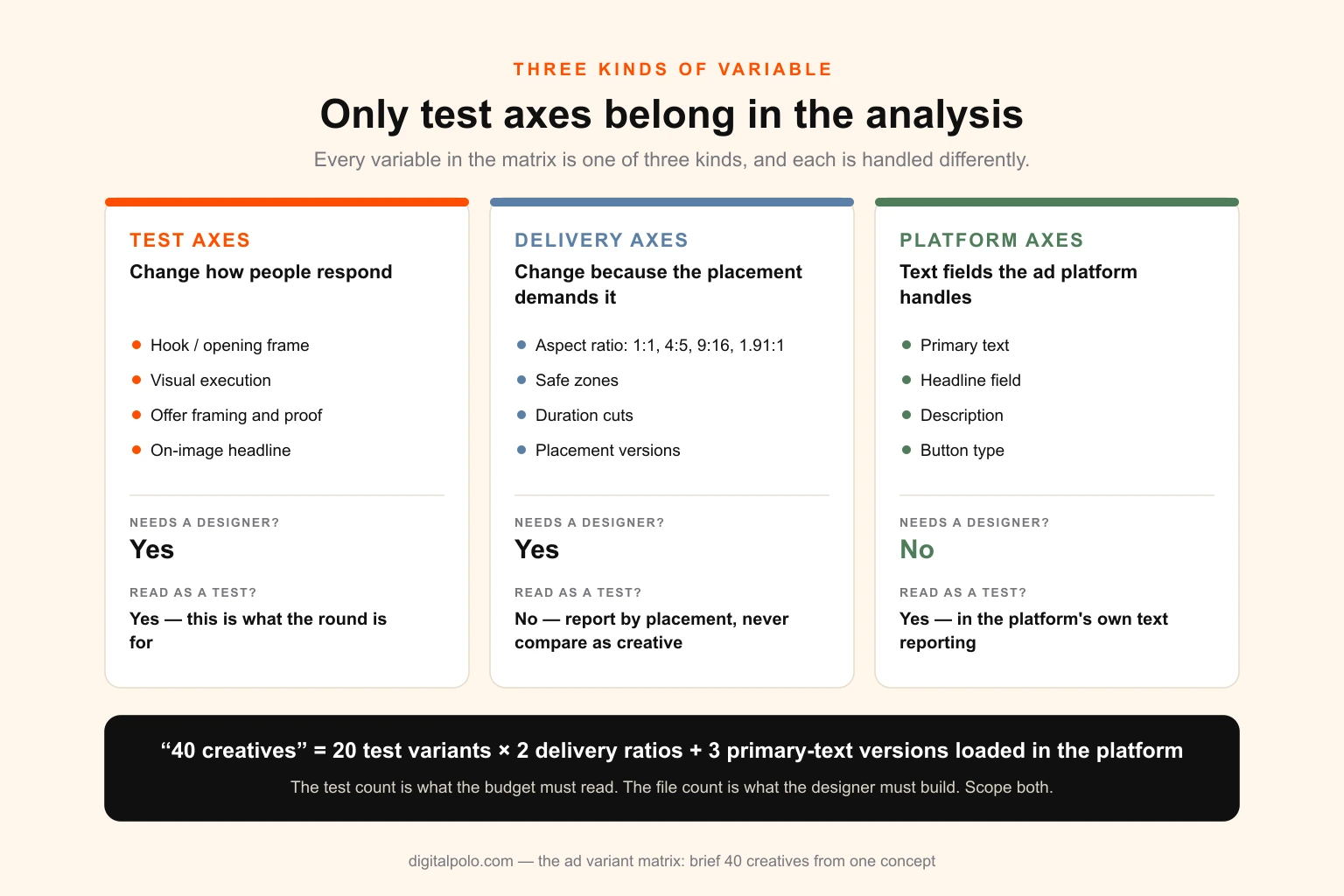
This is the distinction that decides whether a round of forty files teaches you anything. Every variable in the matrix belongs to one of three kinds, and they are handled completely differently.
Test axes change how people respond, and they are what the round is for. Hook, visual execution, offer framing, on-image headline. They need design work and they belong in the analysis.
Delivery axes change only because the placement demands it. Aspect ratio (1:1, 4:5, 9:16, 1.91:1), safe zones, video duration cuts, static versus a light motion version for a placement that favours it. They need design work, but they are not tests. Comparing a 4:5 feed ad with a 9:16 Reels ad does not tell you which ratio is better; it tells you that two placements with different audiences, inventory prices and viewing behaviour performed differently.
Platform axes are variables the ad platform handles as text fields — primary text, the headline field under the image, the description, the link-button type. They need no designer at all. Writing five versions of primary text into the copy deck and loading them in Ads Manager is free; building them into image files is not.
| Kind | Examples | Needs designer? | Read as a test? |
|---|---|---|---|
| Test axis | Hook, visual execution, offer framing, on-image headline | Yes | Yes |
| Delivery axis | Aspect ratio, safe zones, duration cuts, placement versions | Yes | No — report by placement, never compare as a creative result |
| Platform axis | Primary text, headline field, description, button type | No | Yes, but in the platform's own text reporting |
The practical consequence: when someone asks for forty creatives, find out how many of them are tests. Forty files is often twenty test variants in two ratios, or ten in four ratios. The test count is what the budget has to support; the file count is what the designer has to build. Confusing the two either under-scopes the design or over-promises the learning.
How many values per axis
Three to five values on a test axis is the working range. Two values gives a coin flip with little to choose between. More than five usually means the values have stopped being genuinely different — the sixth hook is a rewording of the second.
A useful check: could someone who has not seen the brief tell any two values apart in under two seconds? If two hooks or two executions look the same at scroll speed, they are one value, and one of them should be cut.
Limit each round to two test axes, three at most. Every extra axis multiplies the grid and divides the budget behind each cell.
Layer three: choose the cells, not the full factorial
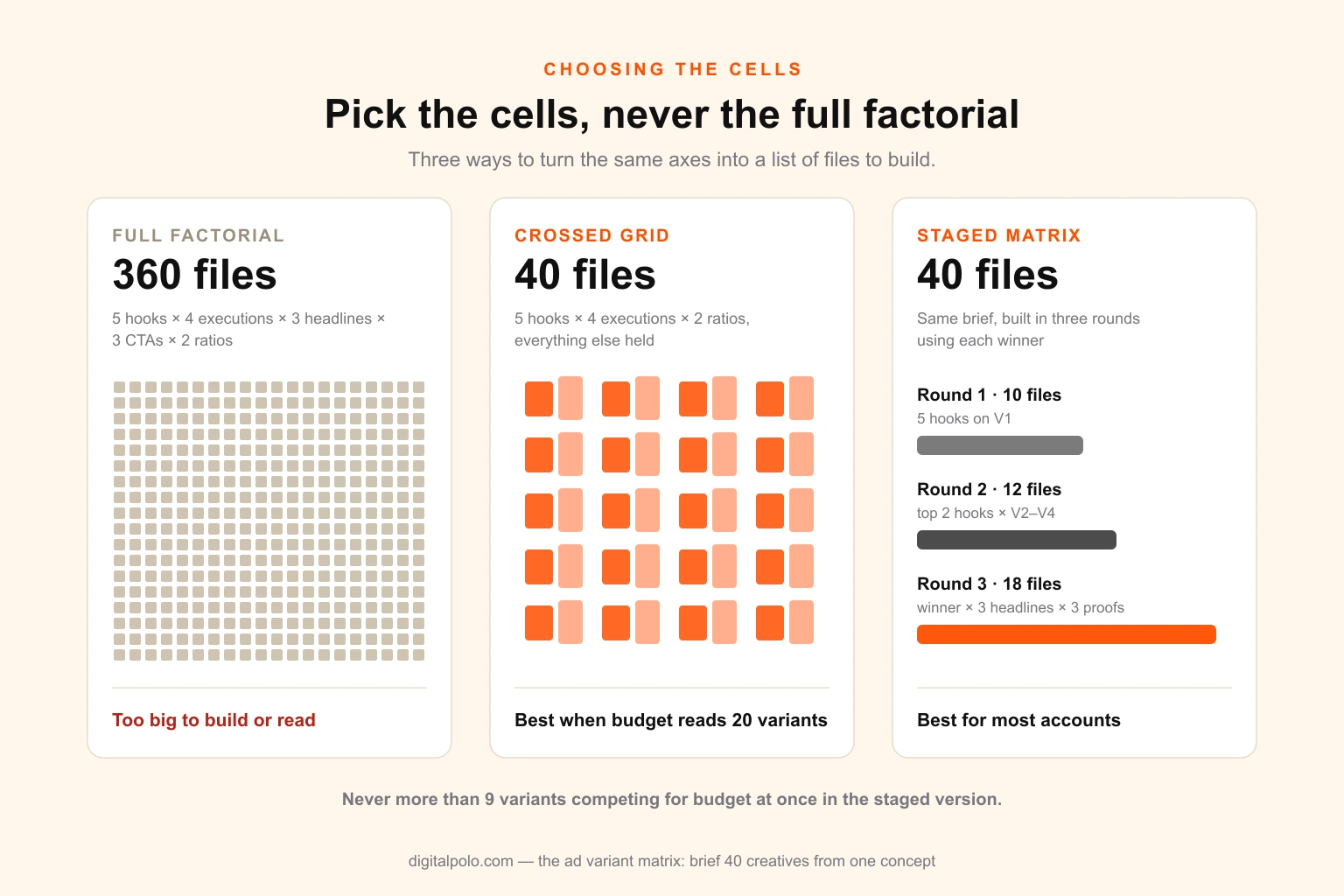
Multiply the axes together and you get the full factorial — every possible combination. It grows fast. Five hooks, four executions, three headlines and three calls to action in two ratios is 5 × 4 × 3 × 3 × 2 = 360 files. Nobody should build that, and no testing budget outside the very largest accounts could read it.
The third layer of the matrix is the cell list: the specific combinations you will actually build. There are three sensible ways to choose them.
Option one: the crossed grid
Cross two test axes completely and hold everything else at a single value. Five hooks × four executions = twenty variants; in two ratios, forty files.
This is the strongest design when the budget can support it, because every hook appears with every execution. You can read each hook's average across four executions, each execution's average across five hooks, and spot combinations that work unusually well together.
Option two: anchor and swap
Choose one anchor cell — your best current guess, or the existing control. Then build cells that each change exactly one axis from the anchor: four alternative hooks on the anchor execution, three alternative executions on the anchor hook, two alternative headlines on the anchor pair.
This produces far fewer cells — ten instead of twenty — and every comparison is clean, because each cell differs from the anchor by one thing. What it cannot show you is interaction: whether hook three would have been the best hook on a different execution.
Option three: the staged matrix
Run the matrix in rounds, using each round's winner to choose the next round's cells. This is the right design for most accounts, because it matches the number of tests in flight to what the budget can actually read.
- Round one tests the axis with the biggest expected effect — usually the hook — on the cheapest execution to produce.
- Round two takes the top two hooks across the remaining executions.
- Round three takes the winning hook-and-execution pair and tests headlines and calls to action on it.
The staged matrix is still one brief. All the axes, all the values, all three rounds of cells and all the copy are written at the start. What changes between rounds is which cells get built and launched, not the document. That is the key difference from briefing round by round, which reintroduces drift every time.
Which option to choose
The deciding question is how many variants your testing budget can give a readable result. A variant needs enough spend behind it that a loss means something — commonly two to four times your target cost per acquisition. Divide your monthly testing budget by that figure and you have your ceiling for the month. The creative volume guide walks through that arithmetic in detail.
| Readable variants per month | Design to use | Why |
|---|---|---|
| Under 8 | Anchor and swap, or a staged matrix with small rounds | A crossed grid would leave most cells unread |
| 8–20 | Staged matrix | Each round fits the budget, and the winners compound |
| 20–40 | Crossed grid on two axes | Every cell can be read; interactions become visible |
| 40+ | Crossed grid plus a parallel second concept | At this volume, concept diversity matters more than more variants of one idea |
If the ceiling is lower than the matrix, stage the matrix rather than shrinking its logic. Cutting cells at random breaks the balance that lets you read each axis. Running the same balanced design over three rounds keeps it.
A worked example: one concept, forty files
Here is a full matrix for a direct-to-consumer brand selling height-adjustable desks to people who work from home. The brand, codes and lines are illustrative, but the structure is exactly what a production-ready matrix looks like.
The spine (locked).
- Objective: first purchase; a winner beats control cost per purchase by 15 per cent or more after spend of three times target CPA.
- Audience: cold, 28–50, remote and hybrid workers, interests in productivity and home office.
- Insight: the ache that starts mid-afternoon is a furniture problem, not a fitness problem.
- Offer: free delivery and a 100-night trial, shown in exactly that wording.
- Proof: review lines from the brand's verified review library only; no unsourced numbers.
- Product: oak top, white frame, shot at sitting and standing height (two approved shots, linked).
- Mandatory: logo lock-up bottom left; trial terms line on every end card.
The axes.
| Code | Hook (test axis) |
|---|---|
| H1 | Callout — "Desk job, sore back by 3pm?" |
| H2 | Reframe — "It's not your posture. It's your desk height." |
| H3 | Before and after — the same person at 9am and at 4pm |
| H4 | Question — "When did the afternoon start hurting?" |
| H5 | Customer voice — a verified review line about afternoons |
| Code | Visual execution (test axis) |
|---|---|
| V1 | Product hero — the desk at both heights, studio light |
| V2 | UGC-style — a person at home talking to camera, desk in shot |
| V3 | Comparison — split frame, old setup against new |
| V4 | Testimonial card — review text, star rating, product inset |
| Code | Ratio (delivery axis) |
|---|---|
| 45 | 4:5 for Facebook and Instagram feeds |
| 916 | 9:16 for Stories and Reels, with the top and bottom safe zones kept clear |
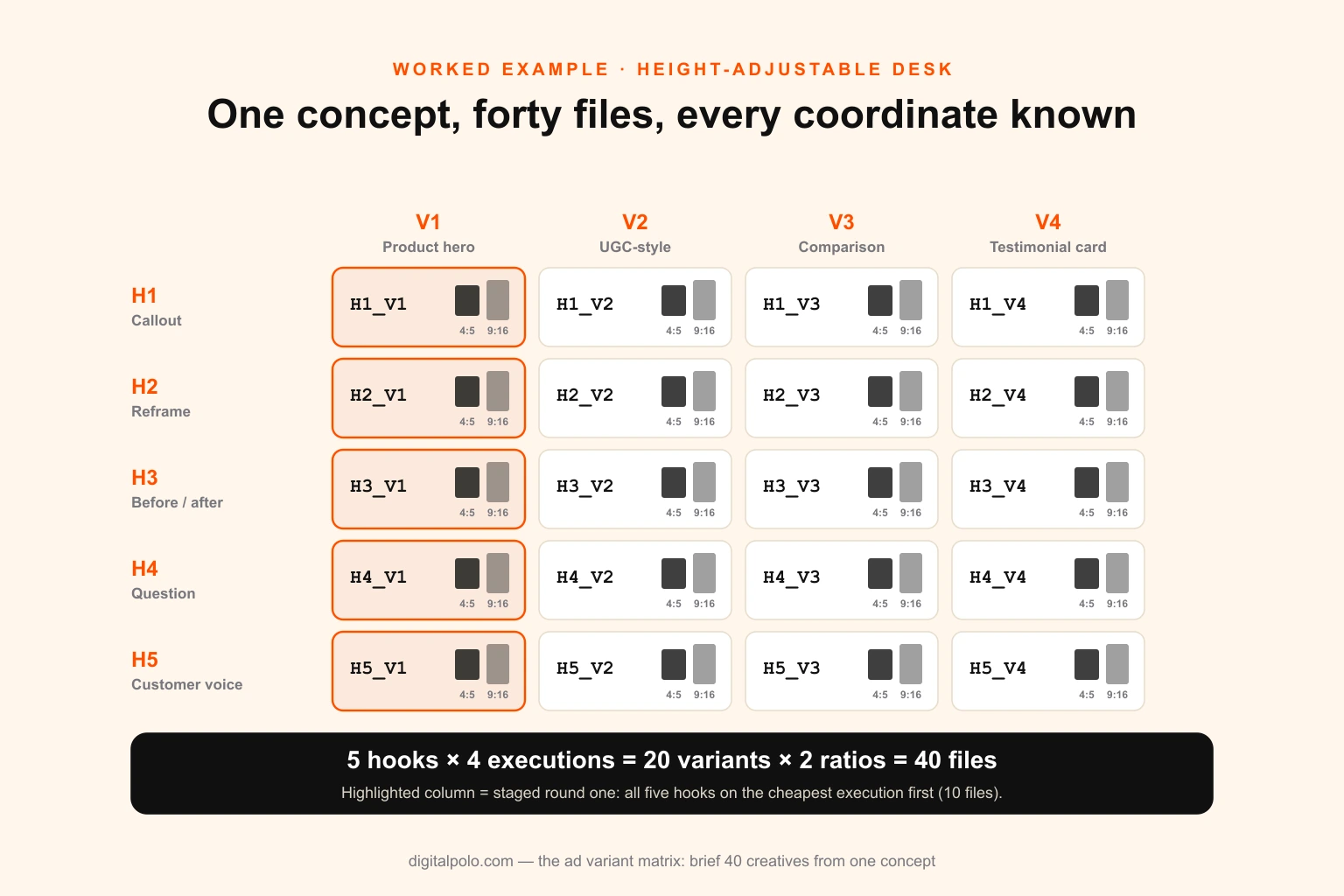
The cells. Crossing five hooks with four executions gives twenty variants. In two ratios, that is forty files. Primary text, the headline field and the button are platform axes: three versions of primary text sit in the copy deck and are loaded in Ads Manager, at no design cost.
If the budget cannot read twenty variants, the same brief runs staged:
- Round one, weeks one and two: H1–H5 on V1, the cheapest execution. Five variants, ten files.
- Round two, weeks three and four: the top two hooks on V2, V3 and V4. Six variants, twelve files.
- Round three, weeks five and six: the winning pair with three on-image headlines and three proof elements. Nine variants, eighteen files.
That is still forty files from one brief, but at no point are more than nine variants competing for the same budget.
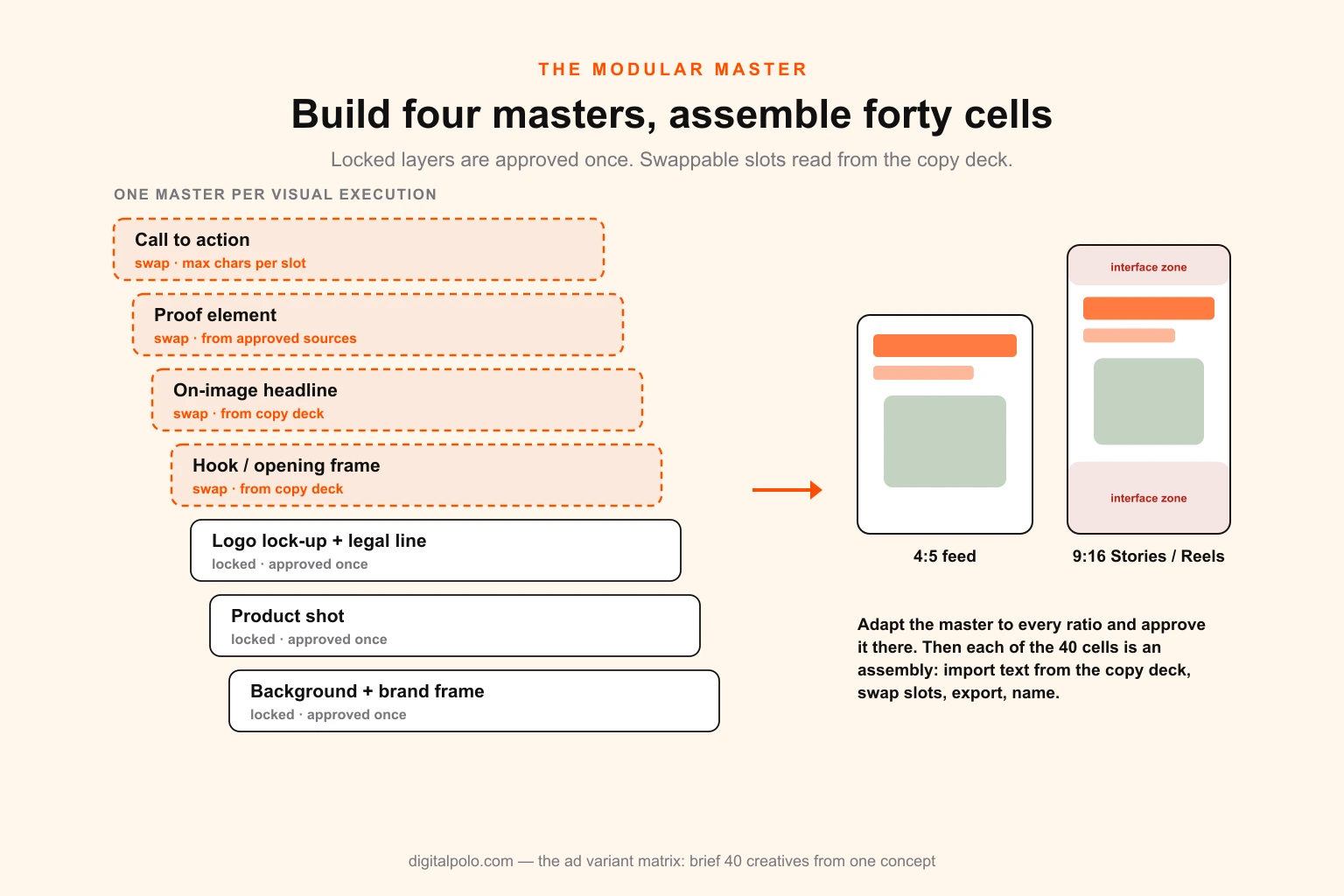
What the designer actually builds is four masters — one per execution — each in both ratios. Every cell is an assembly: drop in the hook from the copy deck, swap the opening frame where the hook demands it, export, name. Which brings us to the build.
Building it: modular masters, not forty files
A matrix brief only saves time if the production is modular too. If the designer still builds forty files from blank canvases, the brief is tidier but the hours are the same.
The master template
For each visual execution, the designer builds one master with every element on a named layer or component, split into two groups:
- Locked layers: logo lock-up, product shot, legal and trial line, brand frame, background. Built once, approved once, never touched again for the round.
- Swappable slots: the hook text, the opening frame or hero image where the hook needs one, the on-image headline, the proof element, the call to action. Each slot has a fixed position, a maximum character count and a type style.
The master is then adapted to each delivery ratio before any cells are assembled. The adaptation is where the real design judgement goes — the 9:16 version is not the 4:5 version stretched, and its text has to sit clear of the interface at the top and bottom of the screen. The platform size and safe-zone specs and the Instagram video formats are worth having open at this step.
Once the masters are approved in both ratios, every cell is an assembly job measured in minutes rather than hours.
Tools that make assembly fast
Most design tools can drive a master from a spreadsheet, which means the copy deck becomes the input rather than something the designer retypes.
- Figma: components with variants and properties for the swappable slots, variables for text and colour, and data-population plugins that fill text layers from a spreadsheet. The natural home for static masters.
- Photoshop: Variables and Data Sets (Image → Variables) replace text layers and swap images from a CSV, one exported file per row.
- After Effects and Premiere Pro: Essential Graphics and Motion Graphics templates expose the hook and headline as editable fields, so video cells are edited without reopening the animation. After Effects can also drive text from a CSV or JSON file.
- Canva: Bulk Create fills a template from a spreadsheet. It is fine for simple statics; it is also usually the point at which teams notice they have outgrown Canva for anything with real design judgement in the masters.
- Creative automation platforms such as Celtra, Bannerflow or Smartly: worth the cost at hundreds of files a month across many markets, overkill for forty.
The tool matters less than the principle: text lives in one place, and the design file reads it. The same logic runs template systems for blog featured images; ad variants are the same problem with stricter specs.
What the hours look like
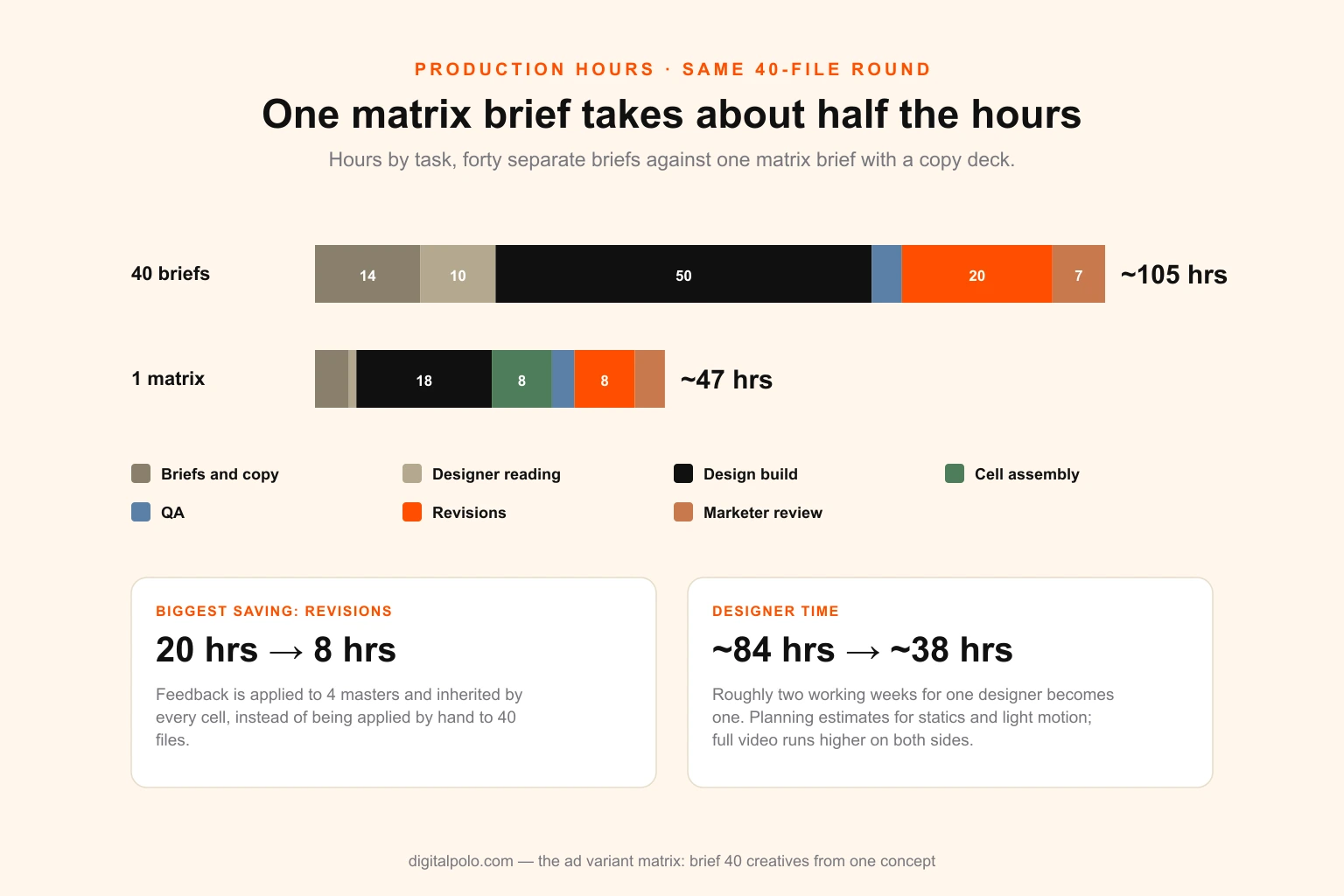
The table below compares the same forty-file round produced both ways. The figures are planning estimates for statics and light-motion cells, not benchmarks — fully edited video runs higher on both sides — but the proportion between the two columns holds across most accounts.
| Task | 40 separate briefs | One matrix brief |
|---|---|---|
| Writing briefs and copy | 13–15 hrs (40 × ~20 min) | 4–5 hrs (spine, axes, cells, copy deck) |
| Designer reading and clarifying | ~10 hrs (40 × ~15 min) | ~1 hr (one document) |
| Design build | ~50 hrs (40 × ~75 min bespoke) | ~18 hrs (4 masters × 2 ratios) |
| Cell assembly | — | ~8 hrs (40 × ~12 min) |
| QA | ~4 hrs | ~3 hrs |
| Revisions | ~20 hrs (applied per file) | ~8 hrs (applied to masters, inherited) |
| Marketer review | ~7 hrs (40 files individually) | ~4 hrs (masters, then spot checks) |
| Total | ~105 hrs | ~47 hrs |
The single biggest line is not the build; it is revisions. On separate files, every round of feedback is multiplied by forty. On masters, it is multiplied by four. That is also why turnaround improves so sharply: the critical path is four masters, not forty files.
The copy deck: every word in one place
The copy deck is the spreadsheet every text slot reads from. It is the single most useful document in the matrix, and the one most often skipped.
Structure it with one row per cell and one column per text slot:
- cell code and ad name
- round
- hook text (on-image or first-frame)
- on-image headline
- proof element
- call to action
- primary text versions (platform axis)
- headline field (platform axis)
- character counts, calculated automatically against each slot's limit
- approval status
Three rules keep it reliable.
Write all of it before design starts. Copy written during design is copy written under deadline, and it is where the offer wording drifts.
Approve it once, as a document. Legal and brand review a spreadsheet in an hour. Reviewing the same lines across forty finished files takes a day and misses things.
Never let the designer retype. Every line is pasted or imported from the deck. Retyping introduces typos, and a typo in one cell is a variable.
Naming: write the coordinates into every file
The naming convention is what turns forty ads into a dataset. If the coordinates of each cell are written into the ad name in fixed positions, results can be split by axis afterwards — every H3 against every H1, every V2 against every V4 — in a spreadsheet pivot or a creative analytics tool such as Motion, without anyone tagging ads by hand.
A working pattern:
BRAND_CONCEPT_HOOK_EXEC_HEADLINE_CTA_RATIO_VERSION
For example, DSK_C07_H3_V2_HL1_CT2_916_v1 reads as: desk brand, concept 07, hook 3, visual execution 2, headline 1, call to action 2, 9:16, first version.
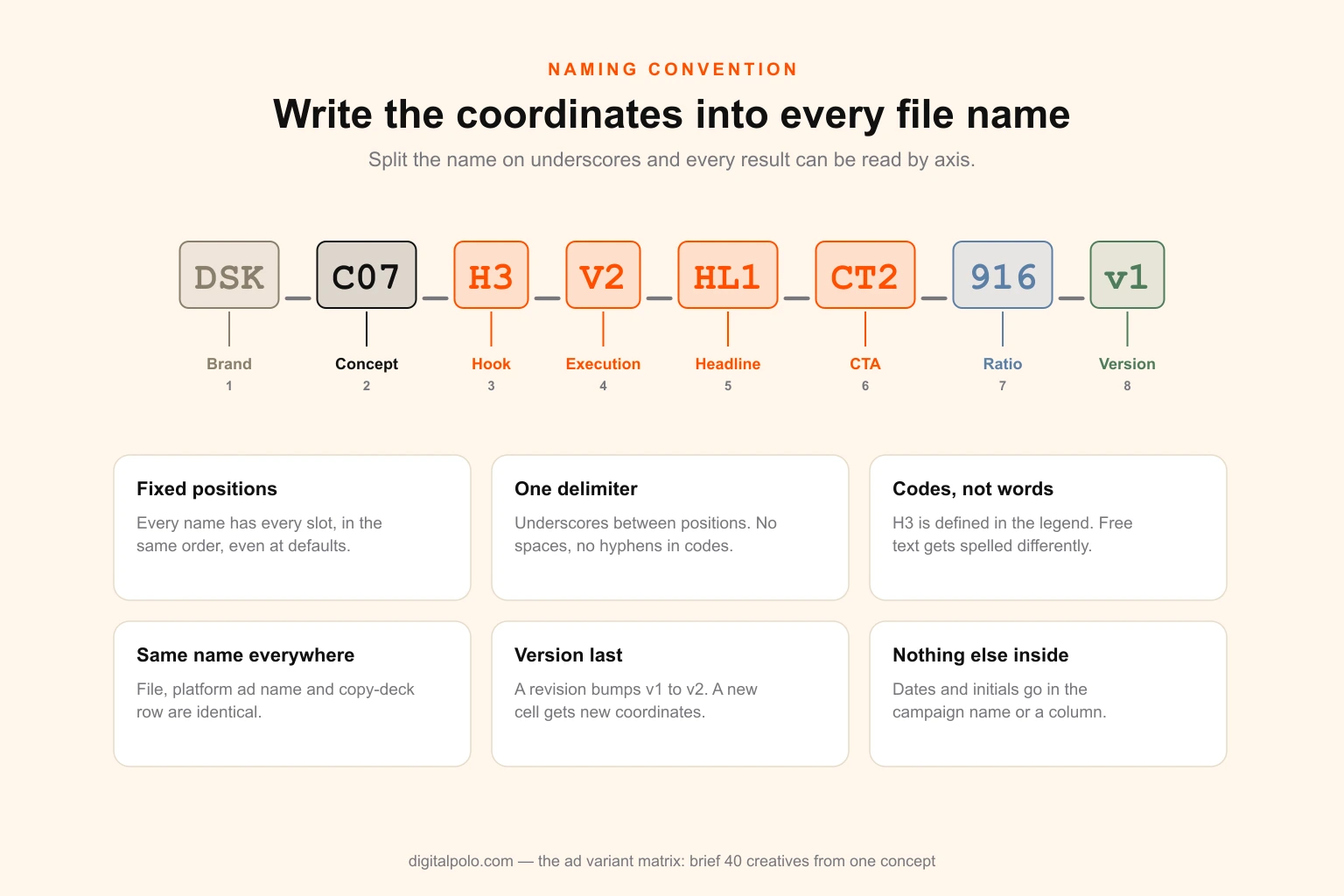
The rules that make it work:
- Fixed positions. Every name has every slot, in the same order, even when an axis is held at its default. A missing slot shifts every column after it.
- One delimiter. Underscores between positions, nothing else. No spaces, no hyphens inside codes.
- Codes, not words. "H3" is defined in the brief's axis legend. "BeforeAfter4pm" is a description that someone will spell differently next month.
- Same name everywhere. The file name, the ad name in the platform and the row in the copy deck are identical. If they diverge, the link between result and cell breaks.
- Version at the end. A revised file keeps its coordinates and increments the version. A new cell gets new coordinates.
- Nothing else in the variable positions. Dates, designer initials and launch notes belong in the campaign or ad set name, or in a separate column, not in the coordinates.
If you are an agency running this across clients, the naming legend becomes part of the onboarding pack, and it is one of the things worth checking when you vet a white-label design partner: a partner who delivers to your naming convention saves hours of renaming on every round.
What the platforms do automatically, and why the matrix still matters
Every major ad platform now offers to combine assets for you. Meta's flexible and dynamic creative options take several images, videos and text versions and assemble combinations per impression. Google's responsive display and search ads and Performance Max asset groups do the same with headlines, descriptions, images and videos.
These are useful, and the matrix should feed them. But they do not replace it, for three reasons.
They optimise for delivery, not learning. The platform chooses combinations to win auctions. It will happily concentrate spend on one combination and leave others nearly unserved, which is fine for performance and useless for understanding why.
Asset-level reporting is partial. You can see that an asset was used and roughly how it performed, but not cleanly what it would have done in a controlled comparison.
They only mix what you give them. The platform cannot invent a new hook or a new execution. The matrix decides which assets are different enough to be worth uploading in the first place.
The practical split: run deliberate tests on the test axes in separately named ads, where the result can be read. Once a winner emerges, load it with its platform-axis text variations into the automated formats and let the platform optimise delivery. The creative fatigue diagnostic then tells you when the winner has stopped working and the next round of the matrix is due.
The one-page matrix brief template
Copy this structure into a document or the first tab of your spreadsheet. Everything the designer needs is on it, and anything not on it is locked.
1. Round header
- Brand, concept code and concept name
- Round number and launch date
- Owner and approver
2. The spine (locked)
- Objective and winner threshold
- Audience and awareness stage
- Insight, in one sentence
- Offer, in exact wording
- Approved proof sources
- Product shots and asset links
- Mandatory elements
- Brand rules (link) and anything off-limits
3. Axis legend
- Each test axis: name, codes, one-line description of each value, reference examples
- Each delivery axis: ratios, placements, safe zones, durations, file formats
- Each platform axis: what lives in the copy deck and is loaded in the platform
4. Cell list
- Every cell to be built, by round, with its full ad name
- Which master each cell is assembled from
5. Copy deck
- Link to the spreadsheet; every text slot for every cell, with character limits
6. Naming convention
- The pattern, the delimiter and the legend
7. Definition of done
- Export formats and sizes, maximum file sizes, delivery folder structure, what counts as approved
The brief should fit on one page plus the copy deck. If it does not, the spine is too loose or there are too many axes. For the underlying brief skills — how to describe an audience, what a good reference looks like — how to write a graphic design brief covers the fundamentals this template builds on.
Pre-handoff checklist
Before the brief goes to the designer:
- The spine is signed off by everyone who can change the offer, the claims or the brand rules
- No test axis has more than five values, and no two values look alike at scroll speed
- There are no more than two test axes in this round
- Delivery axes are listed separately and will not be reported as creative tests
- The number of test variants in flight is within what the testing budget can read
- Every cell has a full ad name following the convention
- Every text slot in the copy deck is written, approved and within its character limit
- Every product shot and asset is linked, final and licensed for paid use
Delivery QA checklist
When the files come back:
- Masters approved in every ratio before any cell was assembled
- Every file name matches its copy deck row exactly
- Locked layers are pixel-identical across every cell built from the same master
- Text sits inside the safe zones on every 9:16 file
- No text has been retyped; spot-check five cells against the deck
- Mandatory elements present on every file
- File formats and sizes meet each platform's limits
Seven mistakes that break a matrix
Testing the delivery axis. Reporting 4:5 against 9:16 as a creative result. The placements differ in audience, inventory price and behaviour; the comparison measures the placement, not the creative.
Too many axes at once. Four test axes with four values each is 256 combinations. Even a fraction of that spreads the budget so thinly that no cell is read. Two axes per round, staged if necessary.
Values that are not really different. Five hooks that are five phrasings of the same sentence are one hook. The matrix then reports "no difference" — which is true, and useless.
A spine that moves mid-round. Changing the offer or the product shot after masters are built either forces a rebuild or, worse, gets applied to some cells and not others. Freeze the spine; changes go in the next round.
Spending cells on cosmetics. Background and button-colour variants cost the same to build as a new hook and rarely move results by a margin the budget can detect.
Free-text naming. Names like "desk_ugc_final_v3_NEW" cannot be split into columns, so the round cannot be read by axis. The analysis falls back to "ad 12 won," and the learning is lost.
Building cells before masters are approved. Feedback on the logo or the type after forty cells exist means forty fixes. Approve the masters first, then assemble.
The KPIs that tell you the system is working
Track these per round. The first four measure production; the last four measure learning.
| KPI | What it shows | Healthy direction |
|---|---|---|
| Brief-to-first-master time | How fast a round starts | Falling round on round |
| Designer hours per file | Whether modular assembly is actually happening | Well under an hour for assembled statics |
| Revisions per master, revisions per cell | Whether feedback lands at the right level | Most on masters, near zero on cells |
| Files delivered to spec at first QA | Brief and naming quality | Above 90 per cent |
| Share of test variants that got a readable result | Whether the matrix fits the budget | Close to 100 per cent; if not, stage it |
| Win rate by axis value | Which hooks and executions actually work | Rising as winning values carry forward |
| Cost per readable test | Production plus media per readable cell | Falling as masters are reused |
| Learnings logged per round | Whether results feed the next brief | At least one per test axis |
The last one is the point of the whole exercise. A matrix that produces forty files and no written conclusion has only saved hours. One that produces "customer-voice hooks beat callouts on every execution, and comparison frames beat UGC on cold traffic" has made the next forty files better.
The short version
- One brief, three layers: a locked spine, a few coded axes and a chosen list of cells.
- Separate the three kinds of variable. Test axes are analysed; delivery axes are built but never compared as creative; platform axes need no designer.
- Spend cells on hooks, executions, offer framing and headlines. Not on concepts (fixed per matrix) and not on cosmetics.
- Choose cells deliberately. Cross two axes if the budget can read it; otherwise stage the same matrix over rounds.
- Build modular masters in every ratio, approve them, then assemble cells from them.
- Keep every word in the copy deck and every coordinate in the file name.
- Expect roughly half the hours of forty separate briefs, with most of the saving in revisions.
Getting the matrix built
The matrix is a briefing system, and it is only as good as the production behind it. The masters need real design judgement in every ratio; the assembly needs to be fast, exact and named to your convention; and the whole thing needs to turn around inside the testing window rather than after it.
Digital Polo builds paid creative this way as standard: masters first, cells assembled from your copy deck, every file named to your matrix, delivered across Meta, TikTok, Google and display. It runs on a flat monthly plan rather than per-asset pricing, which suits variant work — the volume swings by round, but the cost does not. Plans are $399 and $899 a month, and social media design and organic content share the same masters and the same queue.
For brands, it is the alternative to stretching one in-house designer across forty files a round — the trade-off is laid out in unlimited design against a full-time hire. For e-commerce brands and SaaS teams, the matrix sits alongside product launches and listings on one subscription. For agencies, it is the production engine behind a design retainer for media-buying clients, delivered white-label under your brand — see how it works for marketing agencies. If you would rather work with a named individual, you can also hire a dedicated graphic designer through the same plans.
If the vocabulary of paid social is still new to someone on the team, the social media marketing glossary is a quick primer before the first round.
Frequently asked questions
What is an ad variant matrix? A single brief that defines a whole round of ad creative as a grid instead of separate requests. It has a locked concept spine that every variant shares, a set of axes — the variables that change, each with coded values — and a cell list of the specific combinations to build. The designer builds a few modular masters and assembles the cells, and every file is named by its coordinates so results can be read by variable.
How many ad variations should I test at once? As many as your testing budget can give a readable result. Each variant needs roughly two to four times your target CPA behind it before a loss means anything, so divide your monthly testing budget by that figure. Within one Meta ad set, three to six live creatives is the practical range. If the ceiling is lower than the matrix, run it in stages rather than cutting cells at random.
Should I test one variable at a time in ads? One variable per comparison, not necessarily one per round. A crossed matrix can change two axes at once — five hooks across four executions — as long as every value of each axis appears with more than one value of the other. What you must never do is let variables change that are not on the brief, because then nothing can be attributed.
What is the difference between a test variable and a delivery variable? A test variable changes how people respond: hook, execution, offer framing, headline. A delivery variable changes only because the placement needs it: aspect ratio, safe zones, duration cuts. Both need design hours, but only test variables belong in the analysis. Comparing 4:5 with 9:16 measures the placement, not the creative.
How do you name ad creatives for testing? Encode the matrix coordinates in fixed positions with one delimiter, using codes from the brief legend — for example DSK_C07_H3_V2_HL1_CT2_916_v1 for brand, concept, hook, execution, headline, CTA, ratio and version. Fixed positions let the name be split into columns for analysis. Keep dates, initials and notes out of the variable positions.
Do I still need a matrix if Meta or Google mixes my assets automatically? Yes. Automated formats combine assets to win auctions, not to teach you anything, and asset-level reporting is partial. Use the matrix to decide which assets are worth uploading and to keep deliberate tests in separately named ads; then load the winners into the automated formats for delivery.
How long does it take to brief 40 ad creatives? As forty separate briefs, roughly 13 to 20 hours of marketer time plus about 10 hours of designer reading and clarifying. As one matrix brief with a copy deck, about three to five hours, and the designer reads one document. The larger saving is revisions, which land once on each master instead of forty times.
What goes in an ad creative brief for multiple variations? The locked spine, the axis legend with coded values, the cell list by round, the delivery spec per placement, a link to the copy deck, the naming convention and the definition of done. Anything not on the brief is locked by default.
Can one designer produce 40 ad variants in a week? From a matrix, usually yes: four masters in two ratios plus assembly, QA and revisions is roughly 35 to 40 hours. From forty separate briefs it is closer to 80 hours — two weeks — and the files drift more, because forty interpretations never quite agree.
What is a creative testing matrix template? A spreadsheet with one row per cell and one column per axis, plus columns for ad name, every text slot, ratio, round, status and result. Put the axis legend on a second tab and the locked spine on a third, so the whole brief travels as one file.