
Nobody notices the day their design stack breaks.
There is no outage. The Canva subscription renews, your virtual assistant keeps turning things around, the posts keep going out. What happens instead is that a series of small, unrelated-looking frictions accumulate over about eighteen months, and one Tuesday you find yourself explaining to a packaging supplier why the file you sent cannot be used, at the same time as you are personally fixing a flyer at eleven at night, using a logo you can only find as a PNG someone screenshotted.
That is the failure. It presents as a bad week. It is actually a system that ran out of headroom some months earlier.
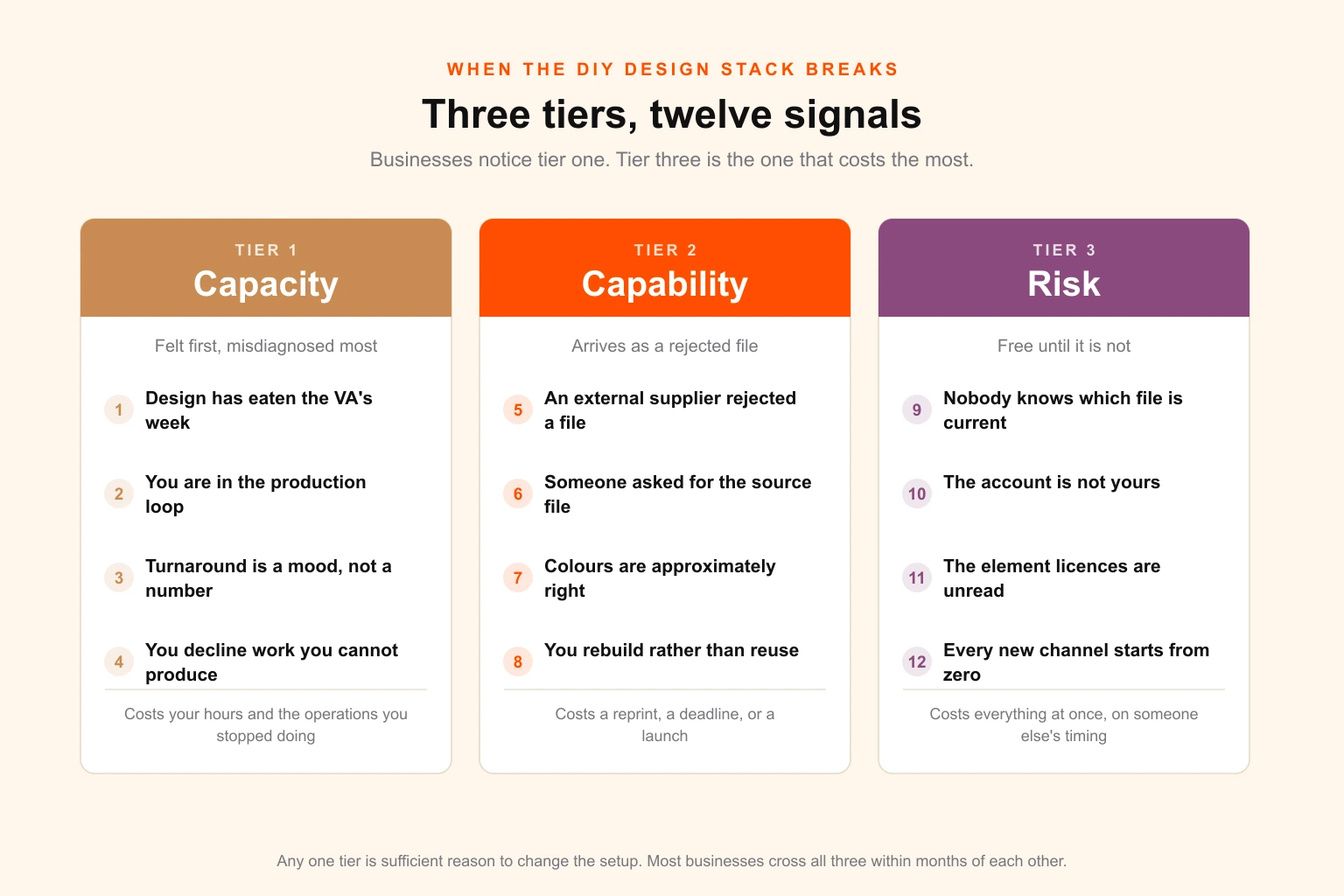
This guide is a diagnostic, not an argument. Canva is a good tool and a good VA is worth more than most businesses pay them. What follows is the set of twelve specific, measurable signals that the combination has stopped being the right one for your stage — grouped by what is actually breaking — plus the arithmetic to check it yourself, and what to extract before you change anything.
First, the part nobody says: this stack is good
If the Canva-plus-VA setup were not genuinely effective, nobody would still be on it at the point where it starts costing them.
It is effective. For a business producing social content, event graphics, internal documents, simple flyers and quick campaign variants, a competent VA operating good templates will out-produce a traditional agency on turnaround, at a fraction of the cost, with a far shorter feedback loop. There is no serious argument against it for that category of work. Most design-industry commentary on Canva is written by designers defending professional territory, which is why it reads as sniffy and why business owners correctly ignore it.
The problem is not the tool. The problem is the boundary.
Canva is excellent at everything that stays on a screen, exists for a short time, and fits a pattern somebody has already solved. It degrades sharply at everything that leaves the screen for a physical substrate, has to be exactly reproducible, has to be opened and manipulated by a third party, or constitutes a permanent asset rather than a disposable one.
Businesses outgrow the stack when their output crosses that boundary and the stack does not. Usually nobody notices the crossing, because the first several assets on the wrong side of it come out roughly fine.
Tier one: capacity signals
These are the signals you feel first and misdiagnose most often. They present as "we're busy" and get treated as a motivation or prioritisation problem. They are neither. They are arithmetic.
Sign 1 — Design has quietly eaten your VA's week
The tell is not that your VA is busy. It is what they stopped doing.
Virtual assistants are hired for inbox, scheduling, CRM hygiene, supplier chasing, invoicing, research, customer follow-up. Design creeps in because it is visible, because it is urgent, and because it is the one task where the request is easy to make and hard to refuse. Over about a year, it expands to fill whatever space it is given.
Run this check. Take the last four weeks. Estimate what proportion of your VA's hours went to producing or revising visual assets, and be generous — count the searching for the right file, the waiting on your feedback, the re-exporting.
Above roughly 40 per cent, you have made a hire you did not intend to make. You are now paying operations rates for design output, and — more expensively — you have lost the operations. The things that quietly stopped happening are usually follow-ups, and follow-ups are usually revenue.
The number itself is not magic. What matters is that most owners, asked to guess before they check, guess low by a factor of two.
Sign 2 — You are in the production loop
If a meaningful share of assets cannot ship without you personally looking at them, the constraint is not your VA's capacity. It is yours.
This is the most expensive sign on the list and the least visible, because your own hours do not appear on any invoice. It shows up as: you doing the final tweak yourself because explaining it takes longer; you being the only person who knows which version is current; assets sitting in a queue waiting for your review while the campaign window closes.
An owner reviewing brand-critical work is healthy. An owner as a required production step is a bottleneck that gets worse as the business grows, which is precisely backwards.
Sign 3 — Turnaround is a mood, not a number
Ask what your current turnaround is for a new social asset, a one-page flyer, a deck refresh.
If the answer is a range with a shrug in it — "depends", "usually a couple of days unless she's busy" — you do not have a design function. You have a favour that usually gets done. That is survivable at low volume and becomes a planning problem the moment marketing has a calendar, because campaigns get scoped around what can be produced rather than what should be.
The healthy version is a committed turnaround by asset type, which is exactly what a design brief process and a real capacity model give you.
Sign 4 — You have started declining opportunities on production grounds
The most under-recognised sign of all, because the decision never gets recorded anywhere.
A partner offers a co-branded slot and you pass because you cannot get the artwork done in time. You skip a trade show because the stand graphics are a project you cannot face. You run three ad variants instead of the twelve the platform wants because twelve is unthinkable. You do not launch the second product line's packaging because the first one took four months.
Nobody logs these. They are invisible in every report. And they are almost always larger than the entire cost of fixing the underlying constraint — which is why the honest version of the creative volume question starts with what you are currently not doing.
The capacity arithmetic
Do not take a benchmark. Run your own, because the answer is usually not what people expect and the surprise is instructive.
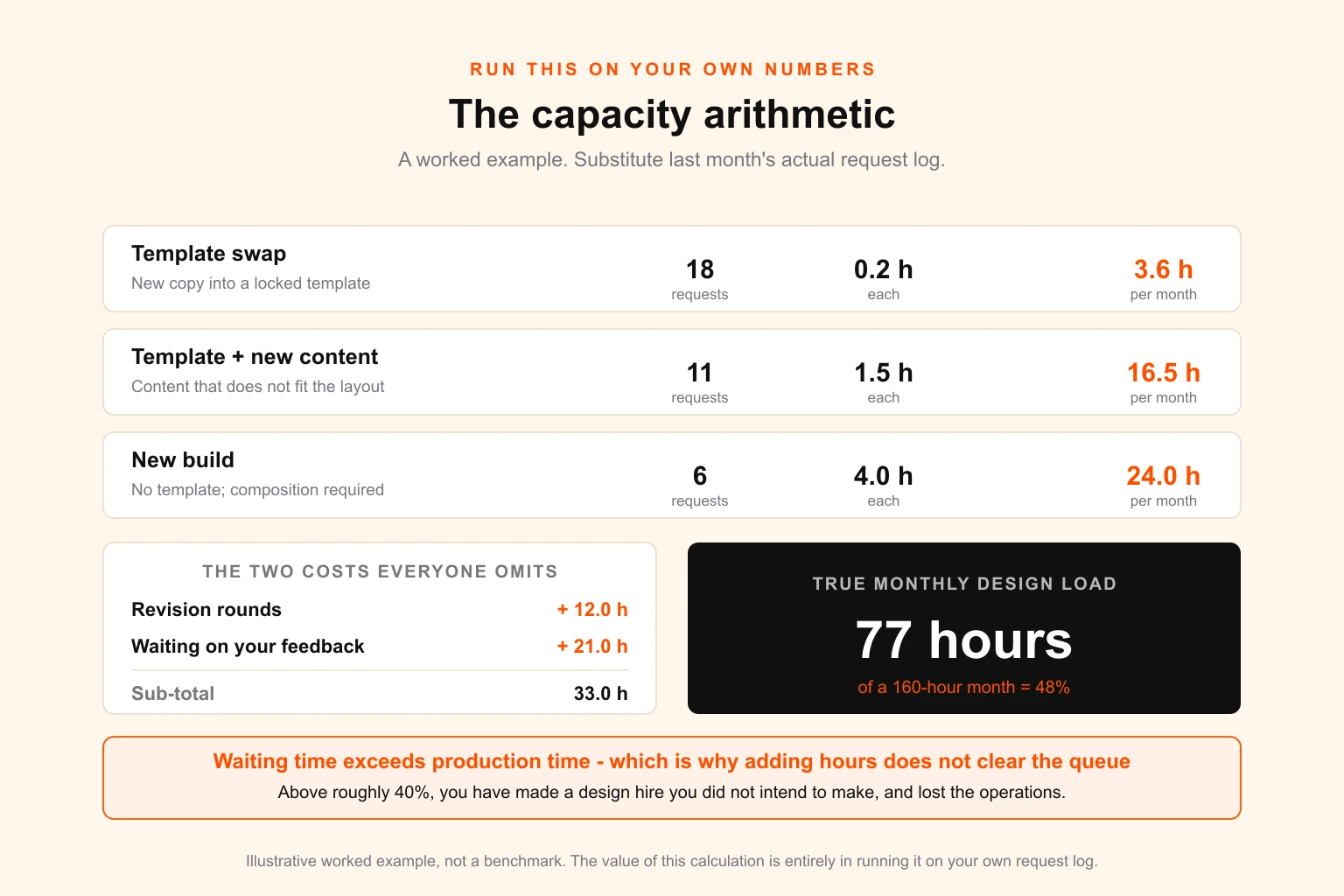
Count last month's completed design requests. Sort them into three buckets:
| Request type | What it actually involves | Realistic cycle time |
|---|---|---|
| Template swap | New copy or image into an existing locked template | Minutes |
| Template plus new content | Existing template, but content that does not fit the layout | Under an hour, plus revisions |
| New build | No template exists; composition decisions required | Half a day or more for a non-designer, plus revisions |
Then add the two costs everybody omits: revision rounds, and your VA's waiting time while a request sits with you for feedback. In most small businesses, waiting time exceeds production time — which is why adding hours does not fix the queue, and why the bottleneck almost never sits where people look for it.
Multiply out. Divide by the hours your VA genuinely has after their operational work. Compare to demand.
Most owners running this for the first time discover two things: that real capacity is roughly half what they assumed, and that the constraint is the revision loop rather than the production.
Tier two: capability signals
Capacity problems are uncomfortable. Capability problems are the ones that cost money in a single event, because they surface as a rejected file with a deadline attached.
Sign 5 — Someone external has rejected your file
A printer, sign maker, embroiderer, packaging supplier, promotional products vendor or manufacturer has come back and said the artwork cannot be used.
This is the single clearest signal on the list, because it is the first time an outside party with no stake in your feelings has assessed your production process. It is also the one most often dismissed as the supplier being difficult.
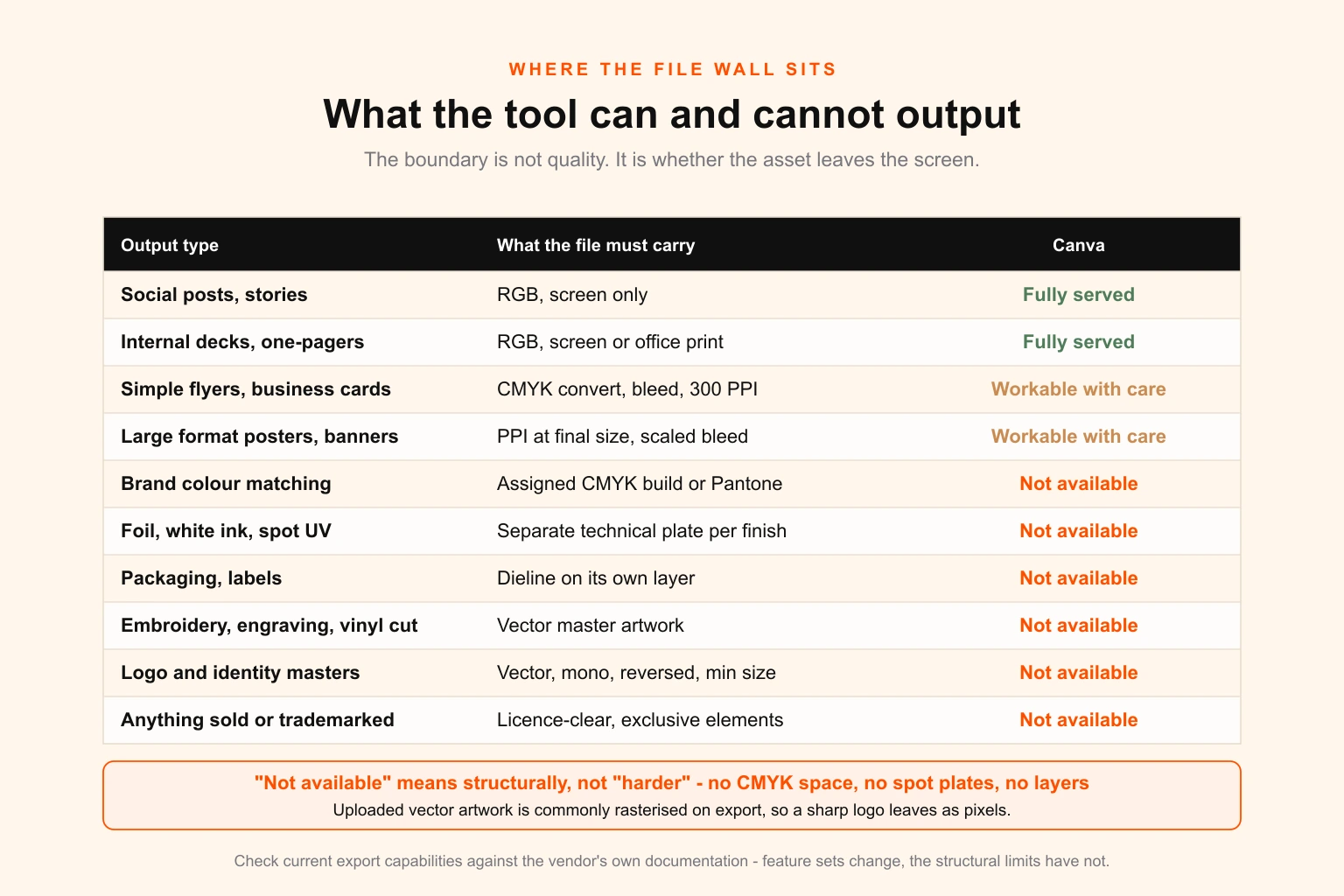
They are not being difficult. Here is what is actually happening, and none of it is fixable by trying harder in the same tool.
There is no CMYK working space. Canva designs in RGB and converts on export. You cannot see the conversion, control it, assign values to specific elements, or soft-proof it. A brand colour that is vivid on screen arrives muddy on the press sheet, and the first time you find out is on the sheet. This is the mechanism behind almost every "the colour is wrong" conversation, and it is why understanding the RGB-to-CMYK boundary matters more than any individual file.
There are no spot colours. You cannot assign a Pantone, which means you cannot specify a matched brand colour, and you cannot build the separate technical plates that foil, white ink, spot UV, varnish or embroidery all require. Anything with a special finish is out, structurally.
There are no technical layers. Packaging needs a dieline on its own layer, in a specific colour, that the supplier can turn off. Labels need the same. Canva has no concept of this, which puts most real packaging and dieline work out of reach entirely.
Uploaded vector artwork does not survive. Upload your logo as a vector PDF and it is commonly rasterised on export — so the sharp artwork you supplied leaves the building as pixels. This is the most insidious one, because the file looks fine at screen size and fails at scale.
Large format is unpredictable. Canva's export sizing does not give you the control that resolution at final print size demands, and the effective-resolution trap that catches trained designers catches everyone else faster.
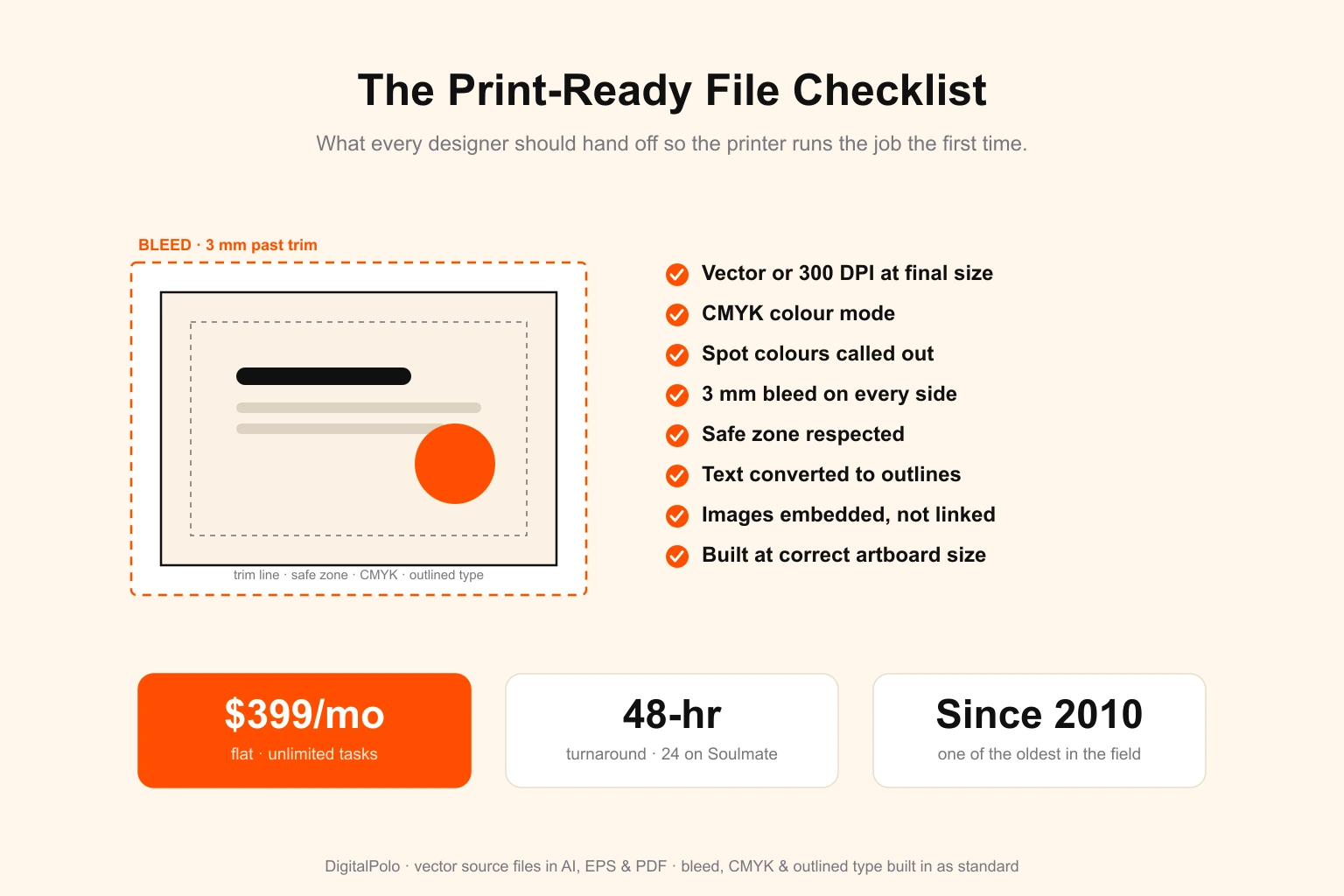
The print-ready file checklist is the specification your supplier is actually checking against. If you read it and recognise that most of it is not producible in your current stack, that is your answer — and it is not a criticism of your VA, who is being asked for something the tool cannot express.
Sign 6 — Somebody asked for the source file and there wasn't one
"Can you send the vector?" "Do you have the AI or EPS?" "We need the layered file."
If the honest answer is a PNG someone once exported, you do not have brand assets. You have pictures of brand assets.
The distinction is not pedantic and it becomes expensive at exactly the wrong moment. Master artwork can be scaled to a building, cut to a vinyl decal, stitched onto a polo, engraved, foiled, and reproduced identically in ten years. A raster export can be placed in a document at roughly the size it was exported at. That is the whole difference, and it is well covered in vector versus raster if you need to explain it to someone.
The practical test: ask for your logo as vector master artwork, in full colour, single colour, and reversed for dark backgrounds, with a stated minimum size and clear-space rule. If nobody can produce that set, every future supplier will hit the same wall you just did.
Sign 7 — Your colours are approximately right
Your logo is a slightly different blue on the website, on the printed brochure, in the deck template, and on the exhibition banner. Each is defensible. Together they read, to a customer, as a business that is not quite in control of itself.
This is not carelessness. It is the predictable output of a system with no colour specification — no assigned CMYK build, no Pantone reference, no consistent conversion. Every asset gets whatever the export produced that day.
The fix is a specification, not more care. Which is a brand guidelines problem, and specifically the difference between a style guide and an actual design system.
Sign 8 — You are rebuilding rather than reusing
Every new asset starts by finding something similar and copying it, or by rebuilding an element from scratch because the original cannot be found or cannot be edited.
This is the compounding one. Its cost is invisible per instance — twenty minutes here, an hour there — and enormous in aggregate, because it never stops and it grows with volume. A business with a proper asset library produces the tenth variant of something faster than the first. A business without one produces the tenth exactly as slowly as the first, forever.
It is the same structural failure that makes turning one campaign asset into fifteen channel formats trivial for some teams and a fortnight's work for others, and the same one that makes producing featured images at scale either a pipeline or a chore.
Tier three: risk signals
These are the quiet ones. They cost nothing at all, right up until they cost a great deal at once.
Sign 9 — Nobody can say which template is current
Ask three people for the current version of a recurring asset. If you get three files, you have brand drift, and it is structural rather than behavioural.
It happens like this. Someone needs a variant. They duplicate the template because that is safer than editing the original. They adjust it. Someone else finds the duplicate first next time and duplicates that. Within a year there are nine versions in the folder, differing in ways nobody chose, and the one that gets used is whichever came up in search.
Nobody did anything wrong at any step. That is what makes it a system problem. Multi-location businesses hit it hardest — it is why asset inventories exist as a discipline, and why the answer is locked masters and a single named source of truth rather than a memo asking people to be careful.
Sign 10 — Your brand lives in an account you do not own
Check, right now, who is the account owner on the Canva workspace. Not who uses it — who administers it, and which email address it is attached to.
If the answer is your VA, a former contractor, an agency, or a personal address belonging to anyone other than you, then every design your business has ever produced sits behind a credential you do not control.
This is the most common way small businesses lose their entire design history, and it almost never involves bad faith. Someone moves on. The handover covers the client list and the passwords everyone remembered. Eighteen months of brand assets are not on the list because nobody thought of them as assets.
The same exposure applies to fonts, stock licences, and any purchased element — which is the broader problem covered in the files and licences to secure before anyone leaves, and one worth resolving this week regardless of everything else on this page.
Sign 11 — You have never read the licence on the elements you are using
Canva's Content License Agreement is more restrictive than most users assume, and the restrictions bite in exactly the places a growing business goes.
The two that matter most, based on Canva's published terms and its own explanatory material:
Stock library content cannot be used in a trademark. Fonts, simple shapes and lines are excepted. Everything else in the library is simultaneously available to every other Canva user, so you cannot claim exclusive rights in it. If your logo contains a library element, your logo is not defensible as a mark.
Standalone content cannot be sold on products. A library photo or illustration used essentially on its own — put onto a shirt, a print, a mug — falls outside the licence. Combining it into a genuine design changes the analysis, but "I added text" is a thinner defence than people assume.
There are further restrictions covering resale of unmodified templates, prohibited categories, and specific limits on unedited content in digital publications. Verify all of this against Canva's current agreement rather than any summary, including this one — the terms have been revised more than once, and licensing exposure is exactly the wrong place to rely on a blog post.
The general principle holds regardless of the specific clause: the moment you print at volume, sell merchandise, or register a mark, the licence terms on every element in the file become a live commercial question. This is the same class of problem as stock asset licensing for print runs and merchandise and font licensing when you resell design work, and it is the one most likely to be discovered by someone else's lawyer.
Sign 12 — Every new channel is a from-scratch build
A new sales channel, a new retail partner, a new market, a new product line, a hiring push. Each one arrives with an asset list, and each list is met from nothing.
A business with a design system meets it by extension: the rules exist, the components exist, and the new format is a variation. A business without one meets it by starting over, every time, with the cost and the inconsistency that implies.
It is the difference between a 90-day brand rollout that actually completes and one that is still going a year later, and between an employer brand kit that exists before you need to hire fifty people and one that gets improvised during the hiring.
The scorecard
Score one point per sign that is currently true. Be honest rather than charitable — the failure mode of this exercise is scoring the business you intend to run rather than the one you have.
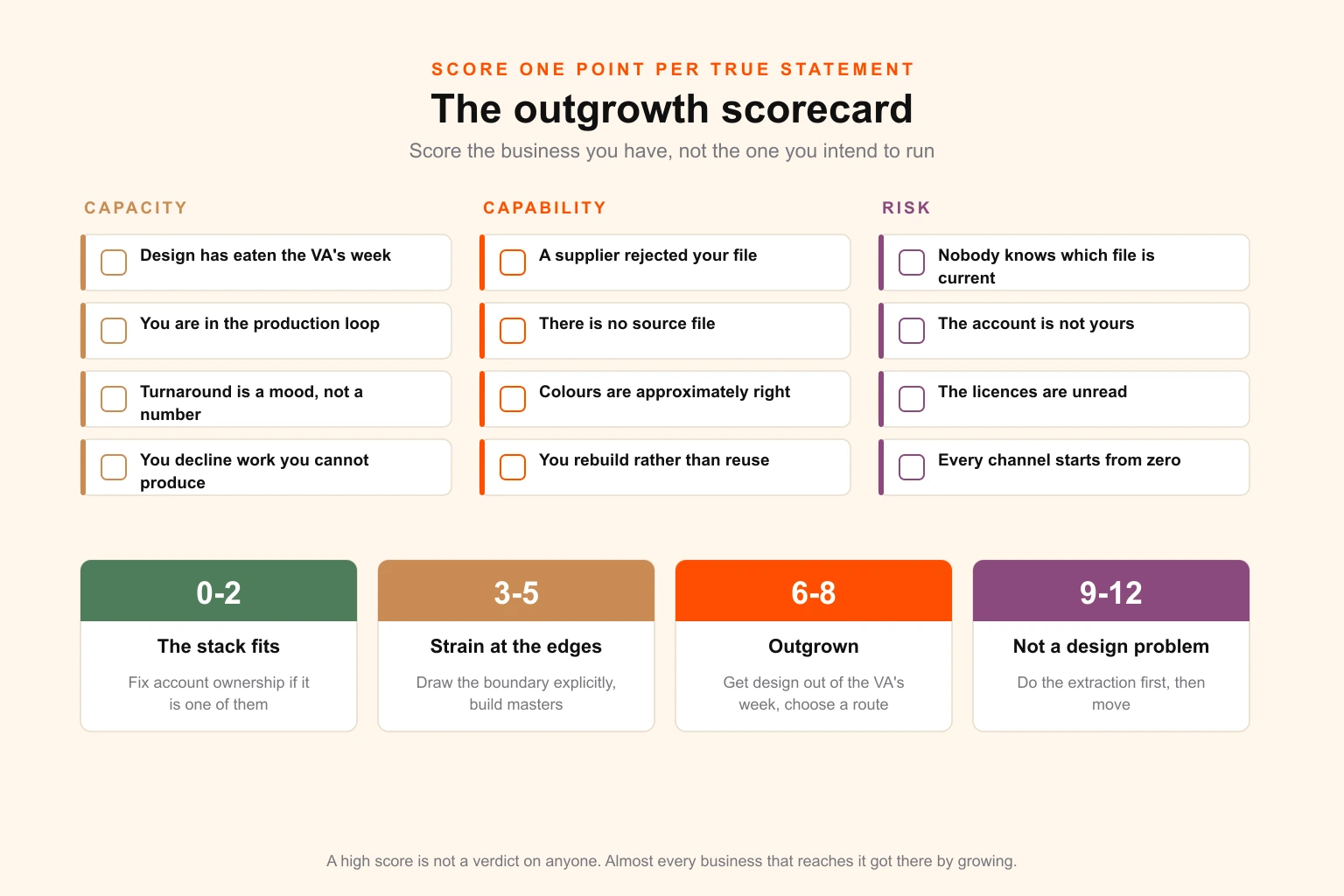
| Score | Reading | What to do |
|---|---|---|
| 0–2 | The stack fits. | Nothing structural. Fix account ownership if sign 10 is one of them, because that one is cheap now and expensive later. |
| 3–5 | Strain at the edges. | Draw the boundary explicitly. Keep Canva for screen and short-life work; route print, packaging and identity elsewhere. Build proper master artwork before the next thing needs it. |
| 6–8 | The stack has been outgrown; you are absorbing the cost personally. | Get design out of your VA's week and back into operations. Establish real capacity. Choose a route — the comparison is below. |
| 9–12 | Not a design problem any more. | You are carrying licensing exposure, continuity risk and an unquantified opportunity cost simultaneously. Do the extraction in the next section first, then move. |
A high score is not a verdict on anyone. Almost every business that reaches this point reached it by growing, which is the good version of the problem.
Before you change anything: the extraction
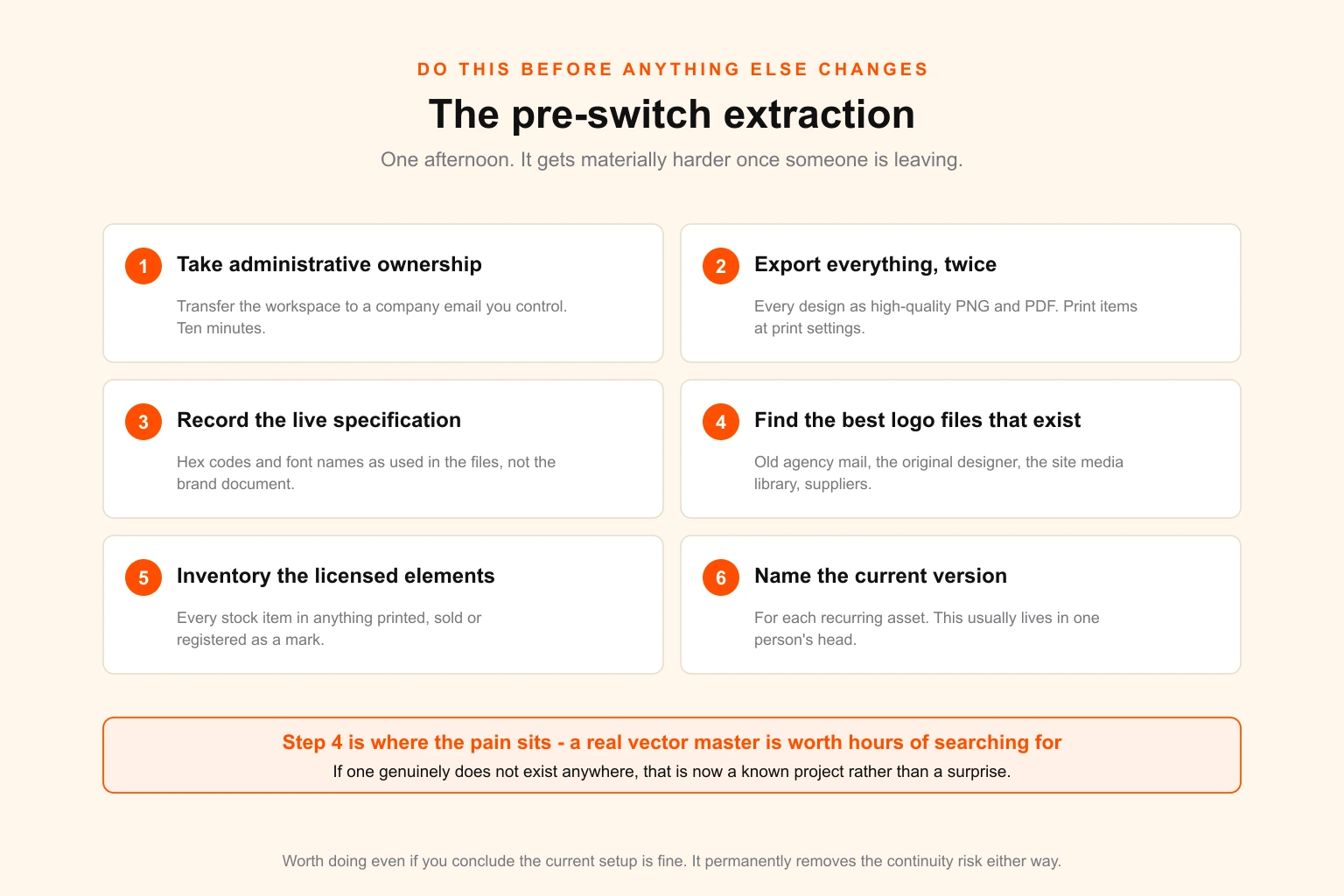
Do this first, regardless of which route you choose, and do it while relationships are still good. It gets materially harder once someone is leaving.
- Take administrative ownership. Transfer the Canva workspace to a company-controlled email address that you administer. This is the single most valuable item on the list and takes about ten minutes.
- Export everything, twice. Every current design as high-quality PNG and PDF. Print-intended items exported separately at print settings. Bulk, not selectively — the item you skip will be the one you need.
- Record the actual specification. Hex codes and font names as used in the live files, not as written in a brand document nobody has opened. Where the two disagree, the files are the truth.
- Find the best logo files in existence. Search everywhere — old agency emails, the original designer, the website's media library, supplier correspondence. Somewhere there may be a real vector master. If there is, it is worth hours of searching. If there genuinely is not, that is now a known project rather than a surprise.
- Inventory the licensed elements. Every stock item used in anything printed, sold, or registered. This is the list a lawyer would ask for.
- Write down which version is current. For each recurring asset, name the one true file. This knowledge usually exists only in one person's head, and that is the definition of a continuity risk.
Item four is where most of the pain sits, and where a small amount of work now removes a large amount of cost later.
The three routes out, and when each is right
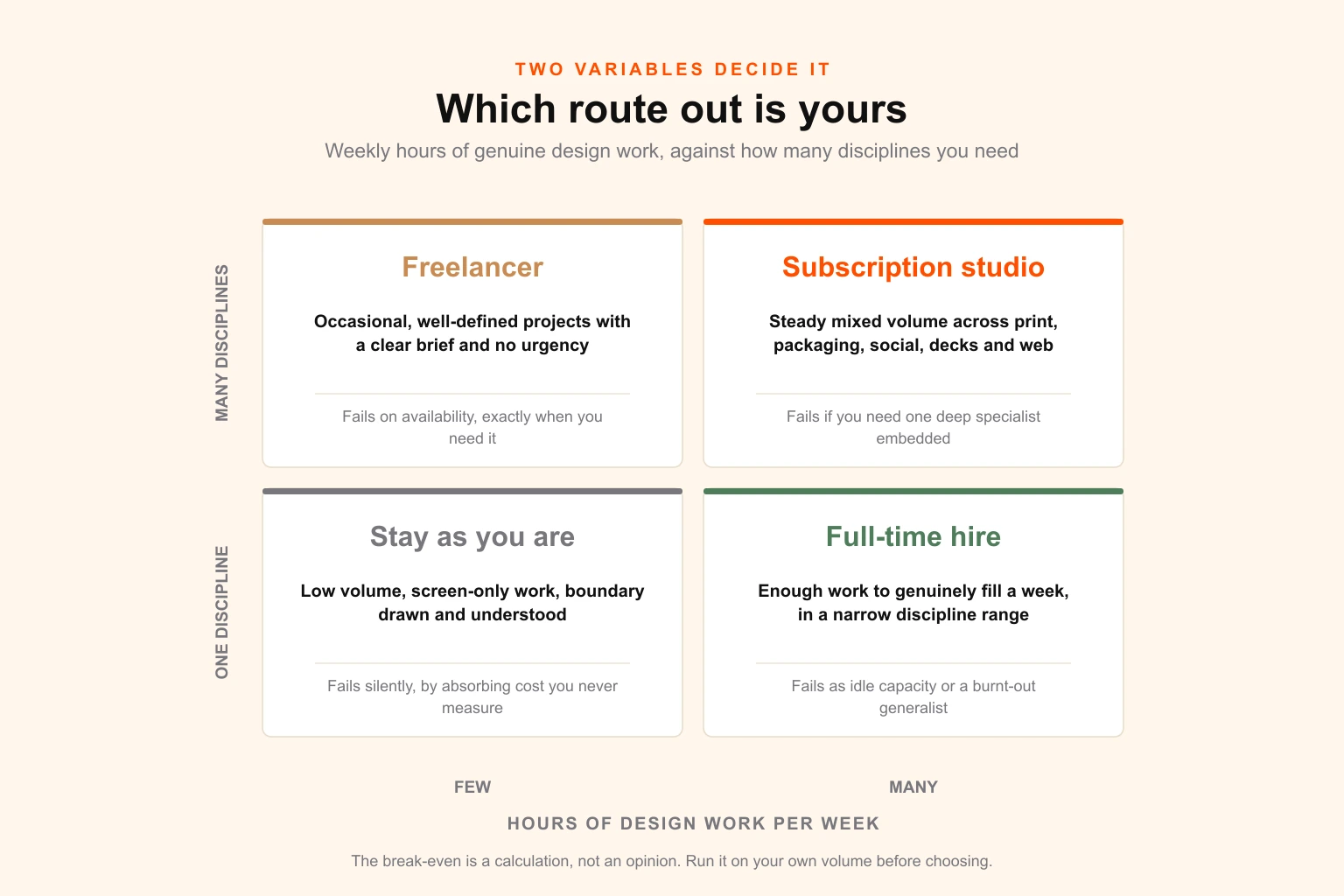
There is no universal answer. There is an answer determined by two variables: how many hours of genuine design work you generate per week, and how many different disciplines you need.
| Full-time hire | Freelancer | Subscription studio | |
|---|---|---|---|
| Best at | Deep context, always available, owns the brand | Well-defined projects, specialist skills | Steady volume across many formats |
| Weak at | Breadth — one person is not all disciplines | Availability, continuity, turnaround | Deep company-specific context, at first |
| Right when | You can genuinely fill a week, narrow discipline range | Occasional projects, clear briefs, no urgency | Continuous mixed volume, several disciplines |
| Wrong when | Volume is lumpy or spans many disciplines | You need reliable turnaround | You need one deep specialist embedded |
| Fails as | Expensive idle capacity, or a burnt-out generalist | The queue you cannot control | A queue you have to learn to brief well |
The honest framing:
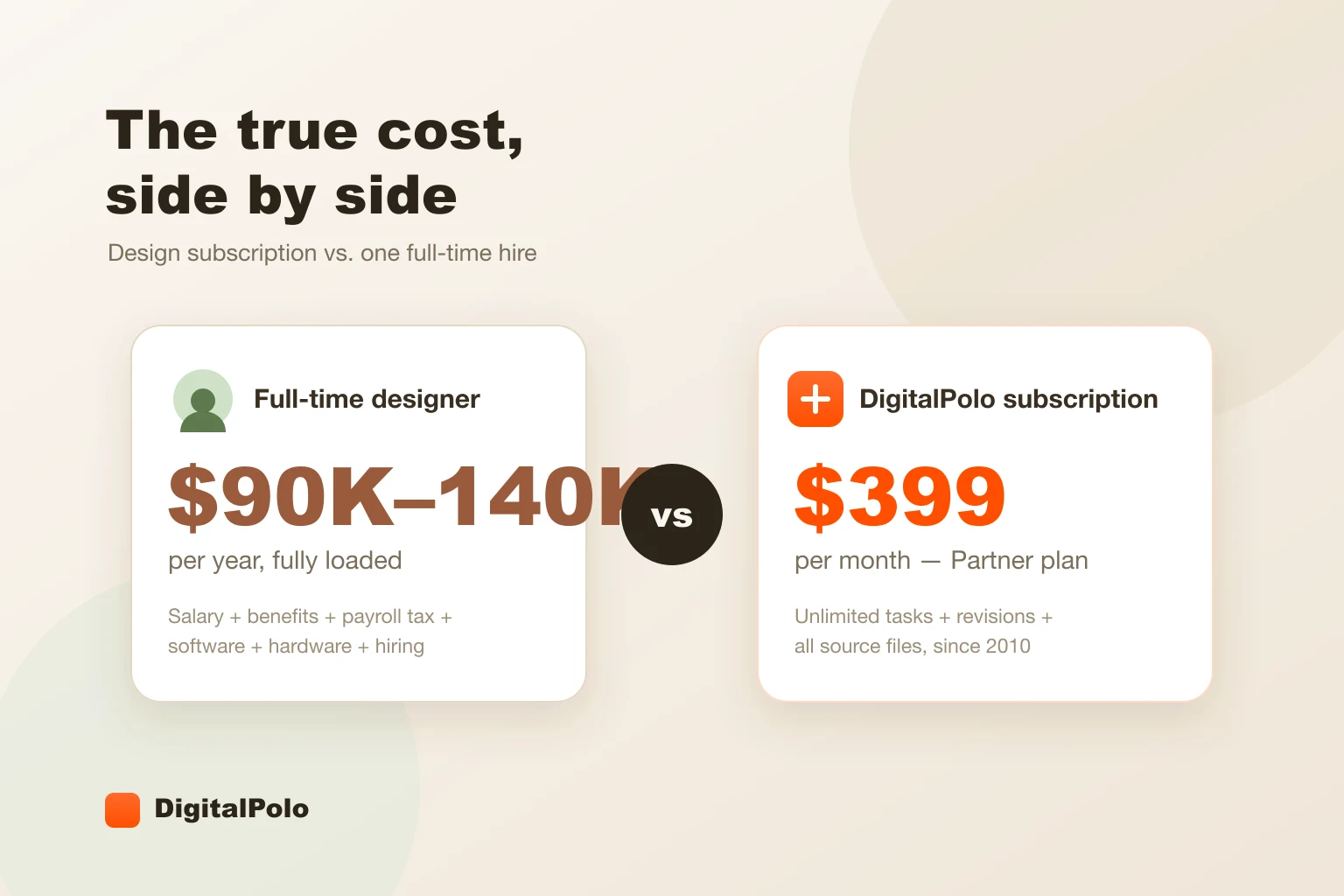
Hire when the work is genuinely full-time and genuinely narrow. The mistake is hiring one generalist to cover print, packaging, motion, web and decks and expecting excellence across all five. The full cost comparison against a subscription covers the loaded-salary maths, and the loaded number is considerably higher than the salary.
Freelance when the work is projects rather than flow. Excellent for a one-off identity or a specialist job. Poor as infrastructure, for reasons the freelancer comparison sets out — availability is the failure mode, and it fails hardest when you most need it.
Subscription when you sit in the awkward middle: too much work for a freelancer, not enough consistent work in any single discipline to justify a hire, and a need for print, packaging, social, decks and web to come from one place with one set of brand rules. Whether that maths works for you is a calculation, and whether unlimited design is worth it and the pricing breakdown both run it properly rather than assuming the answer.
There is a fourth position worth naming, which is not really a route: keeping design in-house by default without deciding to. That is where most businesses at a score of 6 or above currently are.
What to keep Canva for
This matters as much as anything above, because the businesses that get this right do not leave Canva. They demote it to what it is excellent at, and stop asking it for the rest.
Keep it for:
- Social posts and stories operating inside locked brand templates
- Internal documents, decks and one-pagers
- Event and community graphics with short lifespans
- Rapid variants of an approved concept
- Anything a non-designer needs to produce independently, at speed
Route it elsewhere:
- Anything printed at volume, or on anything other than paper
- Packaging, labels, and anything needing a dieline
- Logos, identity systems, and any permanent brand asset
- Anything needing a matched colour, foil, white ink or special finish
- Anything a manufacturer, embroiderer or sign maker has to open
- Anything sold, licensed, or registered as a mark
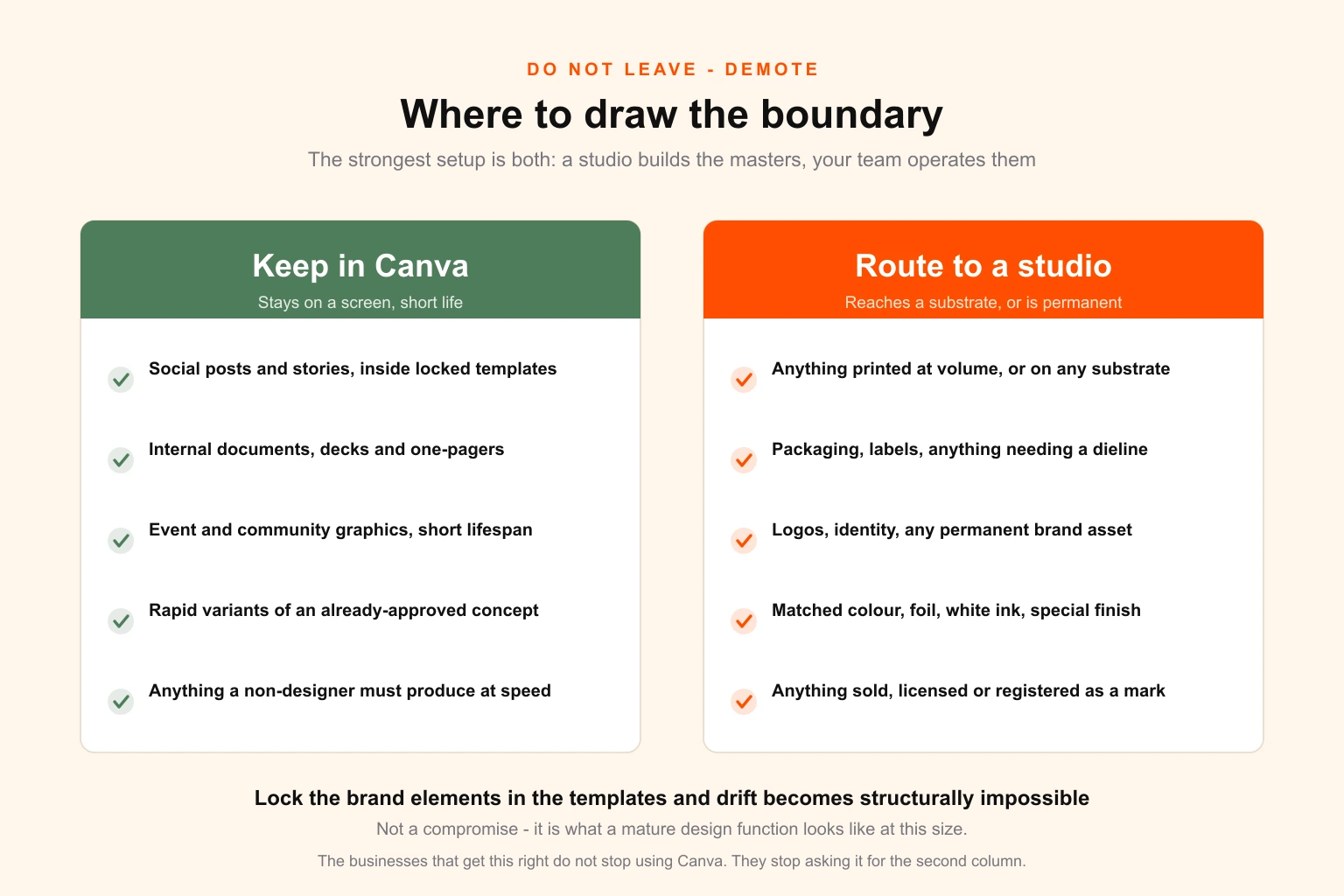
The strongest arrangement is both, working together: a professional studio builds the master templates, the brand system, the print and packaging artwork and the source files — and your VA operates inside those templates in Canva at speed, with the brand elements locked so drift is structurally impossible rather than merely discouraged.
That is not a compromise. It is what a mature design function looks like at this size. The templates are built by people who can build templates, and operated by the person closest to the work. You get the turnaround of the VA setup with none of the capability ceiling, and the licensing and continuity risks resolve as a side effect of having real assets.
What to do this week
Regardless of your score, in this order:
- Check the account owner. Ten minutes. Fix it if it is not you.
- Run the 40 per cent check. Estimate what share of your VA's month went to design. Whatever you guess, check it.
- Ask for the vector. Request your logo as master artwork in three variants. Whether it exists tells you where you stand.
- Score the twelve. Honestly, about the business you have.
- Do the extraction. Six steps, one afternoon, permanently removes the continuity risk.
None of that requires changing suppliers, spending money, or having an awkward conversation. All of it is worth doing even if you conclude the current stack is fine — and if you conclude it is not, you will have done the hard part already.
Where Digital Polo fits
We do the half that Canva cannot: master artwork and source files, brand systems, print-ready production files, packaging and dielines, identity and logo work, brand systems, decks and social template sets — built to be operated by your team afterwards, in Canva if that is where your team works.
Volume is flat-rate rather than per-asset, which is the point: the capacity problem in tier one only genuinely resolves when requesting the eleventh asset costs the same as the first. Plans start at $399 a month, the full pricing detail is here, and if you are weighing this against a hire, the comparison is worth reading first.
If you are an agency or print shop reading this on behalf of clients rather than yourself, the white-label arrangement is the same capability under your own name.
Start with the free version of this: send us the three assets you are least confident about — the one a printer questioned, the one nobody can find the source for, the one that looks different everywhere. We will tell you what is actually wrong with the files and what it would take to fix them, at no cost and with no obligation. That diagnostic is useful whether or not you ever work with us.