
Fourteen months after a rebrand I watched from close range, a customer received a quote with the old logo on it.
Not a leftover brochure. Not a dusty sign at the back of a warehouse. A live, freshly generated PDF, produced that morning by the quoting module inside the company's ERP, using a header image that had been uploaded in 2019 by someone who had since left. Every human-facing surface had been changed. The website, the social profiles, the signage, the decks, the packaging. This one had never appeared on anybody's list because it was not a design asset in anyone's mind — it was a setting.
That is the shape of the problem. Rebrands do not usually fail because the new identity is bad. They fail slowly and embarrassingly, over the following two years, because nobody ever produced a complete list of where the old one lived.
And the reason nobody produced it is that the entire published literature on rebranding is about the wrong half of the job.

Every rebranding checklist stops one step short
Search for a rebranding checklist and you will find a great deal of competent material, almost all of it organised the same way: research and audit, then strategy and positioning, then visual and verbal identity, then internal rollout, then external launch, then measurement.
That structure is correct. It is also, for the purpose of actually executing a rollout, nearly useless — because the entire operational reality of a rebrand is compressed into two bullet points that read something like audit all current brand assets and refresh external touchpoints like business cards, signage, packaging and ads.
Those two lines are where the money is, where the time is, and where every rebrand that drags on for two years goes wrong. They are also the only two lines nobody expands, because expanding them requires knowing your specific business rather than the general shape of a branding project.
So here is the expansion. Not the phases — the surfaces. What actually carries your mark, how you find the instances you have forgotten, who controls each one, what it costs to change, and what order it should happen in.
If you have not yet decided whether to rebrand at all, or you are still weighing how far the change should go, start with the rebranding guide and the brand audit framework — this piece assumes that decision is made and you now have to execute it. If your trigger was a funding round and you are working to a board-set clock, the 90-day brand rollout plan covers the sequencing under that specific pressure. What follows is the inventory underneath all of them.
Build the inventory before you write the design brief
The single highest-leverage change you can make to a rebrand is moving the inventory earlier — before the design work, and ideally before the brief.
This feels backwards. The inventory is admin; the design is the exciting part; surely you list what needs updating once you know what you are updating it to. But two things come out of an early inventory that cannot be recovered afterwards.
It tells the designer what the identity has to survive. A mark that has to work as a 16-pixel favicon, as single-colour embroidery on a polo shirt, cut in vinyl on a van, foil-blocked on a folder, moulded into a plastic housing and legible on a sign read from forty metres is a materially different design problem from a mark that only has to look good on a website. Designers know this in the abstract. They can only design for it when someone hands them the actual list. This is also why brand identity work that starts from an asset inventory produces systems that hold up, and work that starts from a mood board produces marks that have to be redrawn for half the surfaces they land on.
It tells you what the rebrand actually costs. The design fee is almost never the large number. The rollout is. A company that commissions an identity without knowing that it owns four wrapped vehicles, eleven exterior signs, an embossing die, six hundred uniform items and a warehouse holding eighteen months of printed cartons has committed to a budget it has not seen. An inventory built after the identity is approved is not a plan. It is a damage report.
There is a third benefit that only shows up later: the inventory does not expire when the rollout ends. Maintained, it becomes the brand asset register you should have had all along — the thing that makes the next change, the next acquisition, the next packaging revision a counted job rather than an archaeological one. The hotel brand asset inventory is what this looks like when it is built as a permanent document for one specific sector; the employer brand asset kit is the same idea for hiring surfaces.
The three questions that sort every asset
An inventory that is just a long list is hard to act on. What makes it usable is sorting each item by three questions, asked in this order.
Who controls it? Not who owns the brand — who can actually change this specific thing. Some surfaces you change yourself in seconds. Some you can change but must rebuild. Some live inside a third party's system and change on their schedule and to their specification. Some are physical objects you own. Some are physical objects that require a tool to be manufactured first. And some are in other people's hands entirely. Control is the primary sort because it determines who does the work and how long it takes, and it cuts across departments in a way that a departmental list never does.
How is it replaced? A digital file is overwritten. A template is rebuilt. A printed item is reprinted, overprinted, or depleted. A sign is refaced or replaced. A vehicle is rewrapped or partially decalled. A moulded part needs new tooling. These are not variations on one action; they have different costs, different lead times and different people.
What does it cost to leave wrong? This is the question that gets skipped, and it is the one that produces a defensible sequence. A stranger's first three encounters with your brand carry enormous weight. A sign on an internal fire door carries almost none. Both are on the list. They should not be in the same month.
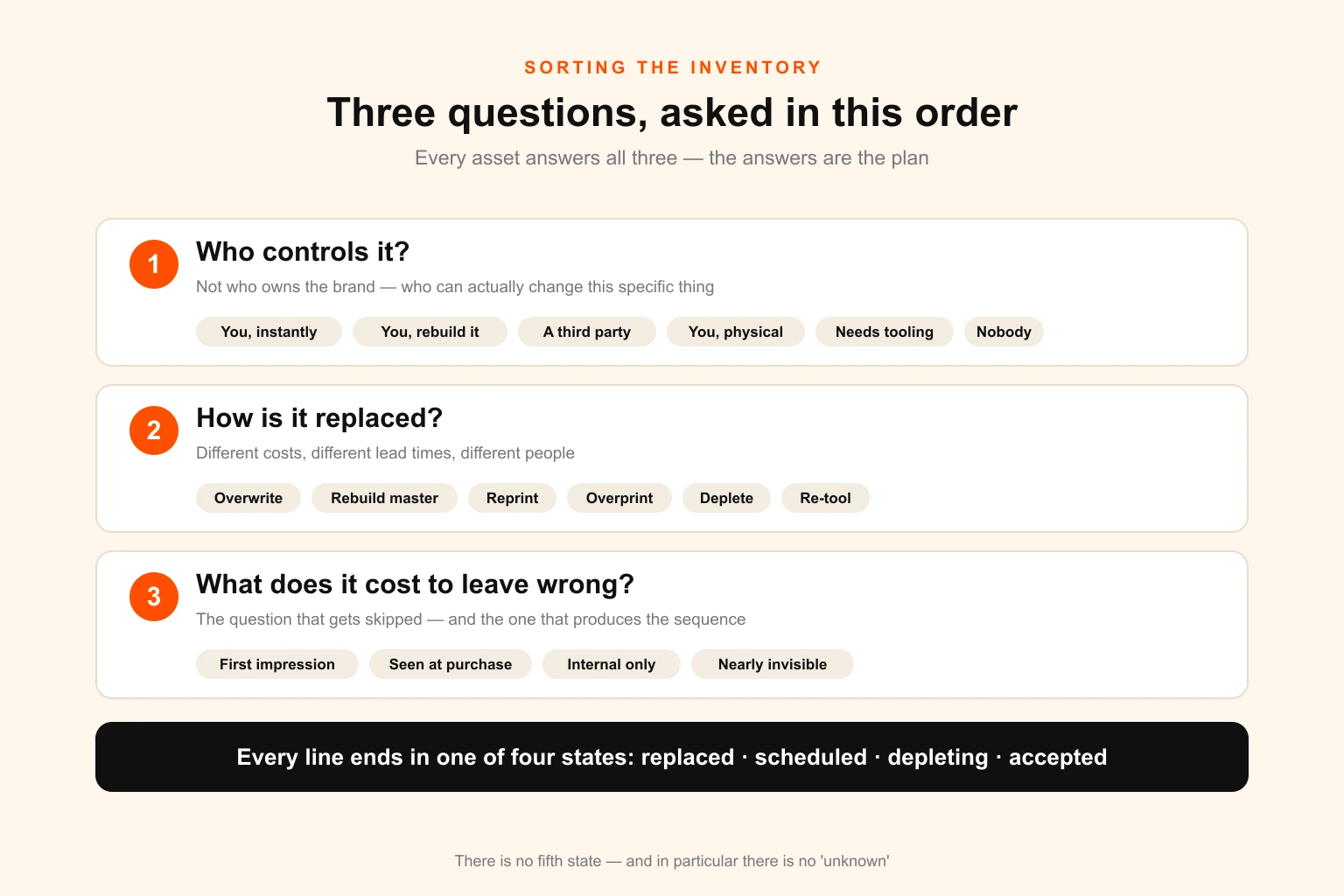
Sort by those three and the inventory stops being a wall of items and becomes a sequenced plan with owners.
The inventory: six layers of control
Most rebrand checklists organise by department — marketing assets, sales assets, HR assets. That structure guarantees gaps, because the surfaces that get missed are precisely the ones no department thinks of as brand assets.
Organise by control instead. Six layers, from the ones you change with a keystroke to the ones you cannot change at all.
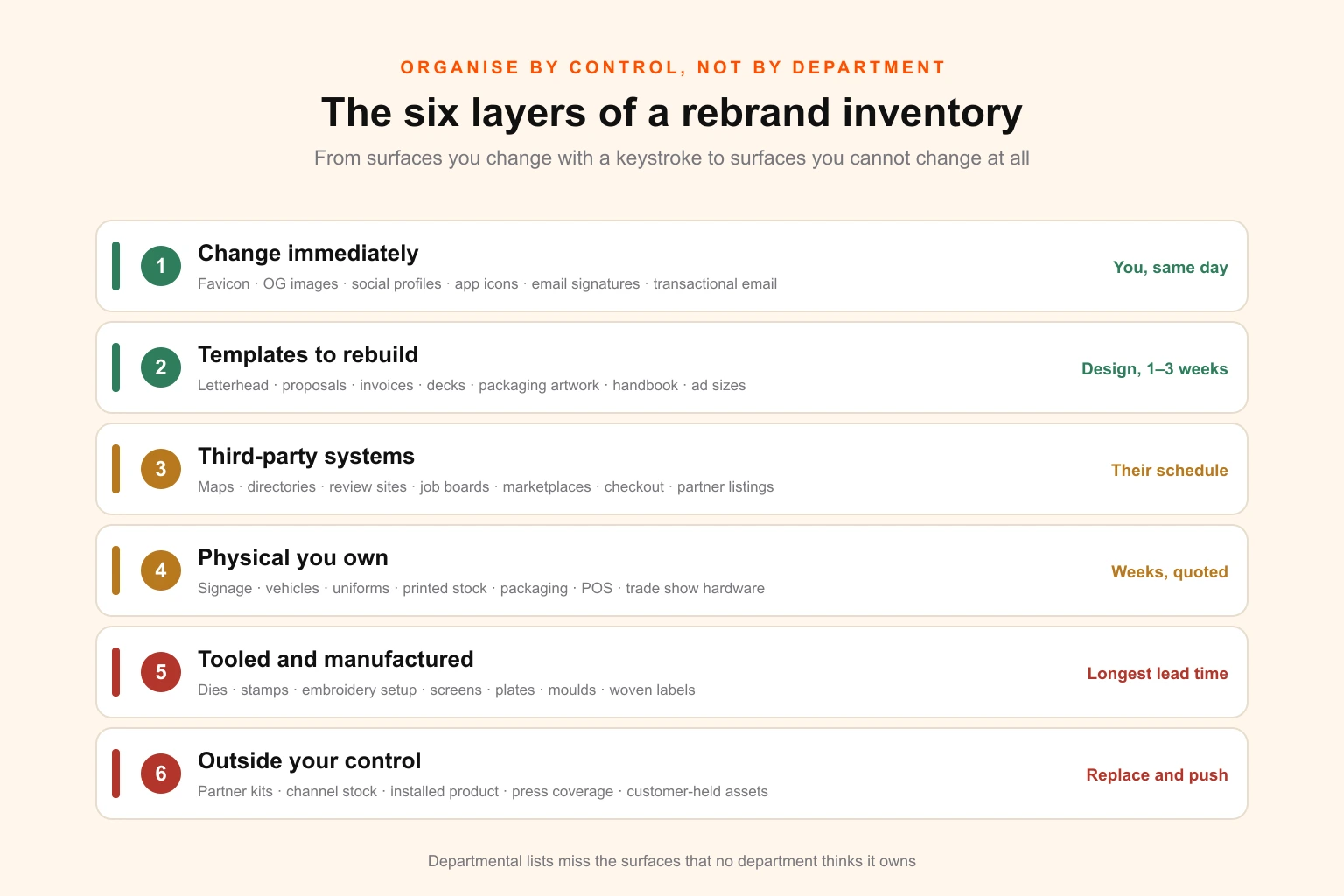
Layer 1 — Surfaces you change immediately
You control these directly, the change is a file upload or a settings edit, and there is no production step. This layer should be complete on launch day. It usually is not, because it is longer than people remember.
- Website logo, favicon and touch icons — the favicon is missed more than any other single item on this list
- Open Graph and Twitter card images, including the default sitewide fallback
- Site footer, header, and any hard-coded logo in a theme or template file
- 404 page, maintenance page, holding pages and any staging environments that are publicly reachable
- Web app or product UI logo, loading screens, empty states and onboarding illustrations
- Login and authentication screens, including any hosted third-party auth pages you have branded
- App store and play store icons, screenshots, feature graphics and listing copy
- Email signatures — the whole company, not the marketing team, and via the generator or policy if you have one
- Transactional email templates: order confirmations, password resets, receipts, shipping notices, appointment reminders
- Marketing email templates, headers, footers and preference-centre pages
- Social profile images, cover images and pinned posts across every platform, including the ones nobody has posted to in three years
- Video channel art, thumbnails, intro and outro stings, lower thirds and end cards
- Video conferencing backgrounds and any meeting-room display wallpapers
- Company-wide desktop and mobile wallpapers, if you set them
- Calendar-booking pages, scheduling links and their confirmation emails
- Chat widget, help-centre and knowledge-base branding
- Podcast cover art and episode artwork, if you run one — the podcast cover design guide covers the platform specs
- Digital ad accounts: account-level logos, brand assets in ad platforms, responsive display asset libraries
- Any browser extension, plugin or integration listing you publish
Two of these deserve individual mention because they are missed almost universally. The favicon persists in browser tabs, bookmarks and history for as long as a user has visited you, and it is stored in a place most content teams cannot reach. And the default Open Graph image — the one that renders when a page has no specific share image — is frequently a file uploaded once, years ago, that nobody has looked at since.
Layer 2 — Templates and documents you must rebuild
You control these, but the change is production work rather than a swap, because each one is a designed artefact. This is the layer that consumes the most design hours in a typical rebrand, and it is the layer most likely to be underestimated by an order of magnitude.
- Letterhead, in both print and digital versions, and in every language and entity you operate under
- Compliment slips, envelopes, labels and mailing materials
- Business cards for every employee — a per-person job, not a single design
- Proposal, quote, estimate and statement-of-work templates
- Contract and agreement templates, including the ones in legal's folder rather than marketing's
- Invoice, credit note, purchase order and remittance templates — these usually live inside the finance system, not in a design folder
- E-signature templates in whichever platform you use
- Presentation masters: the company deck, the sales deck, the investor deck, the quarterly business review, the all-hands template. Presentation systems are where old marks survive longest inside a business, because decks get copied rather than rebuilt
- Report and whitepaper templates, case study templates, one-pagers
- Spreadsheet and dashboard templates that carry a header
- Employee handbook, policy documents, onboarding packs and offer letter templates
- Certificates, awards, training materials and course collateral
- Internal newsletter and comms templates — see internal comms design for why these are worth rebuilding rather than patching
- Print advertising artwork, in every size you have live
- Digital ad creative across every live campaign, in every format — if you are unsure how large that number is, the ad creative volume breakdown is a useful reality check
- Trade show and event graphics: pull-ups, backdrops, table covers, booth panels. Lead times here are unforgiving and covered in the event production timeline
- Product documentation, manuals, spec sheets, safety data sheets and installation guides
- Packaging artwork for every SKU, in every size and variant — see packaging dieline design and label design for the file-level implications
- Menus, price lists and tariff cards, if you have them — menu design has its own reprint economics
The critical discipline in this layer is to rebuild the template, not the document. Fixing forty proposals individually and leaving the master untouched guarantees the old mark returns the moment somebody starts a new one. If you do not currently have a template system worth the name, a rebrand is the correct moment to build one, and the difference between a brand guideline document and a working design system is exactly the difference between a rollout that holds and one that decays.
Layer 3 — Third-party systems and listings
You have an account, but the surface belongs to somebody else. Changes are usually possible, sometimes slow, occasionally require a support ticket, and frequently have their own image specifications that will not match anything in your brand kit.
- Google Business Profile — logo, cover, and every photo showing old signage or old packaging
- Apple Maps, Bing Places and any other map or local listing
- Industry directories, trade association listings and chamber-of-commerce profiles
- Review platforms: G2, Capterra, Trustpilot, Clutch, Yelp, TripAdvisor, sector-specific equivalents
- Job boards and employer-brand profiles: LinkedIn company page, Indeed, Glassdoor, sector job sites
- Marketplace seller profiles and storefronts: Amazon brand store and A+ content, Etsy, eBay, Shopify app listings
- Integration and partner directories on your vendors' websites
- Payment and checkout branding: the logo shown in hosted checkout, the descriptor on customer card statements
- CRM, marketing automation, help desk and community platform branding
- Webinar, event and ticketing platform profiles
- Applicant tracking system careers pages and their email templates
- Procurement and supplier portals that display your logo to clients
- Any co-branded landing pages hosted on a partner's domain
- Press-kit and media-database entries, including old press releases on wire services
The failure mode here is different from the other layers: these do not get forgotten so much as deprioritised, because each one is individually trivial and collectively enormous. The fix is to enumerate them once from your own records rather than from memory — see the discovery section below — and then work the list.
Layer 4 — Physical items you own and can replace
Now the money starts. These are objects in your possession that carry the mark and must be physically reproduced.
- Exterior signage: fascia, monument, pylon, wall-mounted, illuminated, window vinyl and door decals
- Interior signage: reception, wayfinding, room identification, statutory notices, safety signage
- Vehicle livery: full wraps, partial wraps, cut vinyl, magnetic panels, trailer graphics. The vehicle wrap production notes cover what a rewrap involves as opposed to a redecal
- Uniforms and workwear: shirts, polos, jackets, hi-vis, hats, aprons, name badges
- Lanyards, ID cards, access passes and visitor badges
- Printed stationery stock already in the cupboard
- Business cards already printed
- Brochures, catalogues, flyers, leaflets and sales sheets in stock
- Retail packaging, shipping cartons, tape, void fill, tissue, stickers and inserts
- Product labels, hang tags, swing tickets and care labels
- Point-of-sale material, shelf edging, danglers, standees and window graphics
- Merchandise and giveaways: mugs, bottles, pens, notebooks, bags
- Branded equipment, tools, cases and vehicles-adjacent assets such as trailers and containers
- Office assets: wall graphics, feature walls, reception desks with applied lettering, glass manifestation
- Trade show hardware: pop-ups, banner stands, counters, fabric graphics for existing frames
For everything printed, the decision is not automatically reprint. It is a three-way choice covered further down, and getting it right is where a meaningful fraction of the rollout budget is either saved or wasted.
Layer 5 — Tooled and manufactured items
A subset of layer four, separated because it behaves completely differently. These require a physical tool to be manufactured before anything can be produced, which means the longest lead times in the entire project and the most expensive late changes.
- Embossing, debossing and foil-blocking dies
- Rubber, self-inking and steel stamps, including any used for compliance marking
- Embroidery digitising files and the associated machine setup for every garment placement
- Screen-printing screens and setup for apparel and merchandise — the screen print production notes explain why a colour change is a setup change
- Print cylinders, plates and tooling for flexo, gravure or litho packaging runs
- Injection moulds, cavity inserts and any mark cut into a moulded part
- Cutting dies and formes for cartons, labels and inserts
- Etched, engraved or cast plates, plaques and signage components
- Laser or pad-printing setups for hard goods
- Woven labels and their looms setup
- Custom extrusions, castings or fabrications carrying the mark
Identify every tooled item first, in the first week of the inventory, not the last. Two things follow from that list. First, these items set the earliest artwork deadline in the whole project, because production cannot begin until the tool exists. Second, they are the items where a late change to the identity is genuinely expensive rather than merely annoying — a change after the die is cut means cutting the die again.
Layer 6 — Assets you do not control at all
These carry your mark and you cannot change them. The work is not updating; it is replacing and driving adoption.
- Partner, reseller and distributor marketing materials
- Franchisee-produced local collateral and signage
- Co-branded assets on customer and supplier websites
- Product already in the distribution channel in old packaging
- Manuals, warranty cards and inserts inside sealed boxes already shipped
- Installed product carrying an old badge, plate or moulded mark
- Third-party press coverage, articles, interviews and podcast artwork
- Conference and sponsorship materials produced by organisers
- Customer-held assets: signage at client sites, branded equipment on loan, uniforms issued to contractors
- Archived and cached versions of everything you have ever published
- Stock photography and video libraries where your old branding appears in the frame
- Anything a supplier holds on file and will reuse by default on the next order
The correct instrument here is a dated partner pack: new logo files in every format anyone could plausibly need, updated co-branding rules, replacement templates, and a stated cut-off date after which old materials should not be used. Send it directly to named contacts. Publishing it on a page and hoping does not work. If you operate a reseller or white-label channel, the same discipline applies to the asset kits you supply to partners — that pack is now a rebrand deliverable, not just a sales one.
How to find the assets nobody remembers
The inventory above is the map. It is not the territory, because your business has surfaces that are not on any generic list, and the people who know about them will not think to mention them.
Do not build the inventory by asking people what they can think of. Memory is the least reliable discovery method available, and it has a specific bias: people remember the assets they personally touch and are blind to the ones they merely receive. The finance manager who generates forty invoices a day has never once thought of the invoice header as a brand asset.
Search systems instead. Eight methods, each of which surfaces a different set — which is exactly why you run all of them rather than the one that feels most natural. If the reason you are doing this is that a designer or agency left without handing everything over, run the offboarding recovery triage first — several of these assets are still held by your printers, fabricators and platforms, and retrieving them is cheaper than rebuilding them.
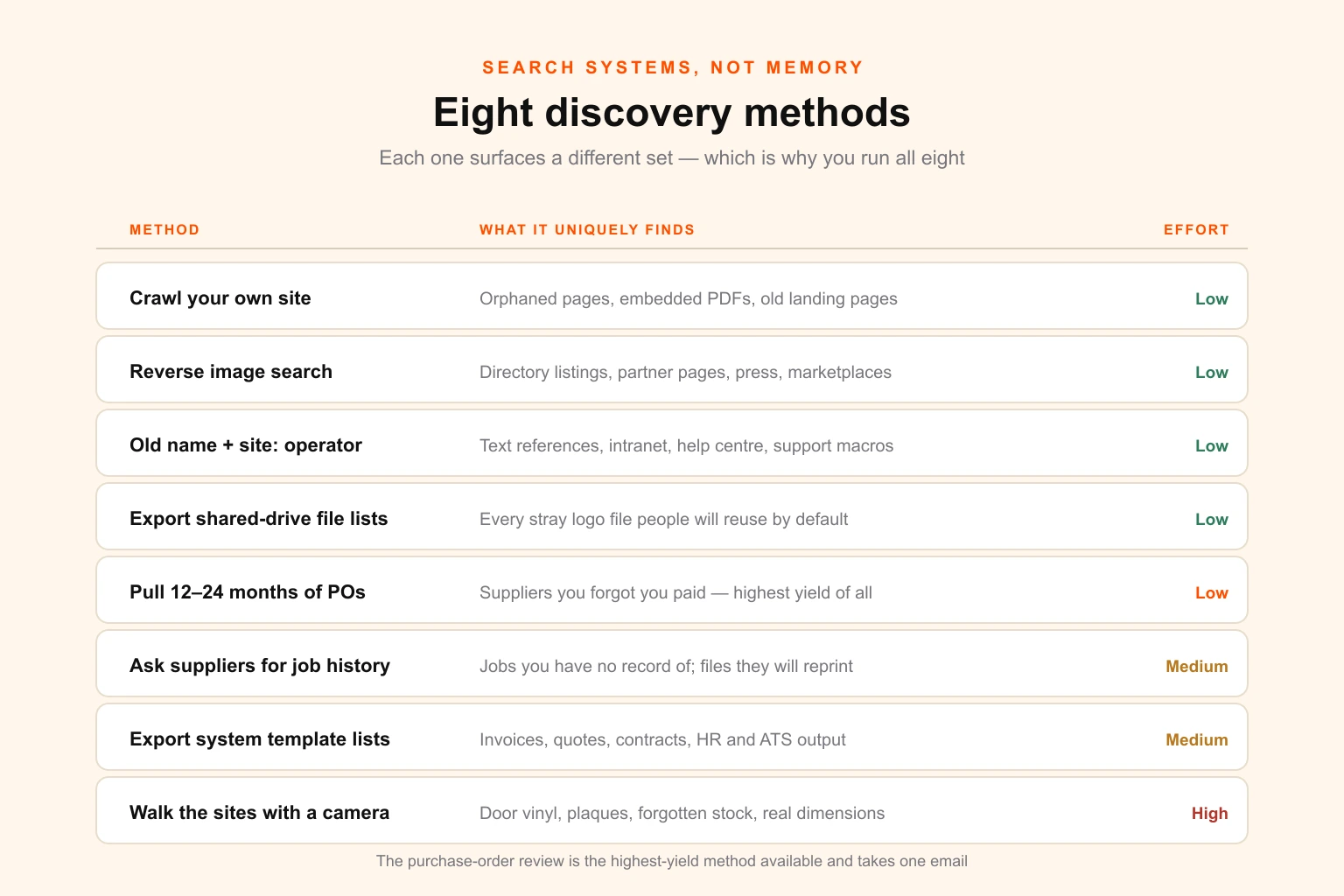
1. Crawl your own website and export every image. Any site crawler will produce a complete list of image assets with their URLs. Sort by filename and the old logo variants surface immediately, including the ones embedded in PDFs, in old landing pages nobody links to any more, and in blog posts from four years ago. This method is uniquely good at finding orphaned pages. Pair it with a website maintenance sweep and you will clear a backlog while you are in there.
2. Reverse image search the old logo. Upload the primary old mark to a reverse image search and work through the results. This finds directory listings you forgot you had, partner pages, press coverage, aggregator sites and marketplace profiles. It is the only method that reliably surfaces layer six.
3. Search the old brand name with operators. Run site:yourdomain.com "Old Brand Name" to find text references on your own site, then run the name without the site operator to find external ones. Do the same inside your intranet, wiki, help centre and support macros. Textual references matter as much as visual ones, and they are easier to miss because they do not look wrong at a glance.
4. Export the full file list from every shared drive and asset library. Not a browse — an export. Then filter on filename patterns: logo, mark, identity, brand, the old name, and the file extensions that indicate source artwork. This is how you find the eleven versions of the logo scattered through project folders that people will reuse by default, and it produces the deletion list you will need later.
5. Pull twelve to twenty-four months of purchase orders from finance. Read the supplier names. Every print, signage, apparel, packaging, promotional-merchandise and fabrication supplier you have paid is a supplier who has produced something carrying your mark. This method is the single most productive one on the list and almost nobody runs it, because it involves asking finance for a report rather than asking marketing a question.
6. Ask each of those suppliers for their job history on your account. Print and signage suppliers keep artwork files and job records, often going back years. A request along the lines of please send us a list of every job you have run for us since 2022 will return items you have no record of at all. It also flags the files they will reuse by default on your next order, which is how the old logo reappears on a reprint six months after launch.
7. Export the template list from every system that generates a document. Your ERP, CRM, accounting package, e-signature tool, HR system, ticketing system, applicant tracking system, email platform and help desk each generate branded output from a stored template. Ask the administrator of each system for the list. This is the method that would have caught the quoting module in the story at the top.
8. Walk the sites with a camera. Physically. Every building, every floor, every vehicle, every store room. Photograph anything carrying the mark and log it with its location. This takes a morning per site and it finds the door vinyl, the fire-door notice, the reception plaque, the branded first-aid cabinet and the forgotten pallet of old cartons. It is also the only way to get accurate dimensions and substrate information for the signage quote, which you will need anyway.
Run all eight, deduplicate, and you have an inventory. Run one or two and you have a list that will be missing exactly the items that embarrass you later.
What the count actually looks like
People consistently underestimate the total, usually by a factor of three to five. The estimate below is a planning starting point, not a benchmark — your own count will differ with your sector, and the point of the inventory is to replace this table with real numbers.
| Organisation | Layer 1–2 digital & templates | Layer 3 listings | Layer 4–5 physical & tooled | Typical total |
|---|---|---|---|---|
| Solo or micro business, one location | 30–60 | 10–25 | 15–40 | 60–125 |
| Small business, 10–30 staff, one site | 60–120 | 20–40 | 40–120 | 120–280 |
| Mid-size, 50–250 staff, 2–5 sites | 150–350 | 30–70 | 150–500 | 350–900 |
| Multi-site or multi-market, 250+ staff | 400–900 | 60–150 | 500–3,000+ | 1,000–4,000+ |
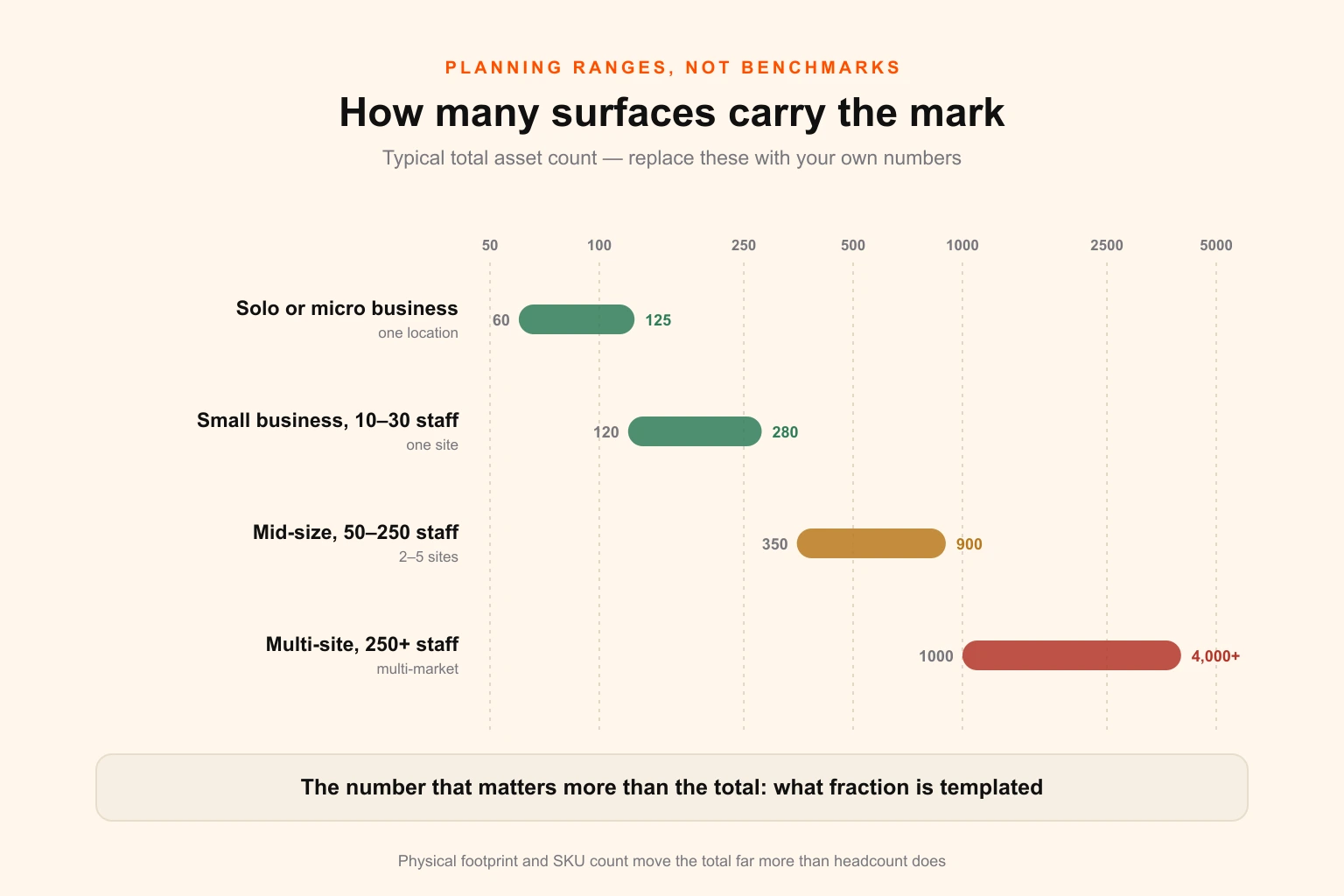
Two things drive the spread more than headcount. Physical footprint — sites, vehicles, uniformed staff — moves layer four faster than anything else. And SKU count moves layers four and five together, because every product variant is potentially its own artwork, its own label, its own carton and sometimes its own tooling. A twelve-person direct-to-consumer brand with two hundred SKUs has a bigger rebrand than a hundred-person consultancy.
The number that matters more than the total is the fraction that is templated. Forty proposals built from one master is one job. Forty proposals built individually is forty. This ratio is usually the difference between a rebrand that takes three months and one that takes a year, and it is worth measuring before you commit to a date.
Sequencing: what changes on day one
Everything cannot change at once, and pretending otherwise produces either an impossible budget or a launch that quietly slips.
Sequence on two variables: how visible the surface is, and how expensive it is to change. Those two produce four quadrants, and each quadrant has a different rule.
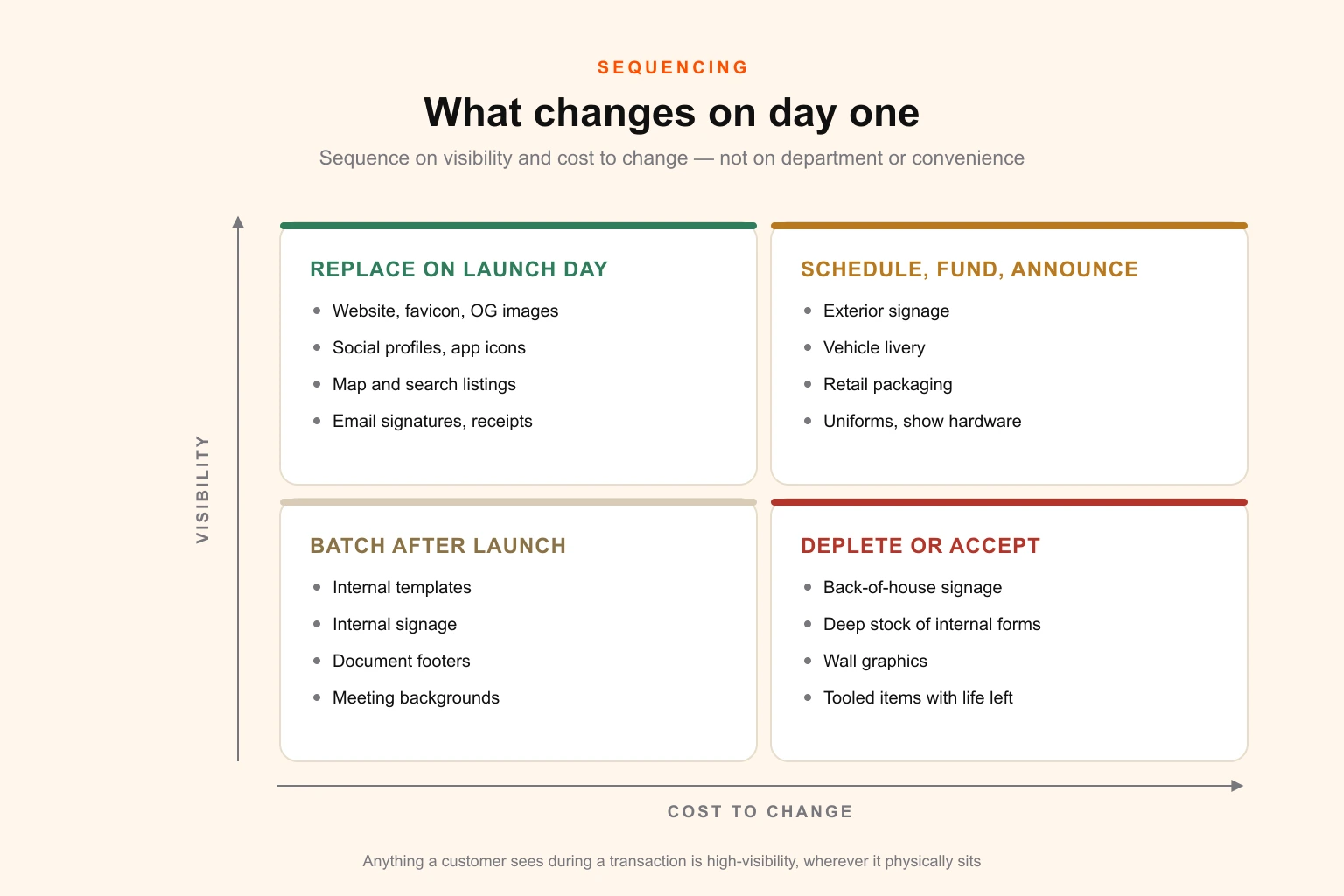
High visibility, low cost — launch day, no exceptions. Website, favicon, social profiles, app icons, map and search listings, email signatures, transactional email headers, primary reception signage. These are what a stranger meets first and they cost almost nothing to change. A rebrand where any of these still shows the old mark on announcement day reads as unfinished, and that impression is far more expensive than the work would have been.
High visibility, high cost — scheduled, funded, announced. Exterior signage, vehicle livery, retail packaging, uniforms, trade show hardware. These take weeks and cost real money. Get them quoted during the inventory, funded before launch, and scheduled with dates. Then say the dates out loud internally, because the most common cause of drift in this quadrant is that nobody knows when it is supposed to happen.
Low visibility, low cost — batched. Internal templates, internal signage, document footers, meeting backgrounds. Do these in batches when the design capacity is free, typically in the fortnight after launch. They are not urgent, but they are cheap enough that leaving them undone is just untidiness.
Low visibility, high cost — depleted or accepted. Internal wall graphics, back-of-house signage, deep stock of internal forms, tooled items with long remaining life. Set a replacement trigger rather than a date: at next refurbishment, at next reorder, at end of stock. Then record the decision explicitly, because an item with a recorded trigger is managed and an item without one is a loose end.
One rule cuts across all four quadrants. Anything a customer sees during a transaction is high visibility regardless of where it sits physically. The invoice, the receipt, the delivery note, the packaging on the box, the confirmation email. These are frequently classified as back-office and they are not — they are the surfaces that reach a customer at the exact moment they are paying attention.
Printed stock: burn, replace, or overprint
Every rebrand arrives at a cupboard, a pallet or a warehouse bay holding printed material with the old logo on it. The instinctive responses are both wrong: throwing all of it away wastes money, and using all of it up makes the rebrand look half-finished for a year.
There are three options, and the decision is made per item.
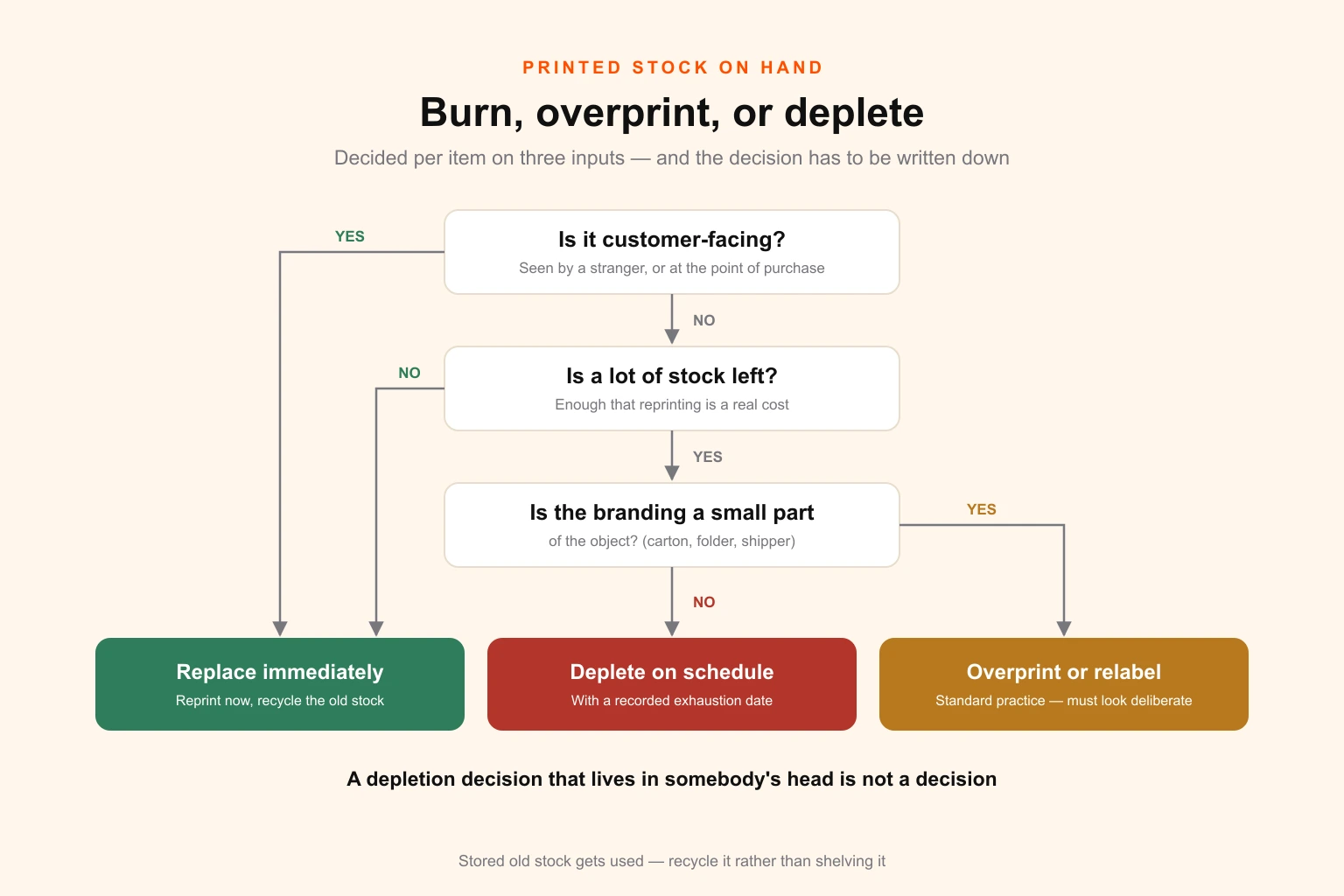
Replace immediately when the item is customer-facing and high-visibility, or when it is cheap relative to the impression it creates. Business cards, current sales collateral, retail-facing packaging, anything handed to a prospect. Reprinting business cards is trivially cheap; handing out a card with the old mark three months after a rebrand is not. Recycle the old stock rather than storing it, because stored stock gets used.
Overprint, oversticker or relabel when the item is expensive, the quantity is large, and the branding is a small part of the object. This is completely standard practice on shipping cartons, outer packaging, folders and stationery. A plain corrugated shipper with a printed panel can carry a new label; a folder can take a foil or digital overprint; a box can be over-labelled at a fraction of reprint cost. The test is whether the result looks deliberate. Done well, over-labelling reads as a normal production choice; done badly, it reads as covering something up, and then you have spent money to look worse.
Deplete on a recorded schedule when the item is internal or low-visibility and the remaining quantity is genuinely large. Internal forms, back-of-house labels, secondary packaging that never reaches a customer. The word doing the work in that sentence is recorded. A depletion decision with an expected exhaustion date is a managed item. A depletion decision that lives in somebody's head is how a box of old letterhead ends up back in the printer tray in eighteen months.
For anything you are reprinting, this is also the moment to fix the file problems that have accumulated. A rebrand forces every artwork file to be opened, which makes it the cheapest opportunity you will ever get to standardise colour references, embed the right profiles, correct bleeds and get everything to genuine print-ready standard. If the old files were supplied as raster where they should have been vector, fix that too — the difference matters at signage and packaging size, and the vector versus raster distinction is exactly what determines whether the new mark survives being scaled up.
Tooling and lead times
The tooled items in layer five set the earliest deadline in the entire project, and they are consistently discovered too late. The figures below are typical working ranges from approved artwork to usable output, and every one of them moves with supplier queue, material availability and complexity — confirm each against the supplier who will actually make the tool.
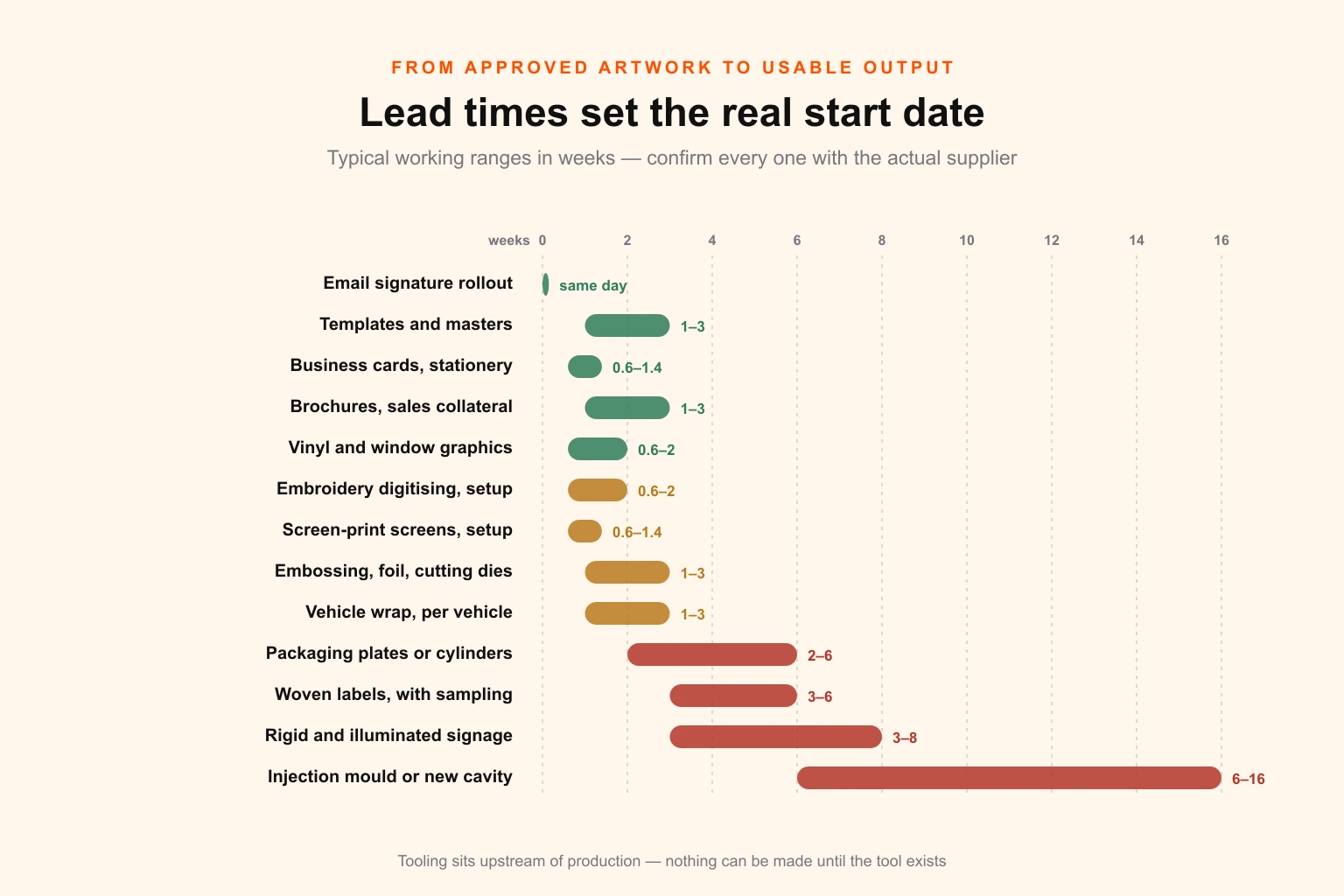
| Item | Typical lead time from approved artwork | Change after production starts |
|---|---|---|
| Email signature rollout | Same day | Trivial |
| Digital templates and document masters | 1–3 weeks (design work, not production) | Trivial |
| Business cards and stationery | 3–7 working days | Cheap reprint |
| Brochures and sales collateral | 5–15 working days | Reprint cost |
| Vinyl and window graphics | 3–10 working days | Reprint cost |
| Rigid and illuminated signage | 3–8 weeks including survey and install | Expensive |
| Vehicle wrap or full relivery | 1–3 weeks per vehicle, plus scheduling | Expensive |
| Embroidery digitising and setup | 3–10 working days | Re-digitise, then reproduce |
| Screen-print screens and setup | 3–7 working days | New screens per colour |
| Embossing, foil and cutting dies | 1–3 weeks | New die |
| Woven labels | 3–6 weeks including sampling | New setup |
| Packaging plates or cylinders | 2–6 weeks | New plates, full set |
| Injection mould modification or new cavity | 6–16 weeks | Very expensive |
Read that table alongside the identity approval date and one thing becomes obvious: the tooled items need approved artwork before most organisations have finished arguing about the logo. If the mould takes twelve weeks and the packaging launch is fixed, the mark has to be final months before anyone outside the project sees it. That constraint should be visible in the brief, and it is another argument for building the inventory before the design work rather than after.
Colour is the second constraint that bites in this layer. The same brand colour has to appear on a moulded plastic part, an embroidered garment, a litho-printed carton, a vinyl sign and a screen, produced by five different processes at five different suppliers. Specify it as a reference with agreed process equivalents rather than letting each supplier convert it themselves — the Pantone to CMYK converter will give you the starting values, and why RGB and CMYK diverge explains why a converted number is a starting point rather than a guarantee. Verify against physical proofs wherever the match is visible to a customer.
The long tail: what comes back
A rebrand has a launch date and a finish date, and they are not the same date. The gap is normally between six months and two years, and the surfaces that surface during it are predictable enough to plan for.
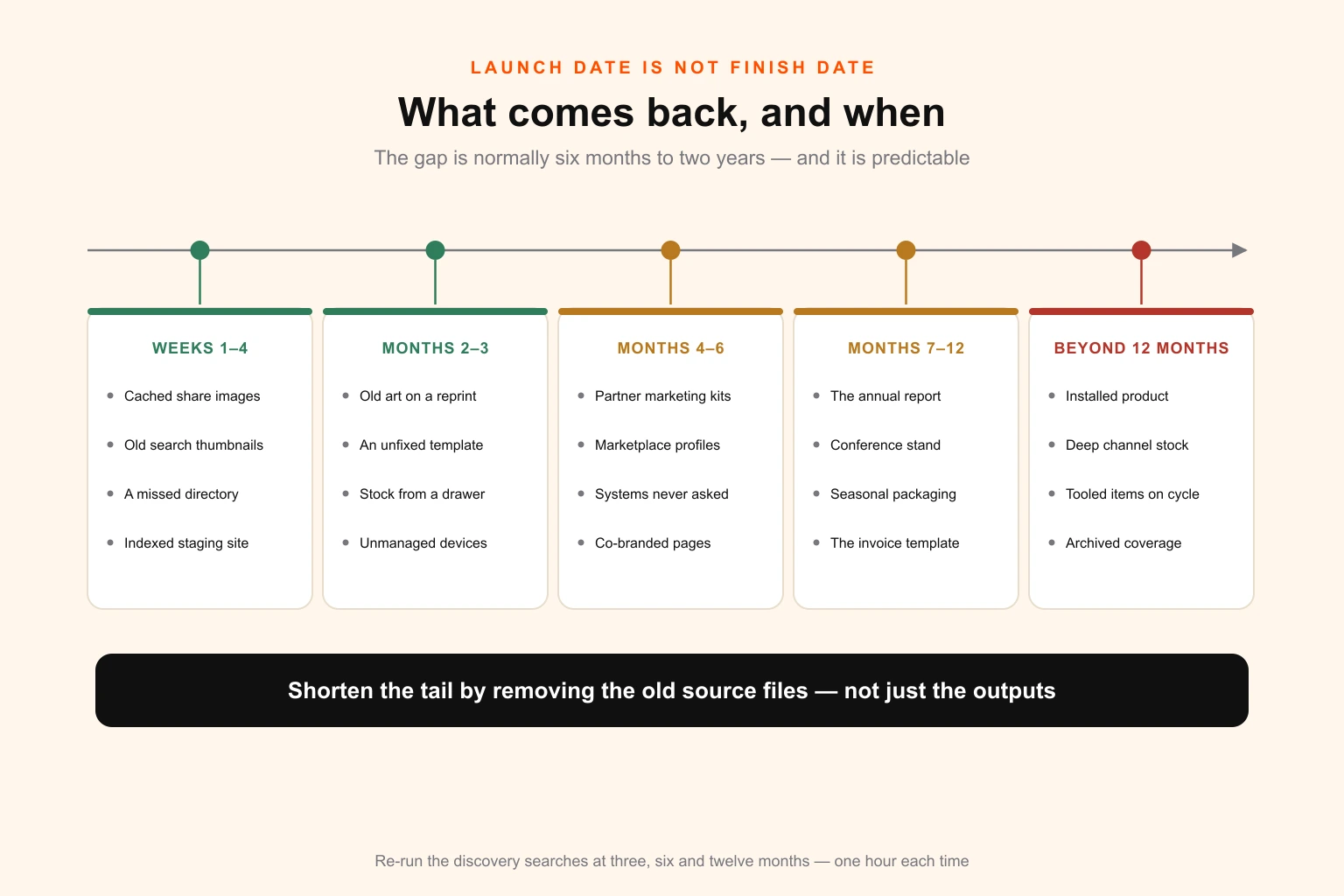
Weeks one to four. Cached share images, old thumbnails in search results, a directory listing you missed, a staging environment that got indexed, a colleague's email signature on a device nobody managed. Mostly cosmetic and mostly quick.
Months two to three. The first supplier reprint that came back with the old artwork because the file was still on their system. The first template nobody re-pointed, discovered when a new starter opens it. Old collateral resurfacing from a drawer.
Months four to six. Partner and reseller materials still showing the old mark, because the pack went out and nobody followed up. Marketplace and directory profiles nobody had the credentials for. Documents generated from systems whose administrators were never asked.
Months seven to twelve. Annual items — the calendar, the report, the conference stand, the seasonal packaging — reaching their first cycle since the change. Anything on a yearly reorder shows up here for the first time. So does the invoice template, if you did not run method seven.
Beyond twelve months. Installed product and equipment in the field. Deep-stock packaging still working through distribution. Tooled items on their scheduled replacement. Customer-held assets. Archived content and third-party coverage, which never fully clears and should not be chased.
The single control that shortens this tail more than any other is removing the old source files. The old mark reappears not because people prefer it but because the old file is the most convenient one to hand. Archive every old logo into one restricted folder, delete every other copy your discovery sweep found, replace the templates rather than the documents, and make the new files easier to find than the old ones ever were.
Then put a calendar reminder at three, six and twelve months to re-run the discovery searches from the section above. It takes an hour each time. It is the step almost everybody skips, and it is the step that finds the quoting module.
What it costs
The design fee is the small number. Here is where the money actually goes, in rough proportion, for a typical mid-size rollout.
| Cost area | Typical share of rollout spend | Notes |
|---|---|---|
| Identity design and system | 5–15% | The mark, the system, the guidelines |
| Template and document production | 10–20% | Scales with how much is bespoke |
| Signage | 15–35% | Dominated by exterior and illuminated units |
| Vehicle livery | 5–20% | Only if you run a fleet |
| Uniforms and workwear | 3–10% | Scales with headcount and garment count |
| Packaging artwork and tooling | 10–30% | Scales with SKU count, spikes with tooling |
| Printed stock replacement | 5–15% | Reducible with good depletion decisions |
| Digital and web implementation | 5–15% | Larger if the domain changes |
| Contingency | 10–15% | It will be used |
Three delivery models for the design half, which is the part you are actually choosing between.
Branding agency, project fee. Right for the identity itself and the system that governs it. Expensive per hour and correctly so. Wrong for the two hundred template adaptations that follow, which is work agencies price at strategic rates and dislike doing.
In-house designer or team. Right if you already have one and they have capacity, which during a rebrand they emphatically do not. The rollout is a temporary spike of two to six months on top of business as usual, and the usual outcome is that either the rollout or the day job stops. The utilisation maths on in-house versus outsourced capacity is worth running before you assume the team absorbs it.
A subscription or retainer design partner for the rollout volume. Right for the long tail of adaptation work — the templates, the document set, the per-SKU packaging artwork, the ad sizes, the per-person business cards. This is volume production against an approved system rather than creative direction, it arrives in a predictable monthly quantity, and it is the shape of work a flat-fee design subscription handles well. Current plan pricing and the wider design cost benchmarks will tell you quickly whether the rollout volume justifies it against per-project quotes.
The common and effective split is an agency or specialist for the identity, and a retainer partner for the two hundred adaptations. Trying to do both with one supplier usually means overpaying for the volume or underinvesting in the mark.
Eleven mistakes that cost real money
1. Building the inventory after the identity is approved. You lose the ability to design for the real constraints and the ability to budget honestly. Both are unrecoverable.
2. Assigning the rollout to marketing. Marketing owns perhaps half the surfaces and has authority over none of facilities, fleet, HR, IT, finance systems or the channel. Name one accountable lead with spending authority, plus an owner per layer.
3. Skipping the purchase-order review. It is the highest-yield discovery method available and it takes one email to finance.
4. Fixing documents instead of templates. Guarantees the old mark returns.
5. Leaving old logo files in reach. The same guarantee, by a different route.
6. Discovering tooling late. A twelve-week mould found in week ten of a twelve-week project is a delayed launch, not an inconvenience.
7. Treating a refresh as operationally lighter than a rebrand. A refresh skips the legal, naming and domain work — genuinely valuable savings. It does not skip the surfaces. Every physical and template item still has to be revisited.
8. Approving a mark that fails on the hardest surface. Single-colour embroidery, 16-pixel favicon, cut vinyl, moulded relief. Test the mark against the four hardest surfaces on your own inventory before approval, not after.
9. Redirecting a changed domain to the homepage. If the domain changes, map every URL individually. Blanket homepage redirects discard the accumulated value of every page you have ever ranked.
10. Publishing the partner pack instead of sending it. Layer six only moves when you push it. Send to named contacts, with a date.
11. Declaring the rebrand finished when the visible items are done. Everything left unrecorded becomes a surprise. Every item should carry one of four states — replaced, scheduled, depleting, or accepted — and nothing should be unknown.
Measuring it
Six numbers, reported weekly to the accountable lead. Nothing else is needed and anything else is noise.
| Metric | What it tells you |
|---|---|
| Inventory completeness | Percentage of layers with a discovery method actually run — this should hit 100% before anything else starts moving |
| Assets in each of the four states | Replaced, scheduled, depleting, accepted. The number to watch is anything still unstated |
| Launch-critical completion | Percentage of the high-visibility, low-cost quadrant that is done. This must be 100% on announcement day |
| Longest outstanding lead time | The date the last tooled or fabricated item lands. This is your real finish date |
| Spend against quoted | Per layer, not in total — a total hides a signage overrun behind a template underspend |
| Old-mark sightings | A simple count, logged by anyone, reset monthly. The trend matters more than the number |
The last one looks soft and is the most useful. Give everyone a single place to report a sighting, count them monthly, and you will have an honest picture of the tail that no project plan will give you.
The checklist
Copy this and work it in order.
- Name one accountable lead with spending authority, plus an owner for each of the six layers
- Run all eight discovery methods before writing anything down as complete
- Pull twelve to twenty-four months of purchase orders and read the supplier names
- Request job history from every print, signage, apparel and packaging supplier
- Export the template list from every system that generates a branded document
- Walk every site with a camera and log what you find, with dimensions
- Identify every tooled item and get its lead time in writing — do this in week one
- Sort every item by control layer, replacement method and cost of leaving it wrong
- Plot the inventory on the visibility-versus-cost matrix and read off the four rules
- Test the proposed mark against the four hardest surfaces on your own list before approval
- Quote signage, livery, uniforms and packaging against the real inventory, not an estimate
- Decide replace, overprint or deplete for every item of printed stock, and record it
- Rebuild templates and masters, not individual documents
- Complete the entire high-visibility, low-cost quadrant before announcement day
- Archive every old logo file into one restricted folder and delete every other copy
- Send the dated partner pack to named contacts, with a cut-off date
- Map every URL individually if the domain changes, and keep the redirects permanently
- Assign one of four states to every line: replaced, scheduled, depleting, accepted
- Diarise a re-run of the discovery searches at three, six and twelve months
- Keep the inventory as a maintained register rather than closing it with the project
Where to start
If you are at the beginning, do one thing this week: send two emails.
The first goes to finance, asking for every purchase order raised to a print, signage, apparel, packaging, promotional or fabrication supplier over the last two years. The second goes to the administrator of every system that generates a document — the ERP, the CRM, the accounting package, the e-signature tool, the HR system — asking for a list of every stored template.
Those two emails will produce more of your real inventory than a week of meetings, and they will produce it before anyone has spent money on design. Everything above is what you do with the answers.
If the count comes back larger than your capacity — which is the normal outcome, and the reason rollouts stall in month three rather than month one — the shape of the problem is a temporary spike of high-volume adaptation work against an approved system. That is a specific kind of design capacity, and it is worth reading how a flat-fee design subscription handles rollout volume before you either overload an in-house designer or quote the whole thing out per project. And if you would rather have somebody run the inventory with you, that conversation is free and it starts with the list, not the logo.