
Your careers page was designed in 2021, your LinkedIn banner is a stretched product screenshot, and three recruiters are currently making job graphics in three different Canva accounts using two different shades of your brand blue. Nobody decided this. It is what happens when hiring volume outruns design capacity, which it does at almost every company that grows.
The cost is not aesthetic. Hiring is a funnel with a measurable cost per unit, and the assets sit at the top of it. Weak, inconsistent or absent employer brand materials mean more spend on paid reach to hit the same applicant volume, more recruiter hours converting cold candidates, longer time-to-fill, and lower offer acceptance from people who could not tell what kind of place this was. LinkedIn Talent Solutions has repeatedly put the gap between strong and weak employer brands at roughly 50% on cost-per-hire and 28% on turnover — a vendor figure, directional rather than forecastable, but the mechanism behind it is straightforward. Every candidate who arrives already convinced is a candidate you did not have to buy twice.
The strategic literature on this is enormous and almost entirely useless once you have decided to act. There are hundreds of guides on defining an employee value proposition and vanishingly few on what you then have to produce: which files, at what sizes, in what quantity, refreshed how often, owned by whom, and paid for out of which budget.
This is that document. It covers the full asset inventory across six layers, the maths that turns headcount into asset volume, the production specs for every surface, the template system that stops 400 assets becoming 400 briefs, what the three delivery models actually cost, the licensing traps in employee photography and fonts that surface only after someone resigns, and a 90-day build sequence that puts the layers in the order that does not require rework.
Why employer brands fail at volume, and it is not a strategy problem
Ask a talent leader why their employer brand is inconsistent and you will usually get a strategy answer: the EVP was never properly defined, leadership never bought in, there is no dedicated employer brand owner. All of that can be true and none of it is the binding constraint.
The binding constraint is arithmetic. An employer brand is not one thing that gets designed once. It is a production line whose throughput requirement scales linearly with hiring volume, running against a design capacity that does not scale at all — because employer brand work almost always sits in a corner of a marketing team whose actual job is revenue.
Watch what happens as a company grows:
At ten hires a year, a recruiter posts a job to LinkedIn with the default template, and it is fine. Total design demand: near zero. Nobody notices there is no system.
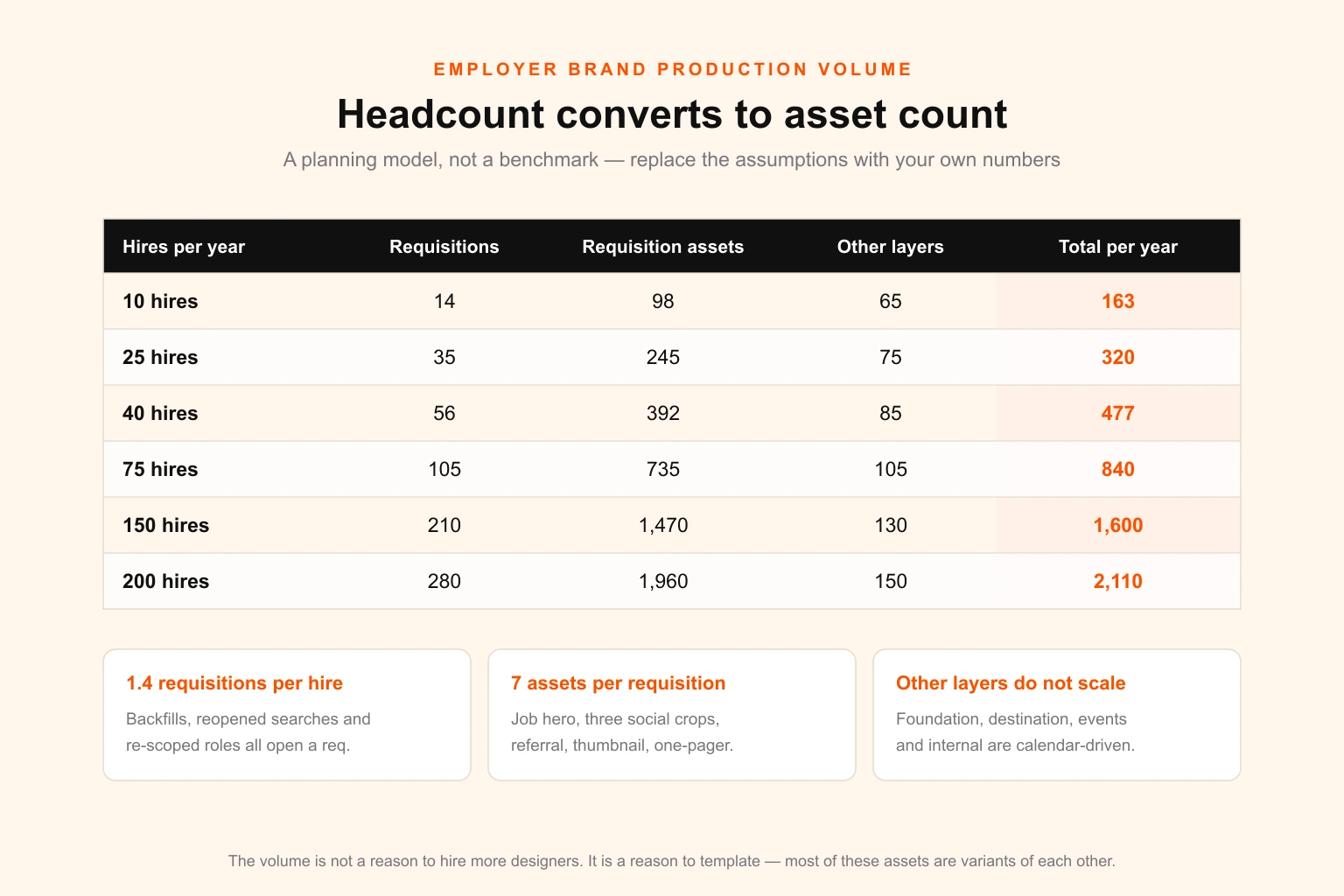
At forty hires a year, someone starts making job cards because the default posts underperform. There are now roughly 55 open requisitions and around 400 individual asset instances a year. Marketing cannot absorb that, so recruiting self-serves. Three tools, four palettes, and a careers page that no longer resembles the social output.
At 150 hires a year, the drift is visible from outside. Candidates see one company on Instagram, another on Glassdoor and a third at the campus fair. Now it is a brand problem, an agency gets hired, and the work restarts from zero — including a rebuild of everything the recruiters made in the interim.
The failure is not that nobody had a strategy. It is that nobody modelled the volume, so nobody built a system that could survive it. Fixing the strategy without fixing the production line just gives you a better-articulated inconsistency. This is the same structural failure that produces brand drift across multi-location businesses, and it responds to the same fix: define the system, template the repeat work, and route only genuinely new work to a designer.
The volume maths: turning headcount into asset count
Before deciding what to build, work out how much of it you will need. The model below is a planning tool, not a benchmark — the inputs are assumptions you should replace with your own numbers.
Step one: requisitions, not hires. You do not design per hire, you design per opening. Between backfills, failed searches that reopen, and roles that get re-scoped mid-flight, most talent teams run 1.3 to 1.5 requisitions per eventual hire. Forty hires is roughly 55 requisitions.
Step two: asset instances per requisition. A requisition served properly consumes:
| Asset instance | Purpose | Reused across roles? |
|---|---|---|
| Job ad hero | Careers page and job board listing | Partly — role family level |
| Social job card, 1200 × 627 | LinkedIn link post and single-image ad | No |
| Social job card, 1080 × 1350 | Instagram and LinkedIn feed | No |
| Social job card, 1080 × 1920 | Stories and Reels | No |
| Referral graphic | Employee sharing, internal comms | Partly |
| Careers page thumbnail | Role listing grid | No |
| Role one-pager | Sent before interview, used by agencies | No |
That is seven instances per requisition, of which perhaps two are genuinely reusable across a role family. Call the effective demand six to eight.
Step three: multiply, then add the layers that do not scale with requisitions.
- Requisition layer: 55 × 7 ≈ 385 instances a year
- Foundation layer: 25–40 files, built once, revised every 24–36 months
- Destination layer: 15–25 files, refreshed annually
- Events layer: 10–40 files, driven entirely by your event calendar
- Onboarding and internal layer: 15–30 files, mostly templates
A company hiring 40 people is therefore looking at roughly 450 to 500 designed items a year, the overwhelming majority of which are near-identical variants of each other. That last clause is the whole strategy. The volume is not a reason to hire more designers; it is a reason to build a template system and reserve designers for the work that is actually new.
The complete inventory: six layers
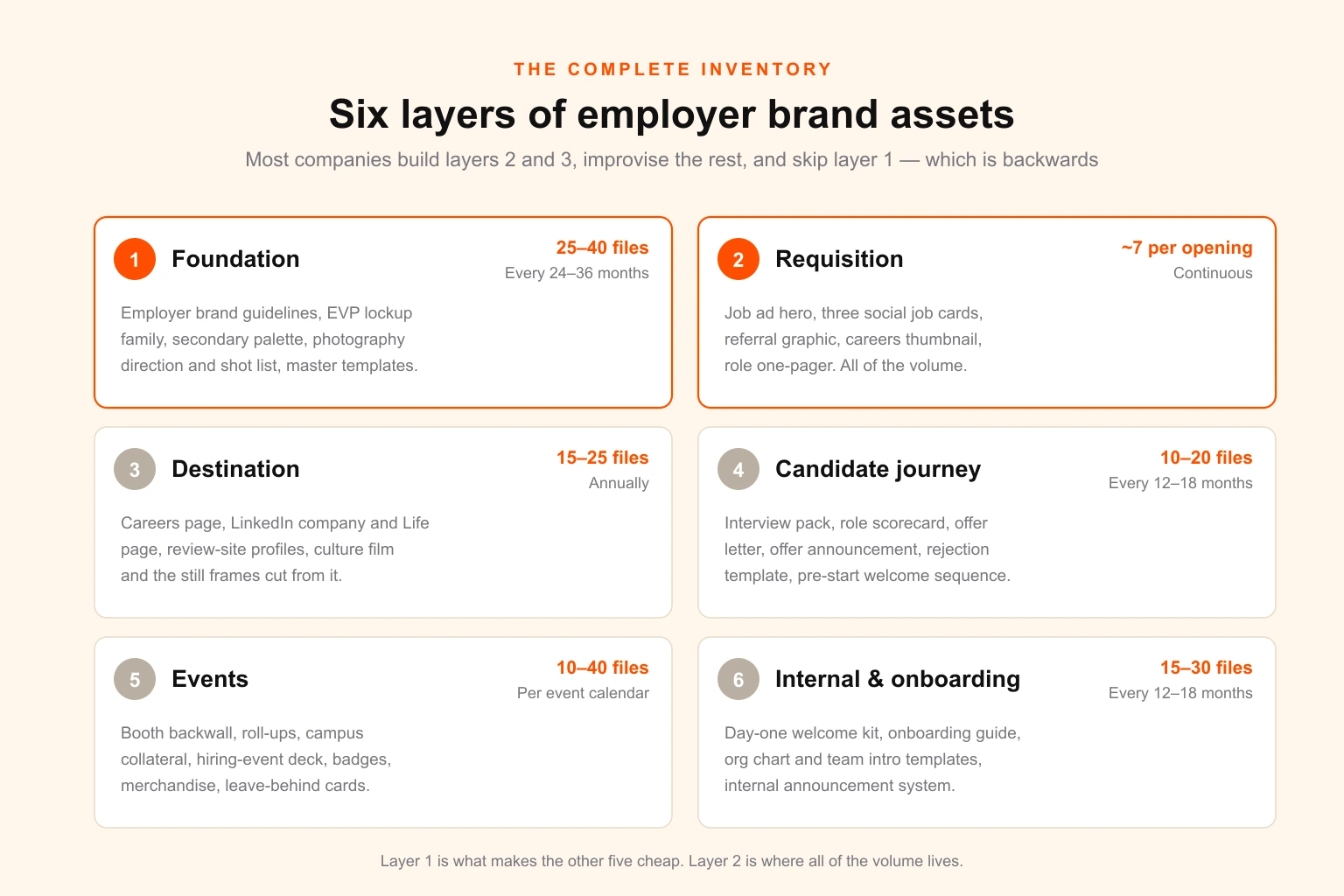
Most organisations build layers three and two, improvise the rest, and skip layer one entirely — which is exactly backwards, because layer one is what makes the other five cheap.
Layer 1 — Foundation
Built once. Everything else derives from it.
- Employer brand guidelines, as a defined extension of the master brand rather than a separate document that contradicts it. If your main brand guidelines already exist, this is a 12–20 page addendum covering the talent context, not a rebuild. The distinction between the two documents matters and is routinely confused — see brand book versus style guide for where the line falls.
- EVP lockup or talent wordmark — usually the master logo with a locked-up descriptor. Full lockup, stacked, horizontal, single-colour and reversed. Six to eight files.
- Secondary palette or accent that signals talent content without breaking the master identity. One accent and one tint ramp is enough; more produces drift. If you are choosing an accent from scratch, the constraints in colour theory for brand design apply here exactly as they do to product marketing.
- Photography direction — the single highest-leverage foundation asset and the one most often skipped. A mood board with 15–20 reference frames, plus written rules on framing, lighting, whether the environment is real or staged, and whether people look at camera. Without this you get a stock-photo careers page, and candidates read stock photography as an admission that there was nothing real to show.
- Photo and video shot list, tied to a repeatable half-day shoot schedule.
- Type and layout rules for the talent context, including the licence check covered later in this guide.
- Master template set — the derivative engine described in the next section.
A useful sanity test on the foundation layer: does it explain how the employer brand relates to the corporate identity, or does it just assert a look? The difference between visual identity and corporate identity is the thing an employer brand extension has to navigate, and skipping the question is why so many talent brands end up feeling like a different company.
Layer 2 — Requisition
Produced continuously. This is where the volume lives and where templating pays for itself.
Job ad hero, three social job cards, referral graphic, careers thumbnail, role one-pager — the seven from the table above. Add, for hiring pushes: a campaign key visual, a paid social variant set, and a sponsored-content banner.
The one non-obvious item here is the role one-pager. It gets sent to candidates before interview, handed to agencies, and used by hiring managers in their own outreach. It is the asset most likely to be recreated badly in Word by someone under time pressure, and the one where a locked template returns the most value per hour of design time.
Layer 3 — Destination
Where a candidate lands after the ad works.
- Careers page or microsite — hero, culture module, benefits grid, team photography, role listing grid, testimonial cards. If it is being built rather than templated, the considerations in website design apply; if it lives inside your applicant tracking system, you are usually limited to a header image, an accent colour and a text block, which is worth confirming before anyone designs to a spec the ATS cannot render.
- LinkedIn company page banner (1128 × 191) and Life page hero, custom modules and gallery.
- Review-site profiles — Glassdoor, Indeed and their regional equivalents. Specs change often enough that you should pull the current requirement from the platform rather than a blog post, this one included.
- Video — even a single well-cut 60-second culture film outperforms a page of copy, and a still frame set from the same shoot feeds the requisition layer for a year.
Layer 4 — Candidate journey
The layer nobody budgets for and every candidate notices.
Interview invitation and prep pack, role scorecard for interviewers, offer letter template, offer announcement graphic, rejection communication template, and the pre-start welcome sequence. These are almost entirely typographic, which means they are cheap to template and disproportionately damaging when they are not — an offer letter that looks like a mail merge from 2009 undercuts a week of well-designed courtship in a single PDF.
The email layer here has its own constraints that a designer working only in Figma will get wrong; the email design guide covers what survives Outlook rendering and what does not.
Layer 5 — Events
Spiky, deadline-driven, and where print costs punish late changes.
Careers fair booth backwall and roll-up banners, campus recruiting collateral, presentation deck for hiring events, branded merchandise, name badges and lanyards, business cards for the recruiting team, and leave-behind cards with a QR to the careers page. Everything in this layer touches print, which means bleed, colour space and resolution are pass/fail rather than negotiable — run everything through the print-ready file checklist before it goes to a printer, and note that event print has lead times measured in weeks, not the hours that digital assets have trained everyone to expect.
Deck design for hiring events is worth calling out separately: it is presented live, at distance, usually in a badly lit hall, and it is the one place where a deck built to the standards of presentation design rather than assembled from slides visibly outperforms.
Layer 6 — Internal and onboarding
The layer that decides whether the promise made in layer 2 survives contact with the job.
Day-one welcome kit, onboarding guide, org chart and team introduction template, internal announcement templates for new joiners, and the internal comms system that carries the employer brand inward. An employer brand that stops at the offer letter is advertising; one that continues through onboarding is the thing the reviews on Glassdoor will eventually describe.
Production specs: every surface, every dimension
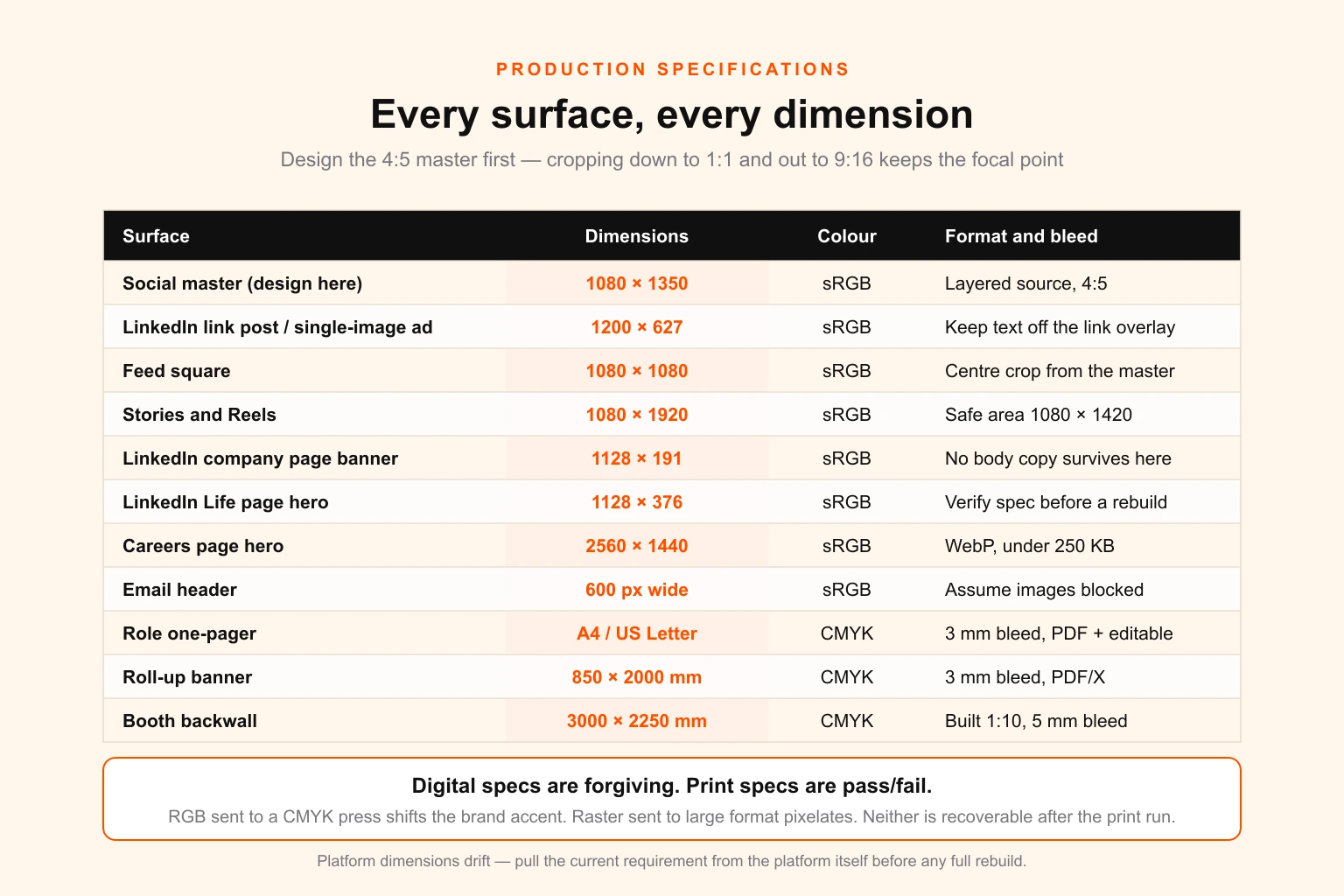
Two rules govern this table.
Design the 4:5 first. A 1080 × 1350 master crops cleanly to 1:1 and extends to 9:16 with the focal point intact. Starting from a 16:9 or 1:1 master and trying to reach 4:5 or 9:16 means recomposing, which is a design decision and therefore a design job — which is exactly the thing you are trying to avoid doing 385 times a year.
Print specs are pass/fail. A digital asset at the wrong size looks slightly off. A print asset at the wrong size, colour space or bleed gets rejected by the printer, or worse, does not get rejected and arrives with white edges the week of the careers fair.
| Surface | Dimensions | Colour | Format | Notes |
|---|---|---|---|---|
| Social master | 1080 × 1350 | sRGB | Layered source | Design here, derive everything else |
| LinkedIn link post / single-image ad | 1200 × 627 | sRGB | PNG or WebP | Keep text clear of the lower-right link card overlay |
| Feed square | 1080 × 1080 | sRGB | PNG or WebP | Straight centre crop from the 4:5 master |
| Stories and Reels | 1080 × 1920 | sRGB | PNG or MP4 | Keep content inside the middle 1080 × 1420 safe area |
| LinkedIn company page banner | 1128 × 191 | sRGB | PNG | Extremely shallow — no body copy survives here |
| LinkedIn Life page hero | 1128 × 376 | sRGB | PNG | Verify current spec before a full rebuild |
| Careers page hero | 2560 × 1440 | sRGB | WebP, under 250 KB | Art-direct a mobile crop separately |
| Careers listing thumbnail | 800 × 600 | sRGB | WebP | Must stay legible at 240 px wide |
| Email header | 600 px content width | sRGB | PNG, under 100 KB | Assume images blocked by default |
| Role one-pager | A4 or US Letter | CMYK + sRGB export | Editable source + PDF | Ship both a print and a screen version |
| Presentation | 1920 × 1080 | sRGB | Editable deck | 24 pt minimum body size for live rooms |
| Roll-up banner | 850 × 2000 mm | CMYK | PDF/X, 3 mm bleed | Keep content above 250 mm from the base |
| Booth backwall | 3000 × 2250 mm | CMYK | PDF/X at 1:10, 5 mm bleed | State the scale in the filename |
| Name badge | 86 × 54 mm | CMYK | PDF, 3 mm bleed | Data-merge field for the name |
| Apparel and tote | ~280 × 355 mm max area | Spot colours | Vector, outlined | Confirm colour count with the printer |
Two failure modes account for most reprints: raster artwork sent for large-format print, and RGB files sent to a CMYK press so the brand accent shifts on arrival. Both are covered in the print-ready checklist, and both are worth catching before a print deadline rather than after.
The template system: 400 assets, not 400 briefs
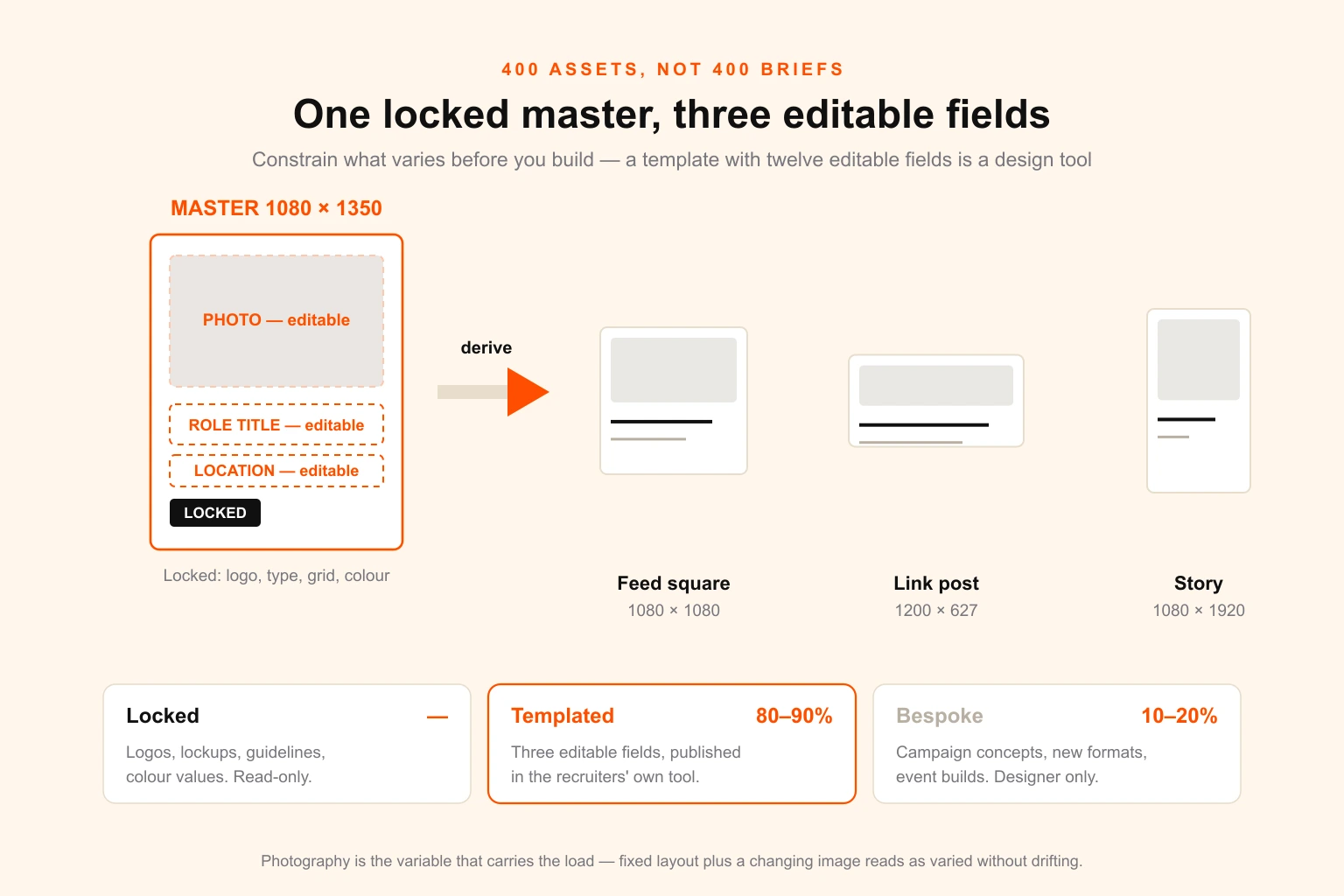
This is the part that decides whether the inventory above is a manageable operation or a permanent bottleneck.
The instinct when brand drift appears is to centralise: all design requests go through one queue, recruiters are locked out of design tools. It fails every time, and it fails for a good reason — recruiters need a job card today, the queue delivers in three days, and the requisition closes in the interim. So they route around the rule, and you get drift plus resentment.
The alternative is to decide, per asset type, whether it is locked, templated or bespoke.
Locked assets have no editable fields at all. Logos, EVP lockups, guideline documents, colour values. Distributed as read-only files from a single source of truth.
Templated assets have a small number of explicitly editable fields and everything else fixed. A job card template where only the role title, location and photograph can change — type, colour, logo placement, grid and crop are locked. Published in whatever tool the recruiting team actually uses, not the tool the design team prefers, because a template nobody can open is not a template.
Bespoke assets go to a designer. Campaign concepts, new formats, event builds, anything where the answer is genuinely unknown.
Done properly, this puts 80–90% of requisition volume into self-serve and reserves designer time for the 10–20% that is new. The maths is unforgiving in the other direction: at 385 requisition instances a year, moving even a quarter of them from templated to bespoke adds roughly 96 briefs, and at an hour of coordination each that is more than two working weeks of somebody's year spent on scheduling alone.
Three implementation details matter more than they sound:
Constrain what varies before you build the template. A template with twelve editable fields is a design tool, and it will be used like one. Three fields is a template. The discipline here is the same one that makes design tokens work at scale — decide what is a variable and make everything else a constant.
Photography is the variable that carries the load. If the layout is fixed and only the image changes, the output stays consistent and still feels varied. This is why the photography direction in layer 1 does more work than any other foundation asset: it is the input to 385 templated outputs.
Write the template brief as a specification, not a wish. The gap between "make us job card templates" and a spec that lists the fields, the character limits, the crop behaviour and the tool is the gap between one round of revisions and five. How to write a design brief covers the format; for a template system the character limits are the part people forget, and a role title that overflows is how a locked template gets unlocked.
For teams already running a design system, the employer brand layer should inherit from it rather than fork — the distinctions in design system versus style guide versus brand guidelines are worth settling before anyone builds, because the three documents have different owners and different update cycles.
What actually moves the metrics
The employer brand literature is heavy on assertion and light on attribution. Here is what is worth knowing, with the sources and the caveats attached.
Candidates research before they apply. Glassdoor's own research has consistently found that the large majority of job seekers — commonly cited around 86% — read company reviews and ratings before applying. LinkedIn has published similar figures in the 75% range for candidates researching an employer's reputation. Both are vendor figures about their own category, so weight them accordingly, but the direction is not seriously disputed: the decision to apply is made before the conversation starts, on surfaces you control.
Cost-per-hire is where the money shows up. SHRM's benchmarking has put average US cost-per-hire in the region of USD 4,700, with average time-to-fill around six weeks. Against a 40-hire year, that is roughly USD 190,000 of hiring cost. LinkedIn's 50% claim on strong versus weak employer brands, even discounted heavily, describes a swing large enough to dwarf the cost of the asset kit itself.
Consistency is the mechanism, not polish. The value does not come from any single beautiful asset. It comes from a candidate encountering the same company on LinkedIn, on Glassdoor, on the careers page, in the interview pack and at the offer stage. Each consistent encounter is a small confirmation; each inconsistent one is a small doubt. This is why the template system outranks the visual concept in practical importance, and why an average design applied consistently beats an excellent design applied to 30% of surfaces.
Real photography outperforms stock, reliably. No rigorous public study isolates this variable, so treat it as practitioner consensus rather than fact — but candidates are unusually good at spotting stock imagery, and reading it as a signal that the company had nothing real to show. A half-day shoot producing 200 usable frames is the highest-return line item in the entire kit.
If you want the broader evidence base on design investment and returns, the sourced figures in our graphic design statistics roundup cover the McKinsey Design Index and adjacent research, all with attribution.
The 90-day build sequence
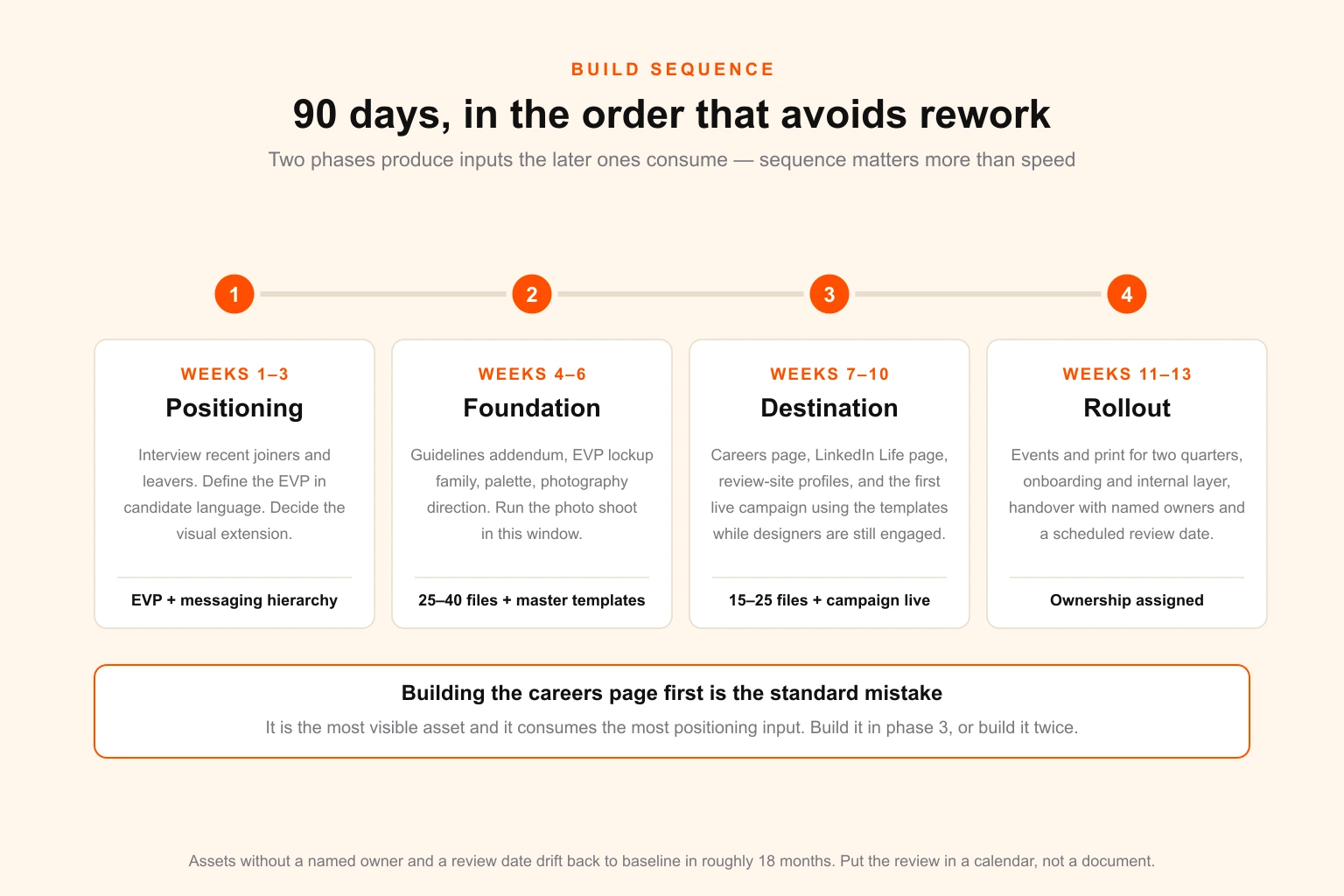
Sequence matters more than speed, because two of these phases produce inputs that the later ones consume. Building the careers page first — the most common approach, because it is the most visible — guarantees you rebuild it once the positioning lands.
Weeks 1–3: Positioning and visual extension
Interview recent joiners and recent leavers, not just leadership. Define the employer value proposition in language a candidate would recognise, then decide how the visual identity extends into the talent context. The positioning discipline here is the same one used for product: brand positioning applied to a labour market rather than a product market, with competitors defined as everyone hiring the same profile — which is usually not your commercial competitor set.
Output: EVP statement, messaging hierarchy by audience segment, visual extension direction.
Weeks 4–6: Foundation layer
Guidelines addendum, EVP lockup family, secondary palette, photography direction and shot list, and the master template set. Run the photo shoot in this window so its output is available for everything downstream — this is the single most common scheduling error, and it delays the entire back half by a month when it goes wrong.
Output: 25–40 foundation files, master templates published in the recruiting team's own tools.
Weeks 7–10: Destination and first campaign
Careers page, LinkedIn Life page, review-site profiles, and the first live requisition campaign using the templates. Run the first campaign while the designers are still engaged — templates always need one round of adjustment after real contact with a real role title and a real deadline.
Output: 15–25 destination files, first campaign live, templates corrected.
Weeks 11–13: Events, print, onboarding and handover
Booth and print collateral for the next two quarters of events, the onboarding and internal comms layer, and the handover — a documented source of truth, named owners per layer, and a scheduled review cadence.
Output: events and internal layers complete, ownership assigned, refresh cycle in the calendar.
A note on the handover, which is where these projects most often quietly fail: assets without a named owner and a review date decay into the same drift you started with, roughly 18 months later. Put the review in a calendar, not in a document.
What it costs: three delivery models
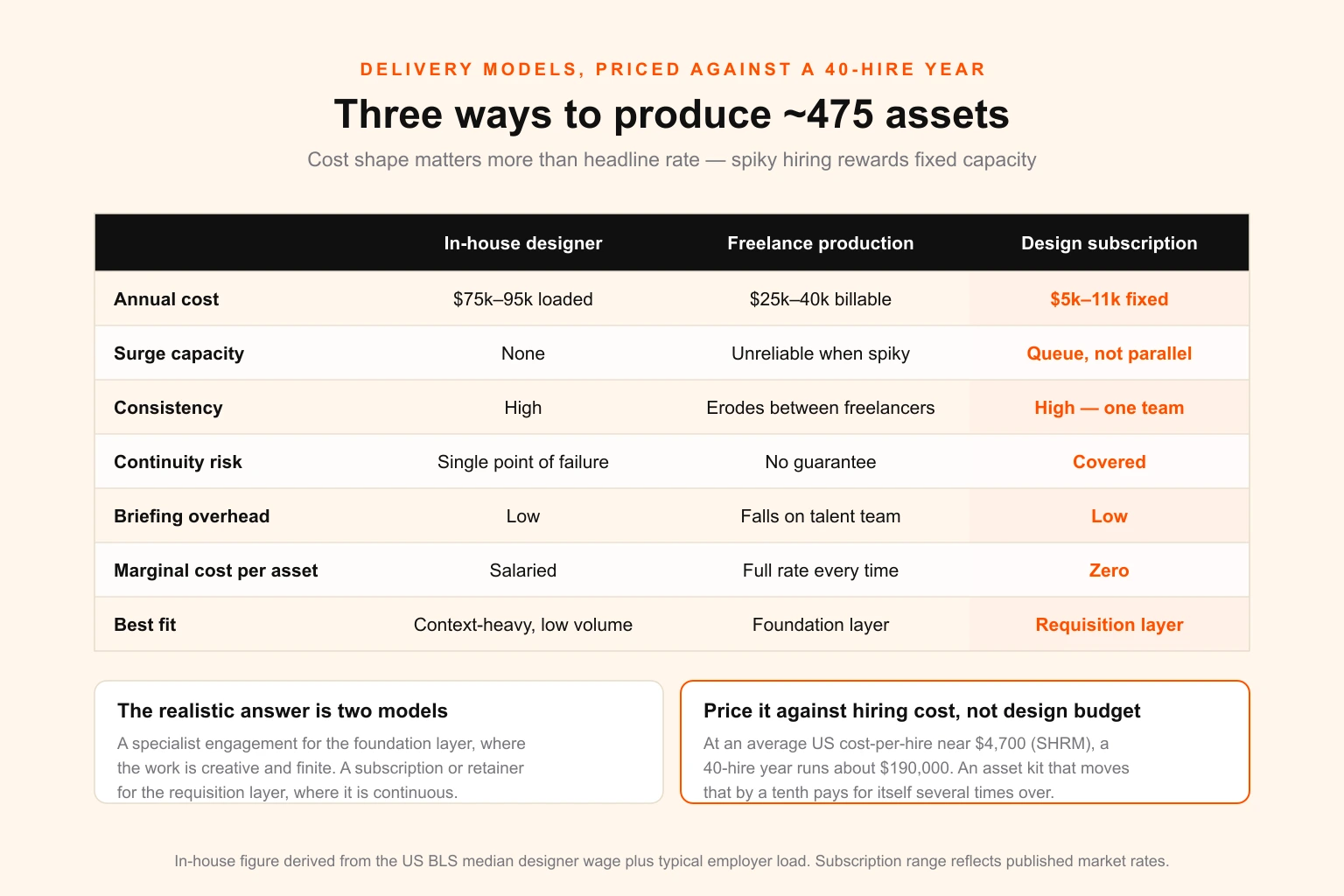
Cost against the 450–500 item year modelled earlier, for a company hiring around 40 people.
In-house designer. US graphic designer median pay sits near USD 59,000 per the Bureau of Labor Statistics, which lands around USD 75,000–95,000 fully loaded once you add employer taxes, benefits, software and equipment. You get availability, context and someone who learns the business. You also get a single point of failure, no surge capacity for hiring pushes, no cover for holiday or resignation, and — at 500 items a year — someone who spends the majority of their week producing template variants, which is both an expensive way to buy that output and a reliable way to lose the designer. The full comparison is in unlimited design versus hiring a full-time designer.
Freelance production. At USD 50–85 an hour and a realistic average of 1.2 hours per instance across a mixed year, 400 instances is roughly USD 25,000–40,000 of billable time. Genuinely cheaper on paper, and the right answer for the foundation layer, where you want a specialist for six weeks and then want them gone. It falls down on the requisition layer: no continuity between freelancers means the consistency you built the templates to protect erodes anyway, briefing overhead lands on the talent team, and freelancer availability is least reliable exactly when hiring is spikiest.
Design subscription. Fixed monthly cost, one team holding the context, unlimited requests through a queue. For this volume that is roughly USD 5,000–11,000 a year — our own pricing runs at USD 399 and USD 899 a month for the two tiers, and the full pricing breakdown explains what the difference between them actually buys. The honest constraint: a subscription is a queue, not parallel capacity. Requests are served in order at a defined turnaround, so a 40-asset event build the week before a careers fair needs to be scheduled, not fired off on the Friday. In exchange the marginal cost of the 300th job card is zero, which is the correct cost shape for work that is high-volume and highly repetitive.
The realistic split for most companies hiring at volume is not one model but two: a specialist engagement for the foundation layer, where the work is genuinely creative and finite, and a subscription or retainer for the requisition layer, where the work is continuous and templated. That is the same structure that works for agencies running design retainers — concept work bought in bursts, production bought as a standing line.
Whichever route you pick, price it against the hiring cost it offsets rather than against the design budget it comes out of. At roughly USD 190,000 of annual hiring cost for a 40-hire year, an asset kit that moves cost-per-hire by even a tenth pays for itself several times over. If you are pricing a broader programme, our graphic design pricing guide covers rate structures across models, and what it costs to hire a designer covers the employment route in detail.
Ownership, licensing and consent
This section exists because these problems surface at the worst possible moment: when someone resigns, when legal reviews the careers site, or when a font foundry sends an email.
Employee photography needs a written release, not just copyright. Owning the copyright in an image does not give you the right to use a person's likeness in advertising. Recruitment marketing is advertising. Get a model release at the shoot covering the intended uses, media, territory and duration, and covering continued use after employment ends — because without that clause, a departing employee can reasonably ask to be removed, and in jurisdictions with strong personality or data protection rights that request may carry legal weight. File releases with the images, so the person retrieving the photo in two years can see whether it is cleared. Re-shoot on a fixed cycle regardless; a careers page full of people who left is its own signal.
Font licences break in three places at once. Desktop licences are counted in seats, web licences in monthly pageviews, and app or embedding licences are separate. An employer brand programme quietly breaches all three: the careers site adds pageviews, recruiters and hiring managers who never touched marketing files now need desktop seats, and a careers page hosted on an applicant tracking system sits on a domain that may not be in your licensed list. Audit before rollout. If the numbers do not work, specify a well-made open-licence face for the talent layer — a deliberate, documented choice beats a licence breach discovered by a foundry's audit team.
Stock and music licences do not cover recruitment advertising by default. Standard stock licences frequently exclude use that implies endorsement, and using a stock model as though they work for you can fall foul of that. Paid social amplification often requires an extended licence. Read the grant, not the marketing page.
Source files, not just exports. Every engagement — agency, freelance, subscription — should end with editable source files in your possession, not screenshots and flattened PDFs. This is the single most common gap discovered when a relationship ends. Specify it in the contract at the start; it is a routine ask and costs nothing to include, and it is much harder to obtain after the fact.
One source of truth, with a named owner per layer. Assets scattered across a shared drive, a Slack channel, three Canva accounts and someone's desktop is the natural resting state, and it guarantees the wrong version ships. One location, one owner per layer, one review date.
Nine mistakes that cost real money
1. Building the careers page first. The most visible asset consumes the most positioning input. Build it in weeks 7–10, not week 1, or build it twice.
2. Treating the employer brand as a separate brand. Doubles maintenance, halves recognition. It is a defined extension, not a fork — the exception being employers whose consumer brand actively signals low-status work.
3. Stock photography on the culture page. Candidates spot it, and read it as evidence there was nothing real to show.
4. No template system. The decision that converts an inventory into a permanent bottleneck. At 385 requisition instances a year, ad hoc production is not a workflow.
5. Skipping the photography direction. It is the input to hundreds of downstream assets. Skipping it is the false economy that guarantees inconsistency at scale.
6. Designing the 16:9 first. Every derivative crop then requires recomposition. Design 4:5, derive down and out.
7. Ignoring the candidate journey layer. A polished ad followed by an offer letter that looks like a 2009 mail merge undoes the work in a single PDF.
8. No named owner after launch. Assets without an owner and a review date drift back to baseline in roughly 18 months.
9. Print artwork produced at digital specs. RGB, no bleed, raster at large format. Caught in five minutes before the file goes out; costs a reprint and a missed event deadline afterwards.
Measuring it
Vanity metrics for this programme are easy to generate and useless. Four that actually indicate whether the asset kit is working:
| Metric | What it indicates | Where it should move |
|---|---|---|
| Cost per qualified applicant | Whether assets reduce paid reach dependency | Down, within one quarter |
| Careers page → application conversion | Whether the destination layer converts the traffic it gets | Up, measurable within weeks |
| Offer acceptance rate | Whether the journey layer sustains the promise | Up, slowly, over two quarters |
| Share of requisitions served self-serve | Whether the template system is actually working | Above 80% within a quarter of launch |
The fourth is the leading indicator for all the others, and it is the one nobody tracks. If recruiters are still filing bespoke requests for standard job cards three months after launch, the templates are wrong — usually too constrained, occasionally in a tool nobody opens — and everything downstream will drift regardless of how good the design is.
The launch checklist
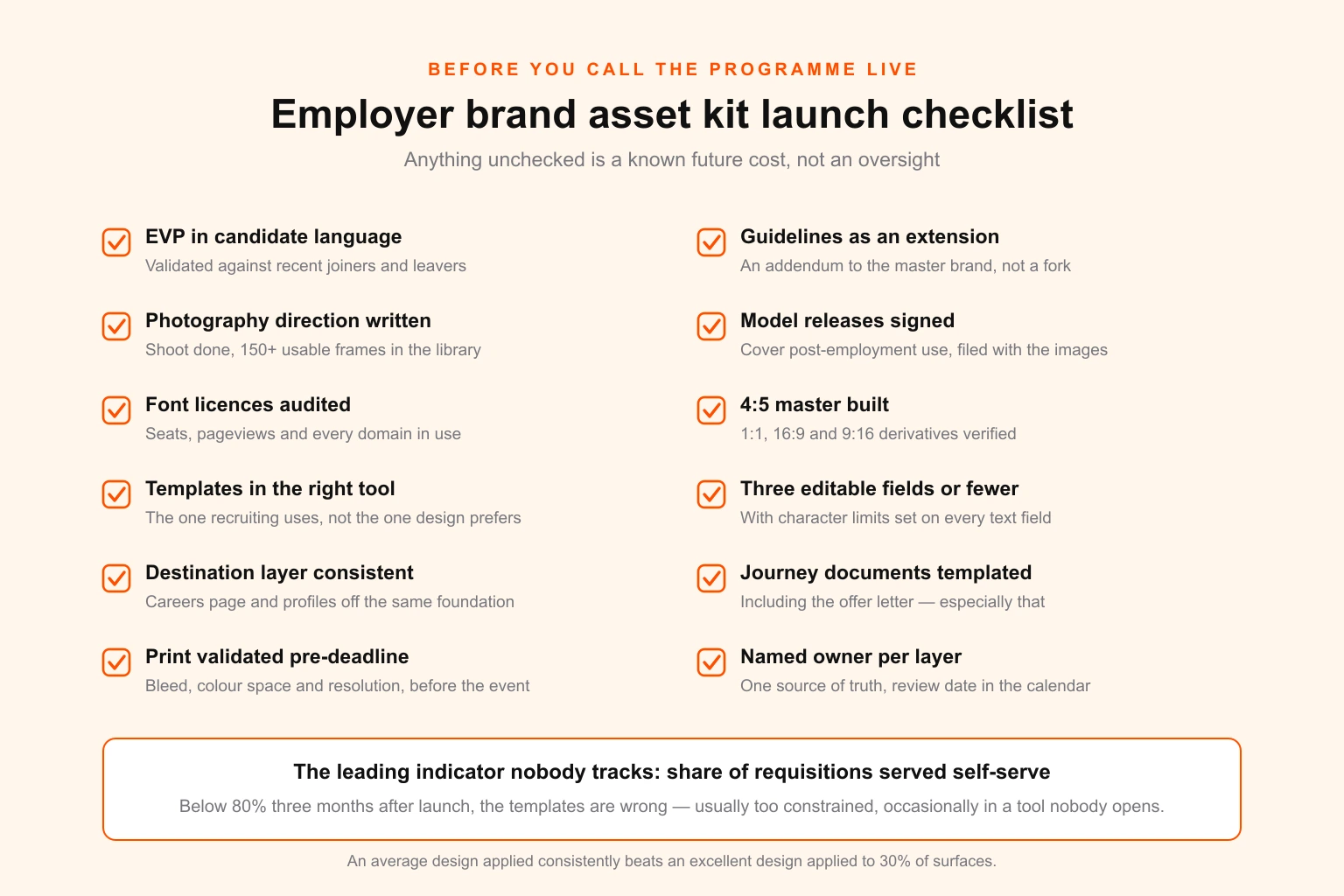
Run this before you call the programme live. Anything unchecked is a known future cost, not an oversight.
- EVP defined in candidate language, validated against recent joiners and leavers
- Employer brand guidelines exist as a documented extension of the master brand
- Photography direction written, shoot completed, 150+ usable frames in the library
- Model releases signed, covering post-employment use, filed with the images
- Font licences audited against seats, pageviews and every domain in use
- Master 1080 × 1350 template built, with 1:1, 16:9 and 9:16 derivatives verified
- Templates published in the tool the recruiting team actually uses
- Editable fields limited to three or fewer per template, with character limits set
- Careers page and all profile assets consistent with the same foundation files
- Candidate journey documents templated, including the offer letter
- Print assets validated for bleed, colour space and resolution before any event deadline
- Named owner per layer, single source of truth, review date in the calendar
Where to start
If you are hiring at volume and reading this with a sinking feeling, the sequence is short.
Count first. Requisitions opened last year × 7. That number is your annual asset demand, and it is almost certainly larger than the capacity currently assigned to it. Everything else follows from the gap between the two.
Fix the foundation before the visible surfaces. Photography direction and master templates return more than a careers page rebuild, and the careers page will need rebuilding anyway once they exist.
Decide the delivery model against the shape of your hiring calendar, not the headline rate. Spiky, campaign-driven hiring rewards fixed-cost capacity. Steady, low-volume hiring can survive on freelance. Continuous high volume is where a subscription's marginal cost of zero stops being a talking point and starts being the whole argument.
Digital Polo runs the production layer of employer brand programmes for companies hiring at volume — foundation files, master template sets, and the continuous requisition-layer output that follows, all through a single design subscription at a fixed monthly cost. The brand-side work sits in brand identity design, the social output in social media design, the events and print layer in print-ready design, and the data-heavy internal comms pieces in infographic design.
If you are an agency or RPO running employer brand programmes for your own clients rather than for yourself, the same production capacity is available white-label under your brand, with source files and NDA as standard — the model is described in full for marketing agencies.
Either way, start by counting the requisitions. The number will tell you which conversation you are actually having.