If you have ever ordered custom stickers, you have hit the choice within the first two clicks: kiss-cut or die-cut? The terms get used interchangeably, the preview images look almost identical, and most product pages explain the difference in a single confusing sentence. Pick wrong and you can end up with stickers that are a nightmare to peel, a border you did not want, or a sheet layout that does not work for what you are selling.
This guide settles it. Kiss-cut and die-cut describe how the cutting blade treats the sticker material and its backing — and that one difference changes how the sticker looks, peels, ships, and gets designed. Below is exactly what each one is, a side-by-side comparison, when to choose which, and how the design file differs so your printer runs it the first time.
DigitalPolo has been delivering unlimited graphic design since 2010 — one of the oldest services in the category — with plans from $399/month, 48-hour turnaround, unlimited revisions, and print-ready vector source files that include the correct cut path for both kiss-cut and die-cut sticker production. For the full file-level spec behind these cuts, see our guide to die-cut sticker design file specs.
Kiss-Cut vs. Die-Cut: The Core Difference
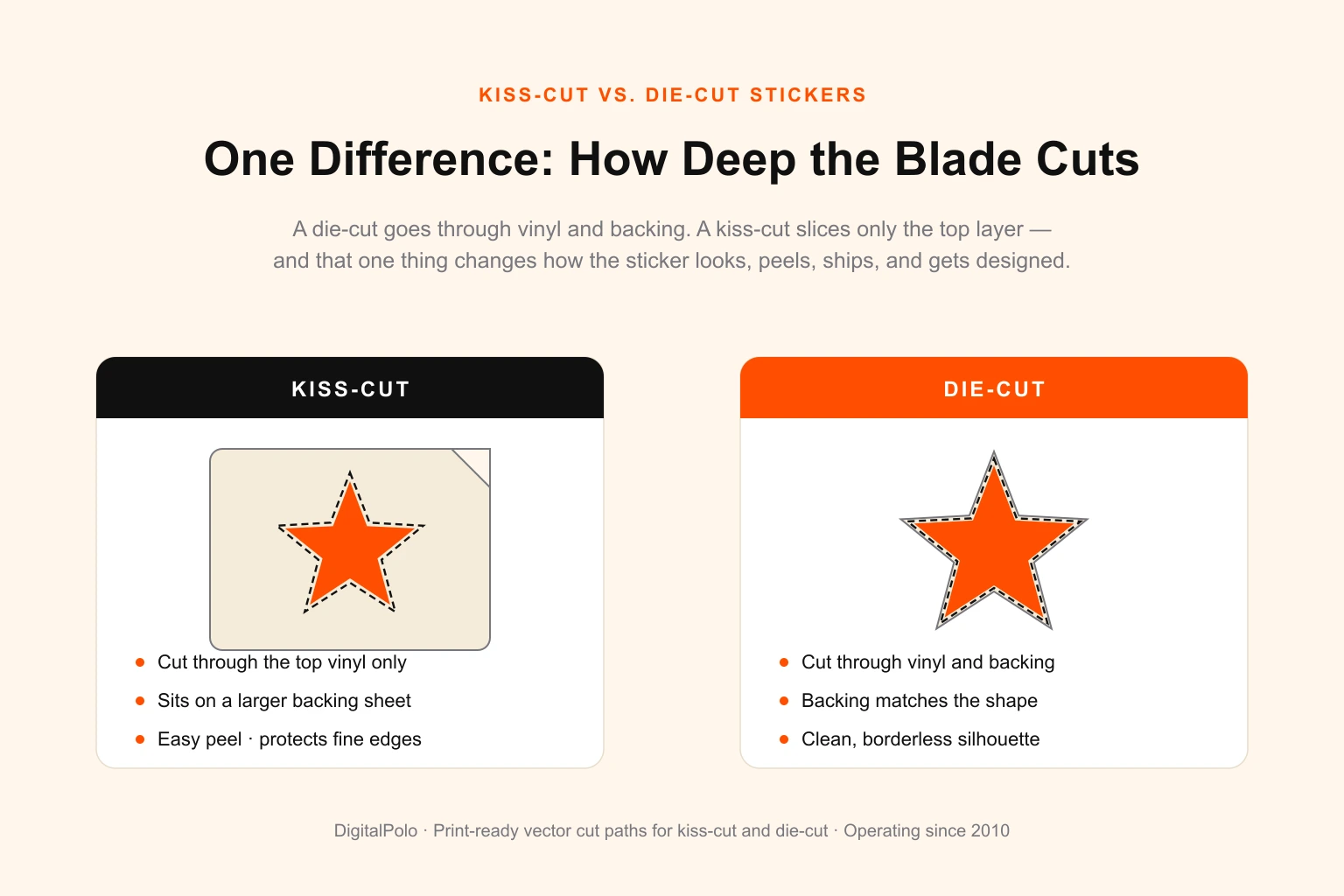
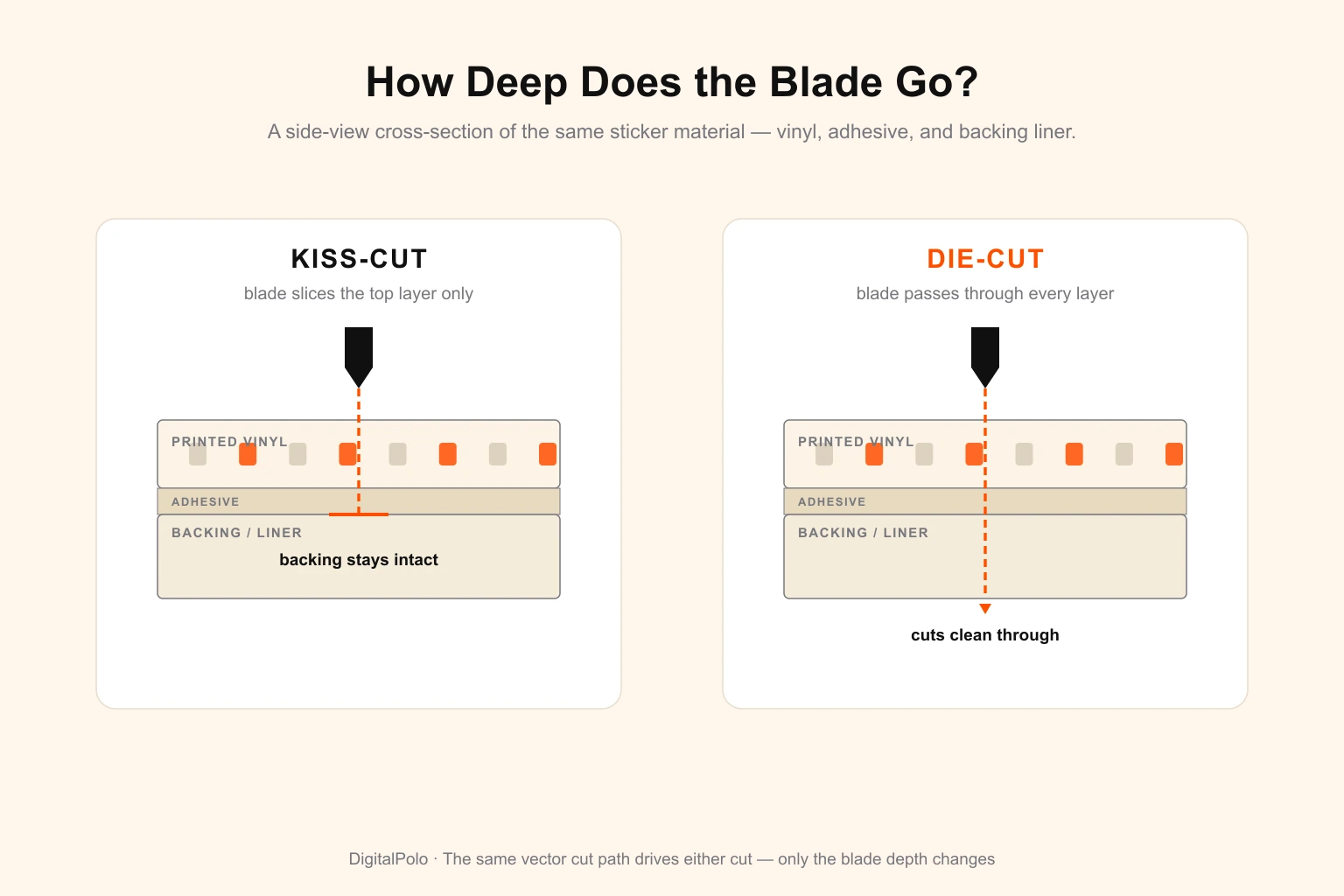
There is exactly one thing that separates the two, and everything else follows from it: how deep the blade cuts.
- A die-cut sticker is cut all the way through — both the printed vinyl and the paper backing. The sticker and its backing share the same custom outline, so you get a shape cut precisely to your design with no surrounding border.
- A kiss-cut sticker is cut only through the top vinyl layer. The blade presses just deep enough to slice the sticker but "kisses" the backing without cutting it, leaving the backing intact as a larger sheet — usually a square or rectangle — that the sticker sits on.
That single distinction — cut through everything versus cut only the top layer — is the whole story. Hold a die-cut sticker and the backing matches the sticker shape exactly. Hold a kiss-cut sticker and you see a smaller design sitting on a bigger backing, easy to peel away from one corner.
What Is a Die-Cut Sticker?
A die-cut sticker is cut to the exact contour of the artwork, through every layer. The result is a clean, custom silhouette: a flame-shaped sticker is flame-shaped, a logo sticker follows the logo's edge, and there is no rectangular border or visible margin around it.
This is the premium, finished look most brands picture when they imagine a "custom sticker." Because the backing follows the same shape, a die-cut sticker reads as a single deliberate object rather than a design printed on a label. It is the standard choice for hero logo stickers, product decals, bumper stickers, and any single sticker where a clean edge and a polished feel matter.
The trade-off is peeling. When a die-cut shape is small or has fine points and thin necks, lifting it cleanly off a backing of the identical shape can be fiddly — there is no surplus backing to grip. For larger, simpler shapes this is a non-issue; for tiny or intricate ones, it is the main reason people switch to kiss-cut.
What Is a Kiss-Cut Sticker?
A kiss-cut sticker is cut only through the top vinyl, leaving the backing whole. The design can still be any shape — the cut follows the artwork — but it sits on a larger backing sheet, typically with a margin of exposed liner around it.
That intact backing is the entire advantage. You can peel from the edge of the sheet rather than the edge of the sticker, which makes even delicate, spindly, or very small designs easy to remove without bending or tearing them. It also protects fine edges in transit, and it is what makes sticker sheets possible: several individual designs kiss-cut onto one shared backing, peeled off one at a time.
Kiss-cut also opens up a design option die-cut cannot: you can keep a visible border — a white or coloured outline cut as part of the design — or leave the backing as a clean frame. That is why planner stickers, label packs, promotional multi-packs, and "sticker bomb" sheets are almost always kiss-cut. If you are running these as a product line, our guide to graphic design for sticker businesses covers how to scale the artwork side.
Kiss-Cut vs. Die-Cut: Side-by-Side Comparison
| Factor | Die-Cut | Kiss-Cut |
|---|---|---|
| Cut depth | Through vinyl and backing | Through vinyl only |
| Backing shape | Matches the sticker outline | Larger sheet, usually square/rectangle |
| Appearance | Clean custom silhouette, no border | Design on a backing; border optional |
| Peeling | Harder for small/intricate shapes | Easy — peel from the sheet edge |
| Sticker sheets | Not suitable (one shape per backing) | Ideal — many designs per sheet |
| Edge protection | Edges exposed | Backing protects fine edges |
| Best for | Single hero/logo stickers, decals | Packs, sheets, small or intricate designs |
| Typical cost | Similar; slightly more for intricate cuts | Similar; cheaper per unit on shared sheets |
When to Choose Kiss-Cut vs. Die-Cut
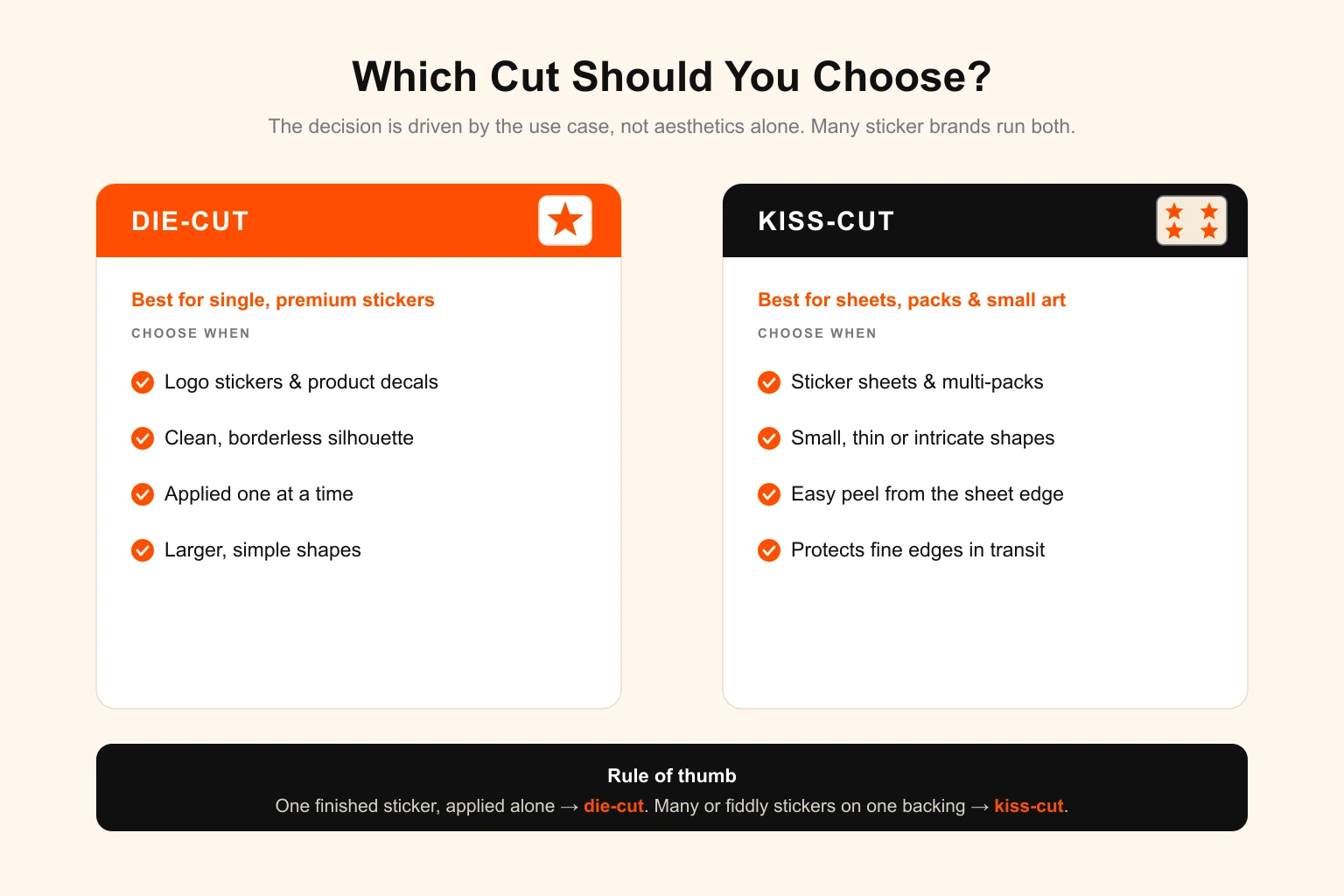
The decision is almost always driven by the use case, not aesthetics alone.
Choose die-cut when:
- You want a single, premium sticker with a clean custom shape and no border.
- It is a logo sticker, product decal, or feature sticker sold or given out one at a time.
- The shape is reasonably large and simple enough to peel without a surplus backing.
- The borderless silhouette is the whole point — laptop stickers, branding, signage decals.
Choose kiss-cut when:
- You are producing a sheet or pack with multiple designs on one backing.
- The design is small, thin, or intricate and would be hard to peel if die-cut.
- Easy peeling matters — events, promotions, kids' products, planner and label sets.
- You want the option of a printed border or a clean backing frame around the design.
A useful rule of thumb: if a customer holds and applies one sticker that should look like a finished object, lean die-cut. If they receive many stickers, or fiddly ones, on a single backing, lean kiss-cut. Many sticker brands run both — die-cut for flagship logo stickers, kiss-cut for sheets and packs.
How the Design File Differs
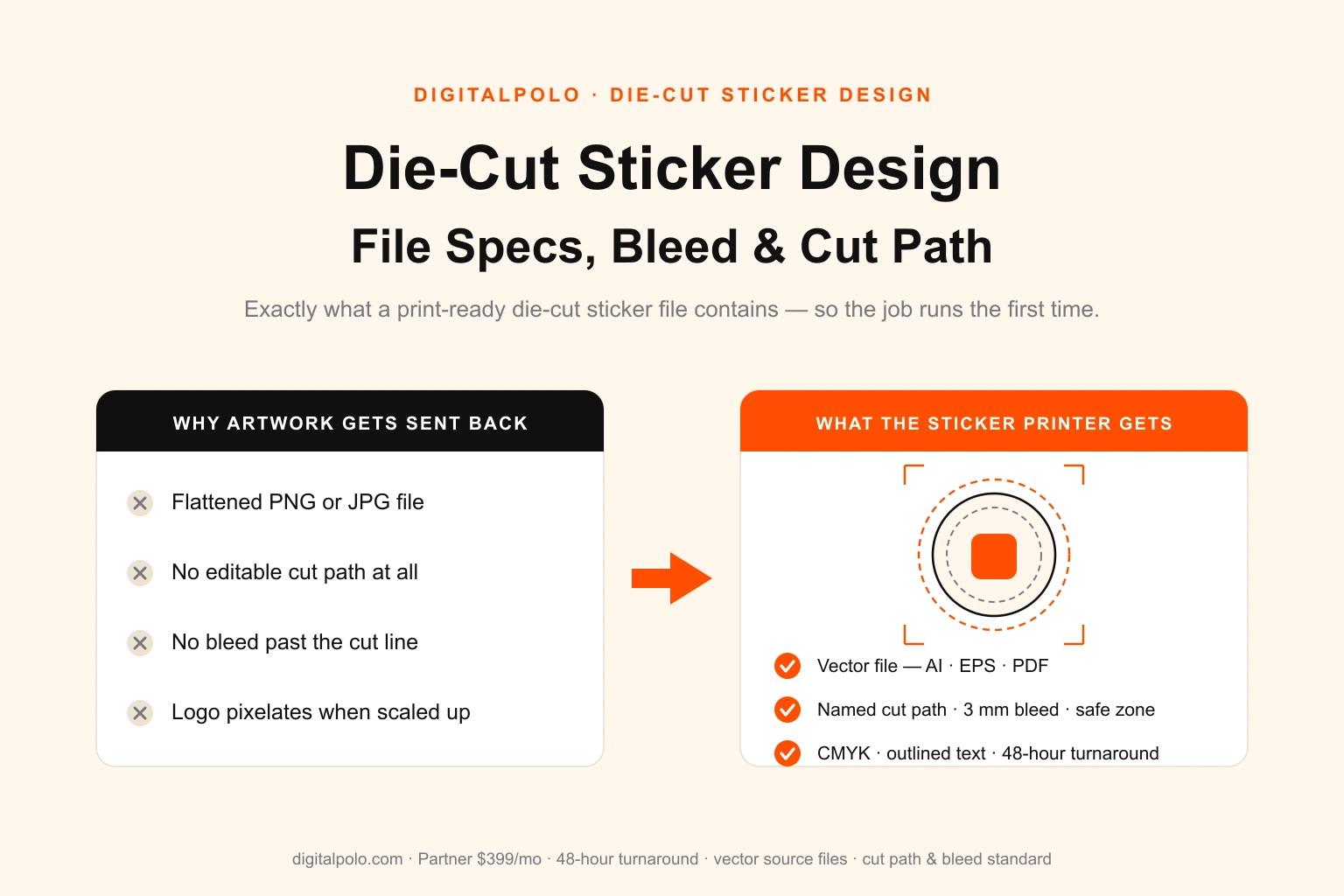
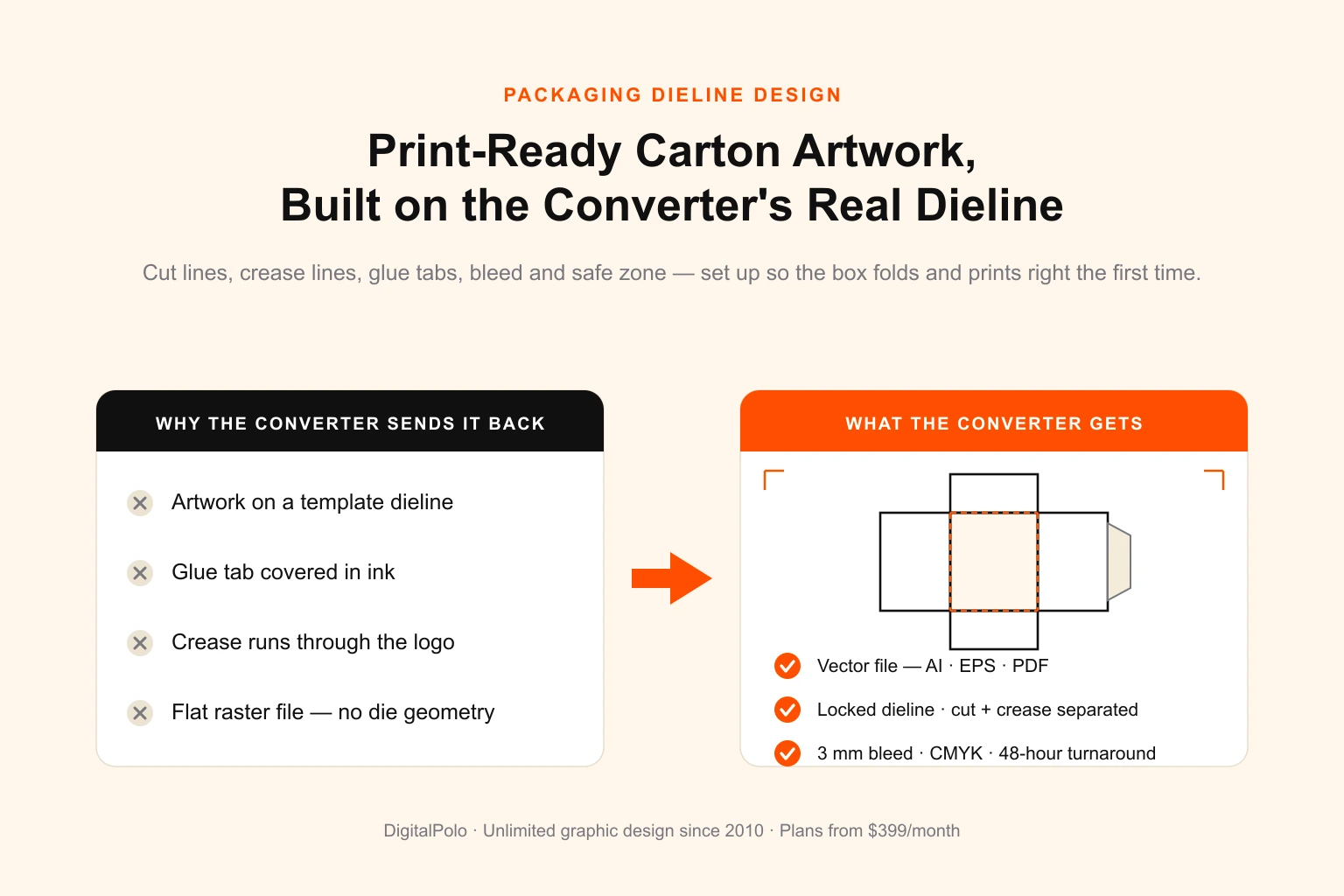
Here is the part that trips up most people briefing a designer: the file setup for kiss-cut and die-cut is nearly identical. Both require a vector file (AI, EPS, or print-ready PDF), a separate and clearly named cut-path layer drawn as a spot colour, artwork that bleeds past the cut path, and a safe zone holding key content in from the edge. This is the same locked-cut-line discipline used in packaging dieline design, where the cut geometry never gets merged into the artwork.
The difference is only in what the cut path does and what sits around it:
- Die-cut file: the cut path is the final sticker outline, and it cuts through everything. Artwork bleeds ~3 mm past that path so no white slivers appear if the cut drifts.
- Kiss-cut file: the cut path cuts only the top layer, and you also define the backing size (for a single sticker) or the sheet layout and spacing (for a multi-sticker sheet). Each sticker on a sheet still gets its own kiss-cut path, plus bleed.
Get the cut path on its own layer, set the bleed, outline the type, and use CMYK or Pantone colour, and either cut type runs without a rejection. The complete checklist — bleed values, resolution, colour mode, and the pre-send list — lives in our die-cut sticker design file specs guide.
Who Should Outsource Sticker Design
Applying clean cut paths to artwork — for kiss-cut sheets one week and a die-cut logo sticker the next — is repeatable, recurring work, which is exactly what a flat-fee design subscription is built for. It tends to fit:
- Sticker brands and shops running ongoing product lines across both cut types.
- Print shops absorbing client sticker work without staffing an art department, much like any print shop handling client design work.
- E-commerce and product brands producing branded packaging stickers, seals, and label packs.
- Agencies and resellers producing sticker artwork for their own clients under their own brand.
Sticker volume is lumpy — a quiet week, then a launch needing a full sheet plus three die-cut designs at once. A subscription absorbs that variance with no per-file charge. The broader case for how flat-fee design replaces project billing is covered in how unlimited graphic design works.
DigitalPolo Plans and Pricing
| Plan | Price | Turnaround | Delivery | Best For |
|---|---|---|---|---|
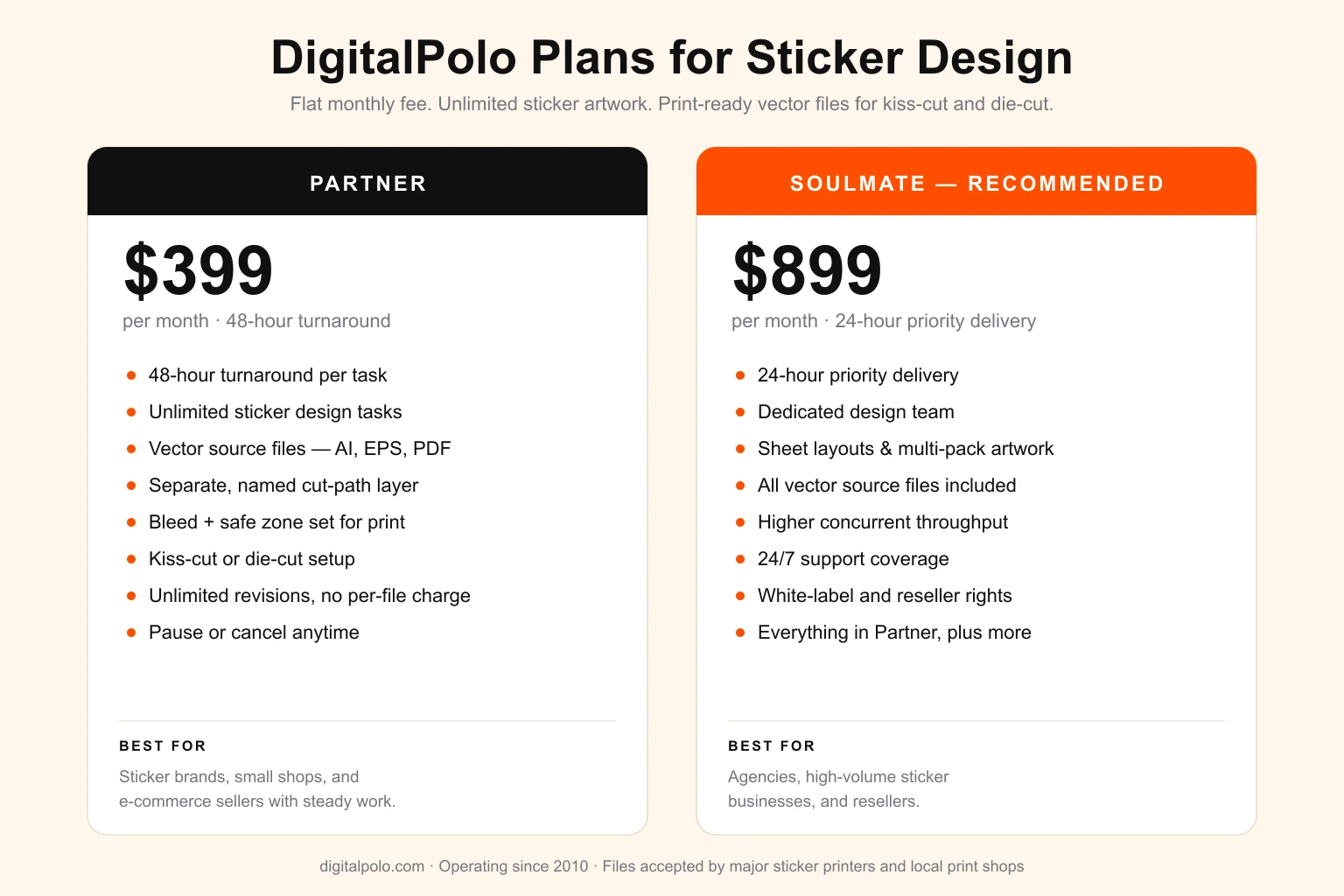
| Partner | $399/month | 48 hours | Unlimited tasks, all source files | Sticker brands, small shops, e-commerce sellers |
| Soulmate | $899/month | 24 hours (priority) | Dedicated team, 24×7 support, all source files | Agencies, high-volume sticker businesses, resellers |
Both plans include delivery of all source files — vector formats (AI, EPS, PDF) suitable for print production, including kiss-cut and die-cut sticker printing, labels, packaging, signage, and promotional product manufacturing.
Verdict: Match the Cut to the Job, Not the Hype
Neither cut is "better" — they solve different problems. Die-cut gives you a clean, borderless, premium single sticker and is the right call for logo stickers, decals, and anything sold one at a time. Kiss-cut gives you easy peeling, edge protection, and the ability to put many designs on one backing, which makes it the default for sheets, packs, and small or intricate shapes.
The good news for anyone briefing a designer: the file setup barely changes between them. A correct vector file with a separate cut path, proper bleed, and outlined type runs as either cut type. That is the standard behind every sticker file DigitalPolo delivers — for sticker brands, print shops absorbing client work, and agencies producing sticker artwork under their own brand. Choose the cut that fits how the sticker is used, and the production side takes care of itself.
Frequently Asked Questions
What is the difference between kiss-cut and die-cut stickers?
A die-cut sticker is cut all the way through the vinyl and the backing paper, so the sticker and its backing share the same custom shape. A kiss-cut sticker is cut only through the top vinyl layer — the blade “kisses” the backing without slicing it — so the sticker sits on a larger, usually rectangular, backing sheet that stays intact.
Are kiss-cut or die-cut stickers better?
Neither is universally better — they suit different jobs. Die-cut stickers give a clean, premium custom silhouette with no visible border, ideal for logos and single feature stickers. Kiss-cut stickers are easier to peel, protect delicate edges, and allow multiple designs on one sheet, making them better for packs, intricate shapes, and small stickers.
Are kiss-cut stickers cheaper than die-cut stickers?
Pricing is usually similar for a single sticker because modern printers use the same digital cutters for both. Kiss-cut becomes more cost-efficient at volume when several stickers share one backing sheet, reducing material and handling. Die-cut can cost slightly more for very intricate shapes or small custom runs. Always confirm pricing with your printer.
When should you use kiss-cut stickers?
Use kiss-cut stickers for sticker sheets and packs, small or intricate designs that are hard to peel when die-cut, planner and label stickers, and anywhere easy peeling matters. The intact backing protects fine edges and makes application simple, which is why most multi-sticker sheets and promotional packs are kiss-cut.
Do kiss-cut and die-cut stickers need different design files?
Both need a vector file with a separate, named cut-path layer and bleed past that path. The difference is what the cut path controls: on a die-cut file it cuts through everything to the sticker shape, while on a kiss-cut file it cuts only the top layer and the backing size or sheet layout is defined separately. Setup is otherwise the same.
Can an unlimited graphic design service create kiss-cut and die-cut sticker files?
Yes. Sticker artwork is recurring, varied, and well suited to a flat-fee subscription. A design service builds the artwork, adds the correct vector cut path for kiss-cut or die-cut, sets bleed and a safe zone, and delivers source files. DigitalPolo's Partner plan at $399/month covers unlimited sticker design with 48-hour turnaround.
Does DigitalPolo deliver print-ready files for kiss-cut and die-cut stickers?
Yes. DigitalPolo delivers vector source files (AI, EPS, PDF) with a separate named cut-path layer, correct bleed and safe zone, and CMYK colour on request — set up for kiss-cut or die-cut as needed. The files are accepted by major sticker printers and local print shops without rework.
Need Print-Ready Sticker Files Without the Hiring Hassle?
DigitalPolo delivers vector source files (AI, EPS, PDF) with every task — built with a separate named cut path, correct bleed, and a safe zone, set up for kiss-cut or die-cut production, ready for sticker printers and local print shops. Partner plan from $399/month. 48-hour turnaround.